E Commerce Websites in 2026: Examples, Design Tips, Builders, and a Step-by-Step Launch Plan
Learn how e commerce websites work, compare the best builders, and follow a clear plan to launch an online store that shoppers trust.
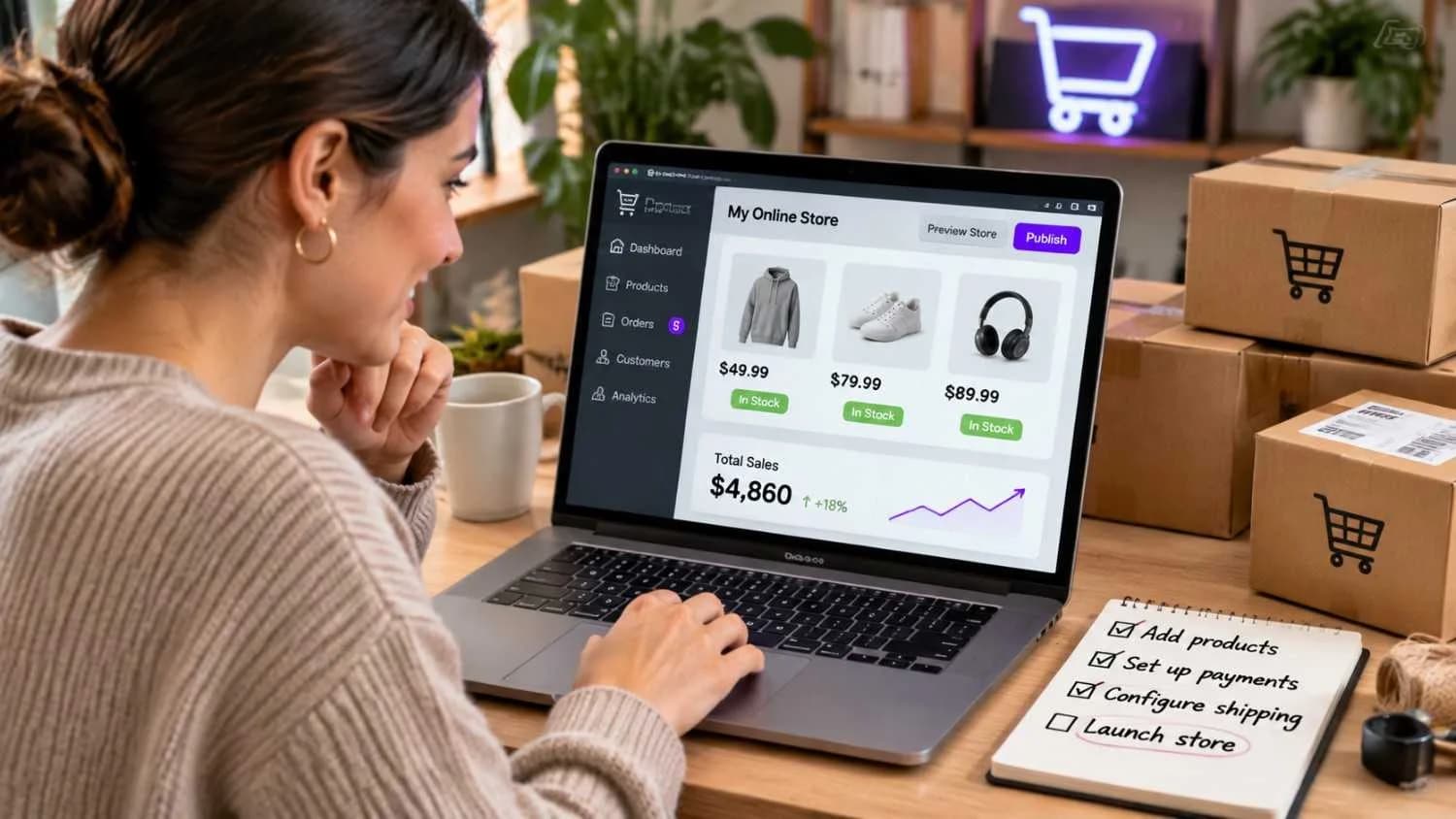
Online shopping stopped being a side channel a long time ago. For many US businesses, the website is now the store, the sales team, and the brand all at once. That makes your approach to e commerce websites a bigger decision than picking a nice template.
This guide explains what e commerce websites are, which types exist, and what the best ones get right. You'll also see how the popular builders compare, how to build a store step by step, and which US-specific details, like sales tax and accessibility, are easy to miss.
Before writing, we looked at what the top-ranking pages on this topic cover and then filled the gaps they tend to leave open: real costs, compliance, and how to choose between a builder and custom development. Prices and features change often, so we point you to the vendor's own site wherever that matters.
What Are E Commerce Websites and How Do They Work?
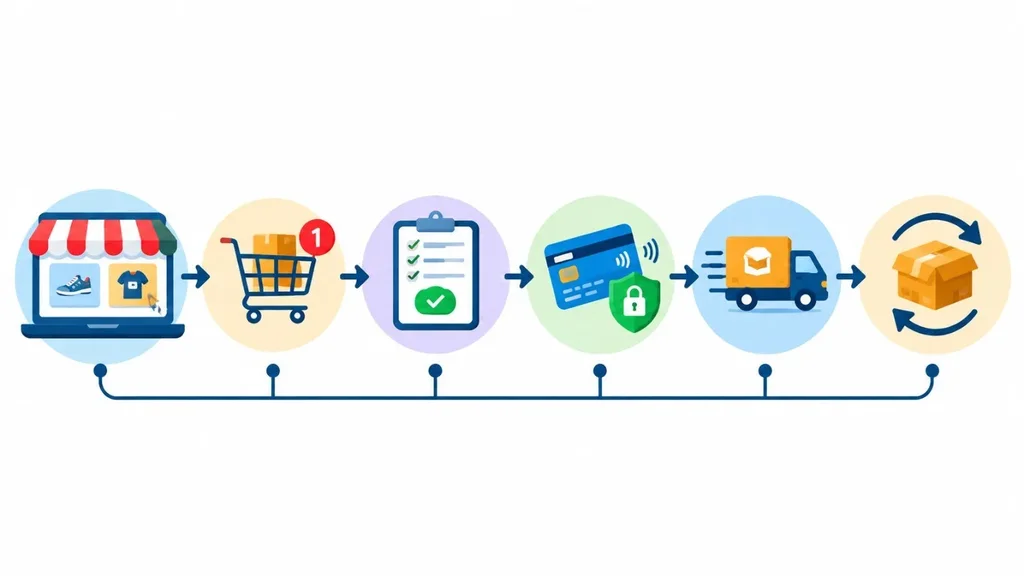
An e commerce website lets people buy products or services online without calling a store or visiting in person. At the very least, it needs a product catalog, a shopping cart, a secure checkout, and a way to manage orders.
The best stores keep working after the sale. They send shipping updates, make returns simple, save order history, and suggest products that actually fit the customer. That is the difference between a site that takes orders and one that earns repeat buyers.
Most online stores are built from five connected parts:
• Storefront: the pages shoppers browse, including categories, product pages, and search.
• Cart and checkout: where a visitor becomes a buyer.
• Payments: the gateway and processor that charge cards and digital wallets securely.
• Order and inventory management: the back office that tracks stock, orders, and refunds.
• Fulfillment and support: shipping, tracking, returns, and customer service.
Types of E Commerce Websites
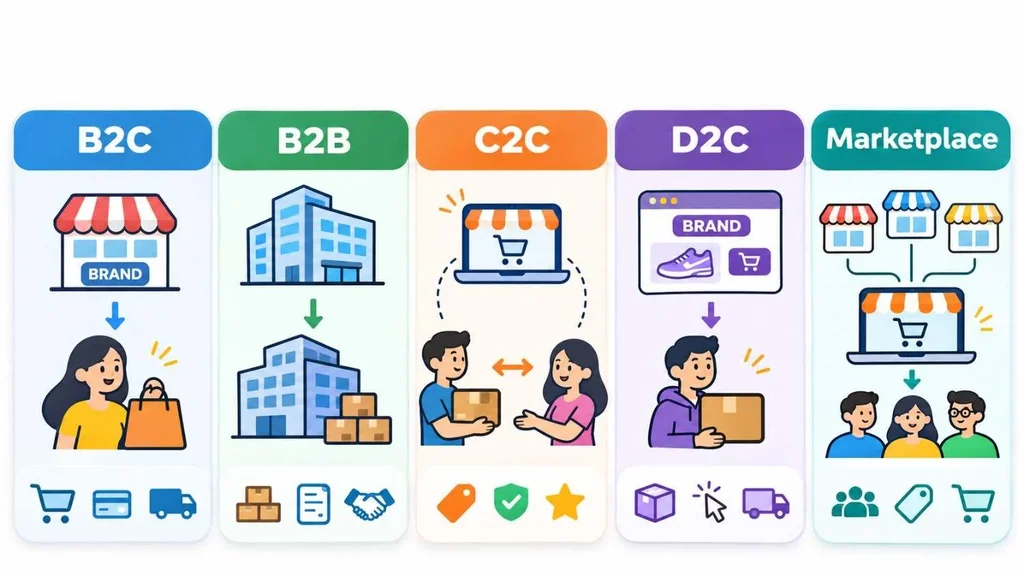
Not every online store sells the same way. The model you choose affects your design, your payment setup, and even your marketing. Here are the most common types.
• B2C (business to consumer): a company sells directly to shoppers. Target is a familiar example.
• B2B (business to business): the buyers are other companies, so expect account pricing, bulk orders, and invoicing.
• C2C (consumer to consumer): individuals sell to each other through a platform such as eBay.
• D2C (direct to consumer): a brand skips retailers and sells on its own site, as Allbirds does.
• Marketplaces: many sellers share one storefront, like Amazon and Etsy.
• Subscription stores: customers pay on a schedule for boxes or refills.
• Dropshipping stores: you sell products, and a supplier ships them without you holding stock.
Plenty of brands mix models, such as a D2C website plus listings on Amazon. If dropshipping is on your shortlist, read this breakdown of whether dropshipping is still profitable before you spend anything on ads.
Best Ecommerce Websites to Learn From
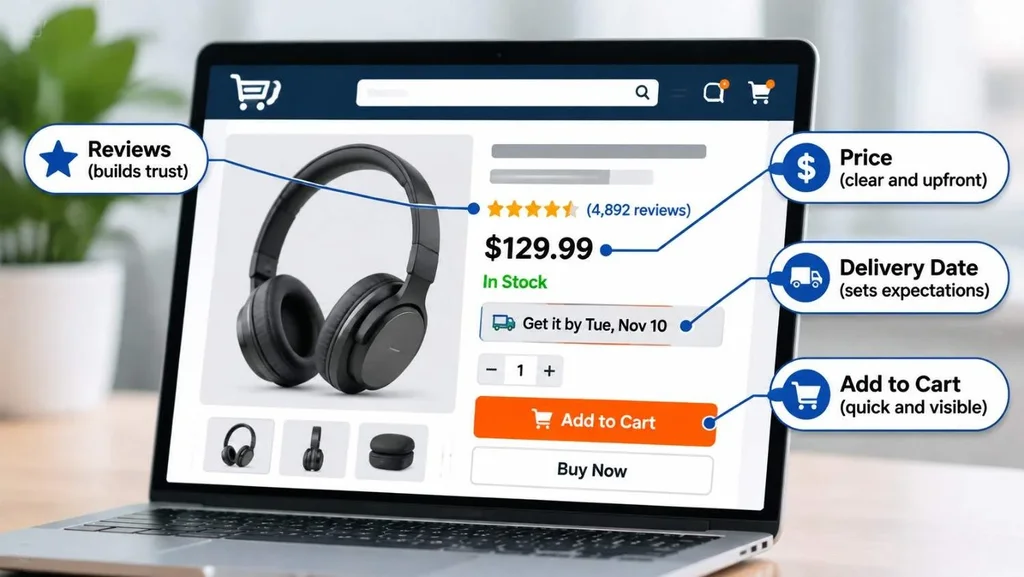
Most lists of the best ecommerce websites rank sites by traffic. That is interesting, but traffic alone doesn't teach a small store much. These ecommerce website examples are more useful when you look at what each one does well and borrow the idea.
Amazon: Clarity at the Moment of Decision
Amazon's product pages put price, delivery estimate, and reviews in front of you before you scroll. The lesson is simple. Answer the shopper's biggest questions early, especially about delivery.
Walmart and Target: Online and In-Store Working Together
Both retailers connect the website to local stores, so shoppers can see pickup and delivery options on the product page. If you have a physical location, showing local availability is one of the easiest ways to turn browsers into buyers.
Etsy: Trust Built Around People
Etsy leans on seller profiles, shop policies, and customer reviews. Shoppers feel like they are buying from a person, not a warehouse. Small brands can copy this with a real about page, a founder story, and honest reviews.
Allbirds: Focus Over Variety
A small catalog lets Allbirds put its effort into clear product pages and material details. If your catalog is small too, depth usually beats breadth: better photos, clearer details, and a stronger story for each item.
Best Buy: Help With Complex Purchases
Electronics shoppers compare specs before they buy, and Best Buy gives them comparison tools and detailed filters. If your products need research, build comparison and filtering in from day one.
These notes reflect how the sites work at the time of writing. Big retailers update their designs often, so treat them as inspiration, not as a template to copy line by line.
Ecommerce Website Design: What Actually Moves Sales
Good ecommerce website design isn't about decoration. It removes doubt and effort at every step. Start with these five areas.
Product Pages
Use sharp photos from several angles, a short description that leads with benefits, and the price in plain sight. Put shipping costs and return details near the add-to-cart button. Unexpected extra costs are consistently among the top reasons shoppers abandon their carts, so don't make people hunt for them.
Navigation and Search
Organize categories the way shoppers think, not the way your warehouse does. Keep the main menu short and make site search forgiving of typos. Add filters for size, color, price, and anything else your customers compare.
Checkout
Offer guest checkout, ask for as little as possible, and show the full total early. Add the payment methods people already trust, such as cards, PayPal, Apple Pay, and Google Pay. According to the Baymard Institute's research, roughly 70 percent of online carts are abandoned, so every field you remove helps.
Mobile Experience
A large share of US shoppers browse on their phones, so design the mobile layout first. Use thumb-friendly buttons, readable text, and an add-to-cart button that stays visible on long pages.
Speed
Slow stores lose sales and rankings. Google's Core Web Vitals give you clear targets: aim for a largest contentful paint under 2.5 seconds, interaction to next paint under 200 milliseconds, and cumulative layout shift under 0.1. Compress your images, and think twice before adding another app that loads extra scripts.
Ecommerce Website Builders Compared
Website builders bundle hosting, templates, a shopping cart, and payments into one package. For most new stores, they are the fastest and most affordable way to launch. Here is how the popular options compare.
| Builder | Best for | Keep in mind |
| Shopify | Stores that want an all-in-one system and a large app store | Plans start around $29 a month. A third-party gateway fee applies unless you use Shopify Payments, and apps add cost. |
| Wix | Fast launches and flexible design | Wix adds no transaction fee of its own, though payment processors still charge theirs. Less depth for very large catalogs. |
| BigCommerce | Growing catalogs and multichannel selling | Strong built-in features, so you need fewer apps. Check plan limits on annual sales. |
| Squarespace | Creatives and design-led brands | Beautiful templates, but fewer advanced ecommerce features than Shopify or BigCommerce. |
| WooCommerce | WordPress owners who want full control | The plugin is free, but you manage hosting, security, updates, and extensions yourself. |
| Hostinger | Beginners and tight budgets | Entry plans start low, around $3.99 a month in recent reviews, though renewal prices can be higher. |
Prices and plans change often, and promotional rates usually rise at renewal. Always confirm current terms on the vendor's site before you commit.
If you're stuck between two or three options, this guide on which e-commerce platform is right for your business walks through the decision in more detail.
When a Builder Isn't Enough
Builders cover most small and mid-sized stores. You may outgrow one if you need complex B2B pricing, a custom checkout, or deep syncing with inventory and accounting systems. In that case, software built around retail operations, like these software solutions for retail and e-commerce, can connect your store to the back office.
How to Build an Ecommerce Website in 9 Steps
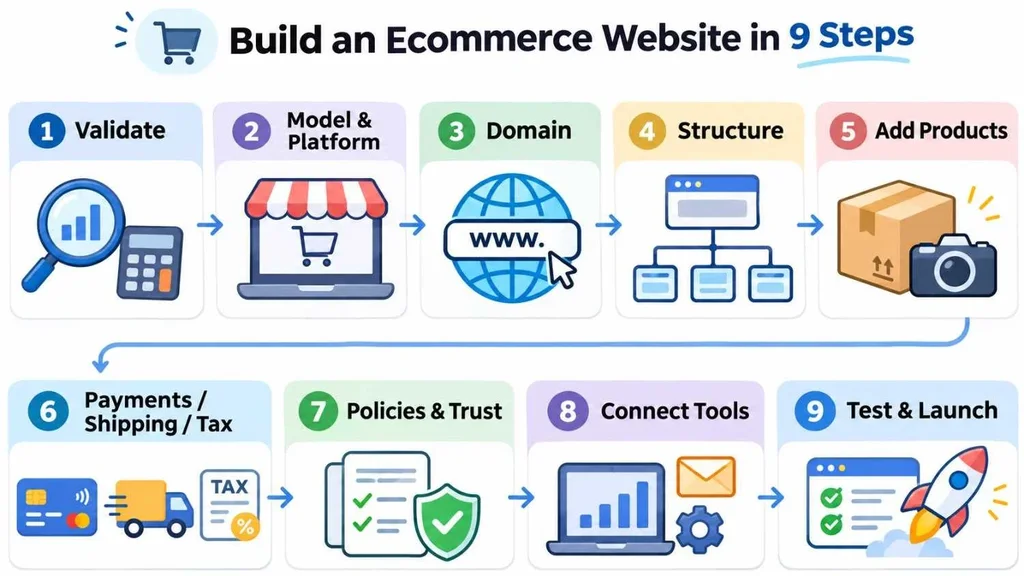
Here is a practical order of work that applies to almost any platform.
1. Validate the idea and know your numbers. Check search demand and competitors, then work out your margin after product cost, shipping, payment fees, returns, and ad spend. If the margin is thin, fix that before you build anything.
2. Pick your model and platform. Decide whether you're selling your own products, running a marketplace, or dropshipping. Then choose a builder or development approach to match.
3. Register a domain name. Choose something short and easy to spell and say out loud. A .com is still the safest choice for US shoppers.
4. Plan your structure. Sketch categories, subcategories, and URLs on paper first. A clear structure helps both shoppers and search engines.
5. Add products with real content. Write your own descriptions, take original photos, and fill in sizes, materials, and specs. Manufacturer copy is shared by hundreds of other stores.
6. Set up payments, shipping, and tax. Connect a PCI-compliant payment provider, define shipping zones and rates, and turn on automated sales tax if your platform offers it.
7. Publish trust pages and policies. You need returns, shipping, privacy, and terms pages, plus a real contact page and an about page. Shoppers check these before buying from a store they don't know.
8. Connect your core tools. Add analytics, email marketing, inventory management, and accounting so you can see what is working.
9. Test, then launch. Place several test orders, check confirmation emails, try the site on different phones, and run a speed test. Then soft launch to friends or a small email list before you spend on ads.
Not sure which tools to add first? This complete guide to e-commerce tools groups them by job, so you can build your stack in the right order.
How Much Do E Commerce Websites Cost?
Cost depends on how much you build yourself. These are the line items to budget for:
• Platform subscription: the monthly fee from a builder or host.
• Domain and hosting: usually modest, though hosting matters more with WooCommerce or a custom build.
• Theme or design: free and paid templates, or custom design work.
• Apps and plugins: reviews, subscriptions, upsells, and shipping tools add up quickly.
• Payment processing: many US processors charge a percentage plus a small fixed fee per transaction, often around 2.9 percent plus 30 cents for cards.
• Photography and content: often underestimated, and often the best return on spend.
• Marketing: ads, email, and affiliate or influencer costs.
• Development: only if you go custom or need integrations.
As rough planning ranges, a template-based store can launch for a few hundred dollars up front plus monthly fees. Custom builds typically start in the low thousands and climb with integrations. Treat those as ballparks, not quotes.
If you wonder why two agencies can quote such different numbers for the same store, this article on what drives software pricing explains it well.
US Requirements Many Guides Skip
If you sell to American customers, a few legal and security basics deserve attention early. This is general information, not legal or tax advice, so check the details with a qualified professional.
Sales Tax
Since the 2018 Supreme Court decision in South Dakota v. Wayfair, states can require remote sellers to collect sales tax once they pass an economic nexus threshold. Thresholds vary by state. Marketplaces like Amazon and Etsy often collect on your behalf, but your own website usually won't unless you set it up. Tax automation tools and a CPA can save you a lot of trouble.
Payment Security
Follow the PCI DSS standard for card data. The easiest path is a hosted checkout from a trusted provider, so card numbers never touch your own server.
Accessibility
Online retailers have faced accessibility lawsuits for years. Most teams aim for WCAG 2.1 AA: add alt text to images, support keyboard navigation, keep strong color contrast, and label form fields clearly. It also makes the site easier for everyone to use.
Privacy
California's CCPA and CPRA apply to many businesses that meet certain size or data thresholds. Even if you don't, a clear privacy policy and honest cookie consent build trust.
SEO for E Commerce Websites
Google publishes dedicated guidance for ecommerce sites, and its helpful content guidelines reward pages written for people first. For a store, that comes down to a few habits.
• Clean URLs: use readable paths like /mens-shoes/trail-runners instead of strings of numbers or session IDs.
• Original product copy: describe what makes the item useful, not just what the manufacturer says.
• Product structured data: mark up price, availability, and reviews so Google can show product rich results.
• Useful category pages: add a short intro and filters, and use canonical tags so filter combinations don't create endless duplicate pages.
• Real reviews: collect genuine customer feedback, and never fake it.
• Google Merchant Center: submit your product feed to appear in free product listings.
Common Mistakes to Avoid
• Launching with hundreds of products before proving that a few can sell.
• Hiding shipping and return costs until the last step.
• Relying on manufacturer photos and descriptions.
• Installing so many apps that the store slows down.
• Skipping analytics, so you can't tell where sales or drop-offs come from.
• Ignoring post-purchase emails, which are among the easiest sources of repeat sales.
A common pattern is a polished homepage paired with a clunky checkout. If you have to choose where to spend your time, fix the checkout first.
Conclusion
E commerce websites reward clarity more than cleverness. The stores that win make it easy to find a product, trust the seller, and finish checkout without surprises.
Start with a validated idea and honest numbers, choose a platform that fits your size today, and plan for the legal basics from the start. Study the best ecommerce websites for ideas, but test everything against your own customers. If you outgrow templates or need your store connected to inventory and accounting, our team builds custom e-commerce development solutions and can help you scope the right next step.
A good store is never really finished. Launch lean, watch your data, and improve one page at a time.
Frequently Asked Questions
What are e commerce websites?
E commerce websites are online stores where people can browse, buy, and pay for products or services. They include single-brand shops, marketplaces like Etsy and Amazon, and B2B ordering portals. Most have a catalog, a cart, secure checkout, and tools for managing orders.
What is the best ecommerce website builder for beginners?
Shopify, Wix, and Hostinger are popular starting points. Shopify suits stores planning to grow, Wix offers easy design control, and Hostinger keeps entry costs low. The right choice depends on your catalog size, budget, and sales channels, so use the free trials before you pay.
How much does it cost to build an ecommerce website?
A template-based store can launch for a few hundred dollars plus monthly fees. Custom builds usually start in the low thousands and rise with integrations. Remember to budget for apps, payment processing fees, photography, and marketing.
Can I build an ecommerce website without coding?
Yes. Builders like Shopify, Wix, Squarespace, and Hostinger use drag-and-drop editors and ready-made templates, so you can launch without writing code. A developer becomes useful when you want custom checkout flows or system integrations.
How do I get my first customers?
Start with people you can reach directly, such as friends, a small email list, and social followers. Then add search traffic through well-structured product and category pages, and consider small, trackable ad campaigns. Reviews and clear policies help early visitors feel safe buying.