ERP Implementation Cost in 2026: What US Businesses Really Pay (and Where Budgets Break)
Small businesses usually pay $25K to $150K for ERP implementation. Here is where the money goes.
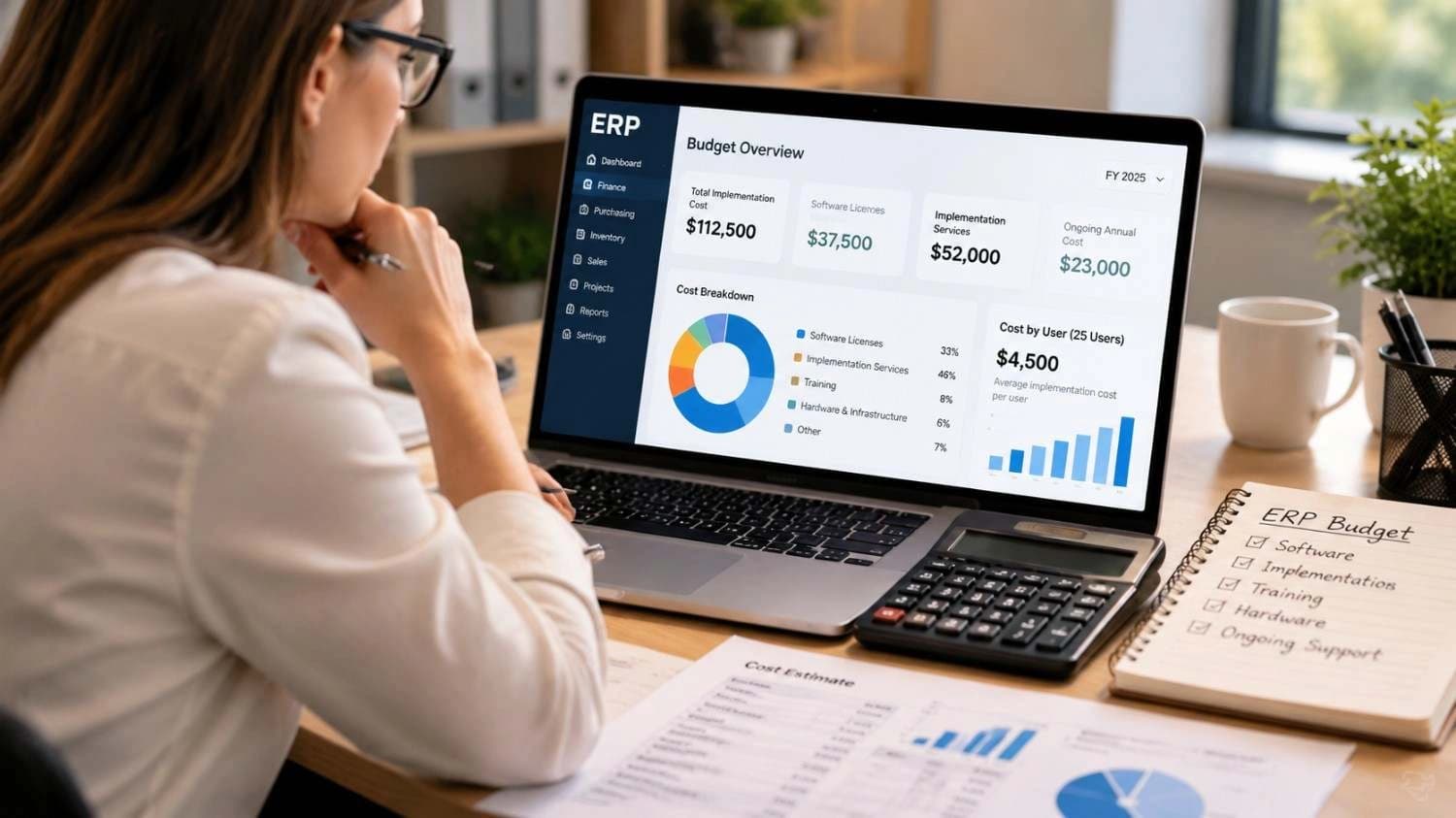
Ask three vendors for an ERP quote and you will probably get three very different numbers. One looks friendly. Another makes you close the laptop. That gap is exactly why ERP implementation cost is so hard to pin down, and why so many budgets fall apart after the contract is signed.
Here is the short version. Small US businesses usually spend between $25,000 and $150,000 to implement an ERP system. Mid-market and enterprise projects climb far beyond that. But the software price is only one slice of the total.
This guide shows where the money actually goes, what ERP software pricing looks like per user, how to work out ERP system implementation cost per user, and which hidden costs catch teams off guard. You will also see a worked example for a 25-user company, so you can sketch a realistic budget before you talk to any vendor.
How we built this guide: the figures come from vendor pricing pages and published industry guides checked in October 2026, plus survey data from Panorama Consulting. Treat every number as a planning range, not a quote. Vendors change prices often, and your final cost depends on scope.
How Much Does ERP Implementation Cost? The Quick Answer
Most published guides agree on the general shape. A basic rollout with standard workflows sits at the low end, while multi-company, heavily customized projects sit at the top. The table below combines those ranges into one view.
| Company size | Typical implementation cost | Typical timeline | What usually drives the price |
| Small (up to 100 employees) | $25,000 to $150,000 | 2 to 6 months | Standard workflows, a few integrations, light data migration |
| Mid-market (100 to 1,000 employees) | $150,000 to $1 million | 6 to 12 months | Several modules, multiple integrations, some customization |
| Enterprise (1,000+ employees) | $1 million to $5 million+ | 12 to 24 months | Multiple entities, compliance rules, heavy integration work |
These ranges cover implementation work only. They leave out the recurring subscription or support fees you will pay every year after go-live.
For context, Panorama Consulting's 2024 survey reported a median ERP project cost of about $450,000. Your project can land well below or above that, depending on size and scope.
What Is Included in ERP Implementation Cost?
When people say "ERP cost," they often mean the license price. In reality, implementation is a bundle of separate work packages. Seeing them one by one makes any quote easier to judge.
Software licensing or subscription
This is the recurring fee for using the system. Cloud ERP usually charges per user per month. Older on-premise systems charge a large one-time license plus yearly maintenance.
Implementation services
This covers project management, requirements workshops, system configuration, and testing. Industry guides put services at roughly 30 to 50 percent of the total spend, and some put systems integrator fees even higher on large projects. For most buyers, this is the biggest line on the quote.
Data migration
Moving customers, items, vendors, open orders, and balances out of old systems takes real effort. Messy spreadsheets make it slower. It is one of the most common places where budgets stretch.
Integrations
Your ERP rarely works alone. Connecting it to an online store, payment gateway, shipping tool, or payroll system adds cost. On larger projects, a single custom integration can run from $10,000 to $50,000 once development and testing are counted.
Customization
Custom fields, reports, approval flows, and new features all need to be built, tested, and maintained through future upgrades. They are valuable when they match a real process, and expensive when they only copy old habits.
Training and change management
A system nobody uses well is wasted money. Budget for classroom or video training, written guides, and time for your team to practice before go-live.
Support after go-live
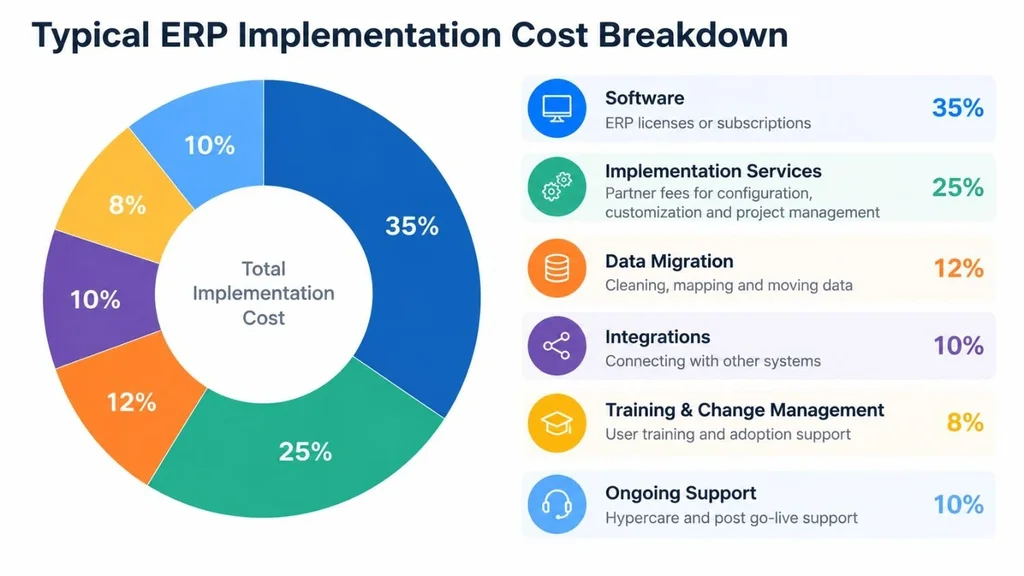
The first few weeks after launch always surface small issues. Plan for hypercare support, plus an ongoing support plan with your partner or vendor.
ERP Software Pricing: What Popular Systems Charge Per User
Software fees are the easiest part of the budget to research, so start there. The table below lists commonly reported US pricing for systems that small and mid-size businesses shop for. Exact prices depend on edition, user type, contract length, and region.
| ERP system | Reported software pricing | Reported small-business implementation |
| Microsoft Dynamics 365 Business Central | About $80 (Essentials) or $110 (Premium) per user per month, plus $8 for team members | Roughly $40,000 to $150,000 |
| Oracle NetSuite | Quote-based. Commonly cited as a base fee near $999 per month plus about $99 to $125 per user | Roughly $25,000 to $100,000+ |
| SAP Business One | About $99 to $176 per user per month in the cloud, or around $3,200 per user perpetual | Varies widely by partner and scope |
| Odoo | About $25 to $61 per user per month depending on plan and region | Roughly $15,000 to $60,000 |
| Acumatica | Quote-based and tied to resource use, not a fixed per-seat price | Varies by modules and users |
Two details change the math more than most buyers expect. First, user types matter. Many vendors sell cheaper "team member" or light licenses for staff who only view or approve data. Second, some vendors charge per user while others charge by usage, so a larger team can make one model far cheaper than the other.
If you want to understand why two similar products can carry such different price tags, read our breakdown of why software pricing varies.
ERP System Implementation Cost Per User: How to Calculate It
"Cost per user" means two different things, and mixing them up leads to bad budgets.
• Software cost per user: the monthly or annual license fee for each person with a login.
• Total implementation cost per user: everything you spend in year one (software, services, migration, training) divided by the number of users.
The second number is the more honest one. Small teams usually pay more per head, because setup work does not shrink in proportion to headcount. Configuring chart of accounts, inventory rules, and approval flows takes similar effort for 10 users or 30.
Worked example: a 25-user distributor on cloud ERP
The scenario below is an illustration built from the published ranges above, not a client quote. It assumes a cloud ERP at roughly $80 to $110 per user per month, standard workflows, and two integrations (an online store and a shipping tool).
| Cost item | Low estimate | High estimate |
| Software subscription (25 users, year one) | $24,000 | $33,000 |
| Implementation and configuration | $40,000 | $70,000 |
| Data migration | $5,000 | $15,000 |
| Integrations (two) | $10,000 | $30,000 |
| Training and change management | $5,000 | $12,000 |
| Subtotal | $84,000 | $160,000 |
| Contingency (20%) | $16,800 | $32,000 |
| Year-one total | about $101,000 | about $192,000 |
Divide that by 25 users and the year-one cost lands between roughly $4,000 and $7,700 per user. From year two, the bill drops to subscriptions and support, so your running cost is much lower than the first-year figure suggests.
ERP Implementation Cost for Small Business: What to Expect
Small companies have one big advantage: fewer processes to untangle. They also have one big risk, which is spending enterprise money on features they will never use.
A realistic small-business budget in the US sits between $25,000 and $150,000 for implementation, plus the yearly subscription. Companies with clean data, standard workflows, and one or two integrations stay near the bottom. Manufacturers with bills of materials, multi-warehouse inventory, or custom reporting land closer to the top. Our guide to choosing and implementing a cloud ERP for SMBs walks through the selection process in more detail.
Where small businesses should spend
• Requirements and process mapping before you buy.
• Clean data. Fixing duplicates and old records before migration is cheaper than fixing them inside the new system.
• Training for every daily user, not only the manager.
Where small businesses can save
• Advanced modules you will not touch in the first year.
• Heavy customization. Start with standard workflows and adjust after real use.
• Full licenses for people who only need to view or approve.
Open-source and lower-license-cost platforms can also reduce the recurring bill, though you should still budget for good implementation work. If you are weighing that route, see our comparison of ERPNext and Odoo for growing businesses.
Factors That Push ERP Implementation Cost Up or Down
Two companies with the same headcount can receive quotes that differ by 3x. These are the usual reasons.
Customization depth
This is the biggest swing factor. One industry guide notes that keeping customizations below roughly 10 to 15 percent of requirements can cut total implementation cost by 20 to 40 percent. The principle is simple: change your process to fit the software when you can, and change the software only when the process is a real competitive edge.
Number of modules and integrations
Finance alone is a modest project. Add inventory, purchasing, manufacturing, CRM, HR, and ecommerce, and each module brings its own configuration, testing, and training.
Industry complexity
Regulated or process-heavy industries need more setup. A manufacturer tracking lots, routings, and work orders has a larger scope than a service firm. Our overview of ERP for manufacturing shows what that extra scope typically involves.
Data quality
Clean, structured records migrate quickly. Ten years of inconsistent spreadsheets do not.
Deployment model
Cloud ERP usually has a lower upfront cost and recurring fees. On-premise has higher upfront cost and more control. Compare both over three to five years instead of looking only at year one.
Your own team's readiness
A named internal project owner who can make decisions quickly saves paid consulting hours. Slow approvals and unclear ownership burn them.
Hidden ERP Costs That Blow Up Budgets

Most overruns come from work that nobody priced at the start. According to Panorama Consulting's 2024 survey, about one-third of projects exceeded their budget. Among those, the most common reasons were extra technology requirements (51 percent), underestimated staffing or organizational issues (39 percent), underestimated consulting fees (33 percent), and expanded scope (26 percent).
Watch for these items:
• Internal staff time, including the hours your finance and operations people spend in workshops and testing.
• Backfilling roles while key employees focus on the project.
• Extra integrations discovered mid-project.
• Scope creep from "one more report" requests.
• Parallel running of old and new systems during cutover.
• Ongoing training for new hires and new features.
• Upgrade and testing costs for any custom code.
How much contingency should you add?
Advice varies. Some guides suggest around 10 percent, while others recommend 20 to 30 percent. A practical rule: use about 15 to 20 percent for a clean, standard rollout, and 20 to 30 percent when you have messy data, many integrations, or heavy customization.
How to Choose ERP Implementation Services Without Overpaying
The partner you pick affects your final bill almost as much as the software does. A cheap quote with vague scope often turns into a larger invoice through change orders.
Understand the pricing models
• Fixed fee: predictable, but only if the scope is written clearly.
• Time and materials: flexible, but needs close tracking.
• Hybrid: a fixed fee for core setup, with hourly rates for extras.
Questions to ask before you sign
1. What exactly is in scope, and what counts as a change request?
2. Who will do the work, and how many similar projects have they delivered?
3. How is data migration priced, and how many test cycles are included?
4. What does support look like in the first 90 days after go-live?
5. Can you share references from companies of my size and industry?
Specialist ERP implementation services teams should answer all five clearly and in writing. If a vendor dodges them, treat that as a warning sign.
It also helps to see how a structured rollout works in practice. We explain our approach in how we implement and customize ERPNext.
8 Practical Ways to Reduce ERP Implementation Cost
1. Write down must-have requirements first, and separate them from nice-to-haves.
2. Use standard workflows wherever possible, and keep customization focused.
3. Clean and de-duplicate your data before migration starts.
4. Roll out in phases, with finance and inventory first and advanced modules later.
5. Assign one empowered internal project owner.
6. Compare total cost of ownership over three to five years, not year one only.
7. Ask for fixed-scope pricing with clear change-order rules.
8. Match license types to real usage so casual users do not need full seats.
Conclusion: Budget for the Whole Project, Not Just the Software
ERP implementation cost is never one number. It is a mix of subscription fees, services, data work, integrations, training, and your own team's time. For small US businesses, $25,000 to $150,000 is a sensible planning range for implementation, with a contingency of 15 to 30 percent on top.
The best protection is clarity. Define your scope, compare total cost over several years, and insist on written answers about what is and is not included. Do that and your final invoice will look a lot like your first estimate.
If you want a second opinion on a quote or a rough estimate for your own project, talk to the Canduit team and share your user count, modules, and timeline.
Frequently Asked Questions About ERP Implementation Cost
How much does ERP implementation cost for a small business?
Most small businesses in the US spend between $25,000 and $150,000 on implementation, plus yearly software fees. The low end fits standard workflows and light data migration. The high end fits manufacturing, multiple warehouses, or heavy integrations.
What is the ERP system implementation cost per user?
Software typically costs about $25 to $175 per user per month, depending on the vendor and edition. When you include services, migration, and training, first-year cost often lands around $4,000 to $8,000 per user for a 25-user company. Larger teams usually see a lower cost per user.
Why does ERP implementation cost more than the software itself?
Software is the tool, but implementation is the work of fitting it to your business. Configuration, data migration, integrations, testing, and training all take skilled hours, which is why services often make up 30 to 50 percent of the total.
Is cloud ERP cheaper to implement than on-premise ERP?
Usually the upfront cost is lower, because you avoid servers and large license fees. However, subscriptions continue every year, so compare both options over three to five years before deciding.
How much contingency should I add to an ERP budget?
A common range is 15 to 30 percent. Use the lower end for clean data and standard processes, and the higher end when you expect complex migration, many integrations, or custom development.