How Do I Get Started With AI Data Integration? A Practical Beginner’s Roadmap
Learn how to connect your data, choose ETL or ELT, and build your first automated pipeline in 90 days.
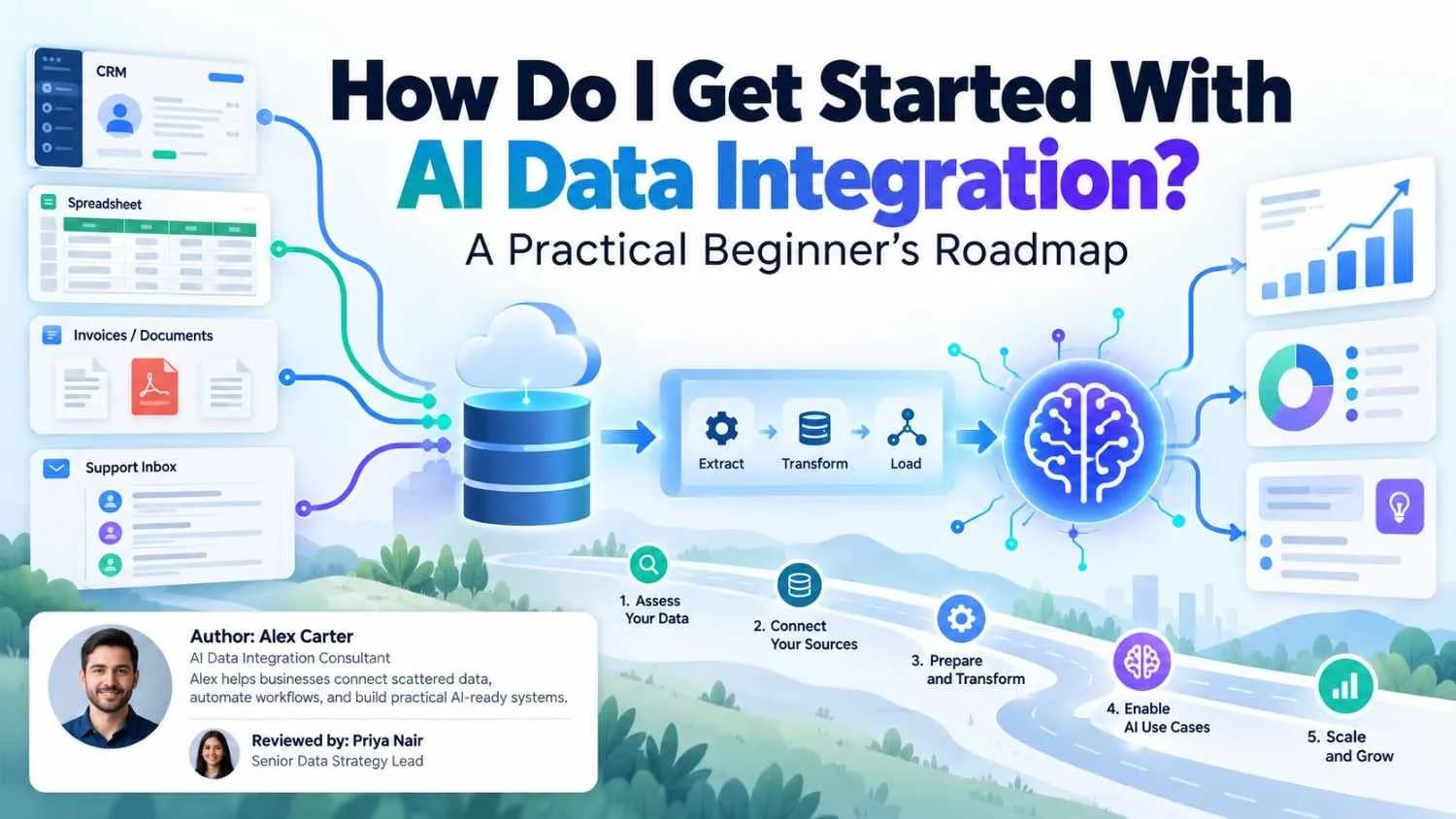
If your customer data sits in a CRM, your orders in another tool, your invoices in a spreadsheet, and your support history in an inbox, you already know the problem. Nothing talks to anything else, and every report starts with a round of copy and paste.
Now add AI to the picture. A chatbot, a forecasting model, or an AI agent is only as useful as the data it can reach. That is why so many teams are asking how to get started with AI data integration before they spend money on the AI itself.
The good news is that you do not need a huge budget or a team of ten engineers. You need one clear goal, a short list of data sources, and a repeatable way to move that data into one trusted place. This guide walks you through that process in plain English. You will learn what AI data integration really means, how ETL fits in, how to compare AI data integration tools, and what a realistic first 90 days looks like.
What Is AI Data Integration?
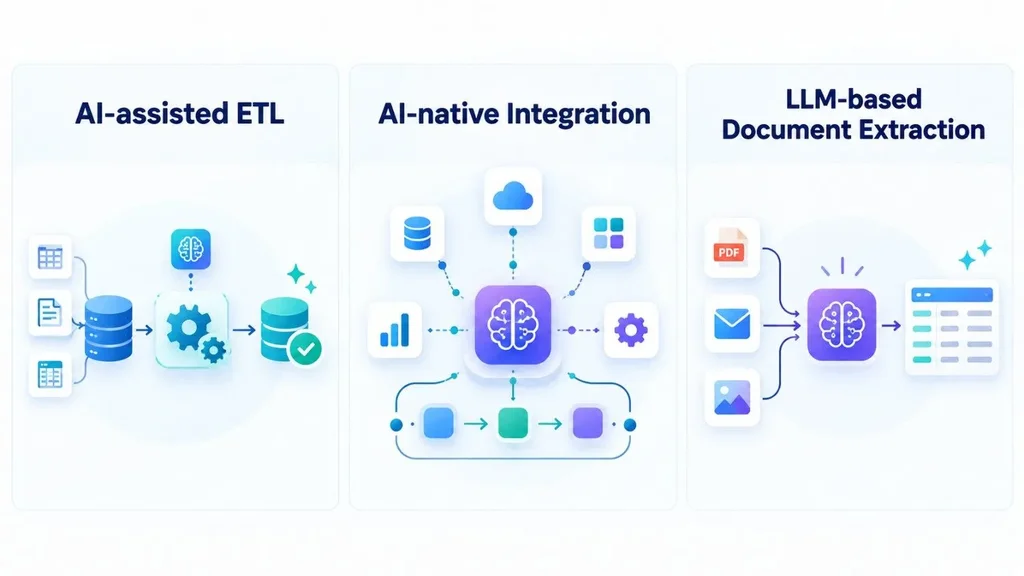
Data integration means pulling data from different systems into one consistent view. AI data integration adds machine learning and language models to the hardest parts of that job: finding sources, matching fields, cleaning records, catching errors, and keeping pipelines healthy.
In practice, you will run into three flavors.
The three types you will see
• AI-assisted ETL: Classic extract, transform, and load pipelines with smart add-ons, such as suggested field mappings and automatic quality checks. Much of today’s data integration software already includes this.
• AI-native integration: Platforms where AI helps plan, run, and monitor the whole pipeline, and adjusts when a source system changes.
• LLM-based unstructured integration: Language models that pull structured fields out of PDFs, emails, and images, such as turning a vendor invoice into database rows.
Most beginners should start with the first type. It improves a process you already understand, and the other two make more sense once your basics are stable.
Why Data Integration Has to Come Before AI
It is tempting to start with the exciting part, like a chatbot or a prediction model. But AI learns from, and answers with, whatever data it can reach. If that data is duplicated, outdated, or scattered, the output will be too.
A 2025 IBM Institute for Business Value report, as cited by Domo, found that more than half of surveyed executives said trouble connecting AI infrastructure to legacy systems had caused their organizations to miss their goals. In other words, integration is where many AI projects stall.
The same rule applies to AI agents. An agent that answers customer questions needs current order, policy, and account data to be right. If you are exploring that route, Canduit’s article on how AI agents can provide 24/7 support for your business shows where agents fit and why the data behind them matters.
How to Get Started With AI Data Integration: 8 Steps
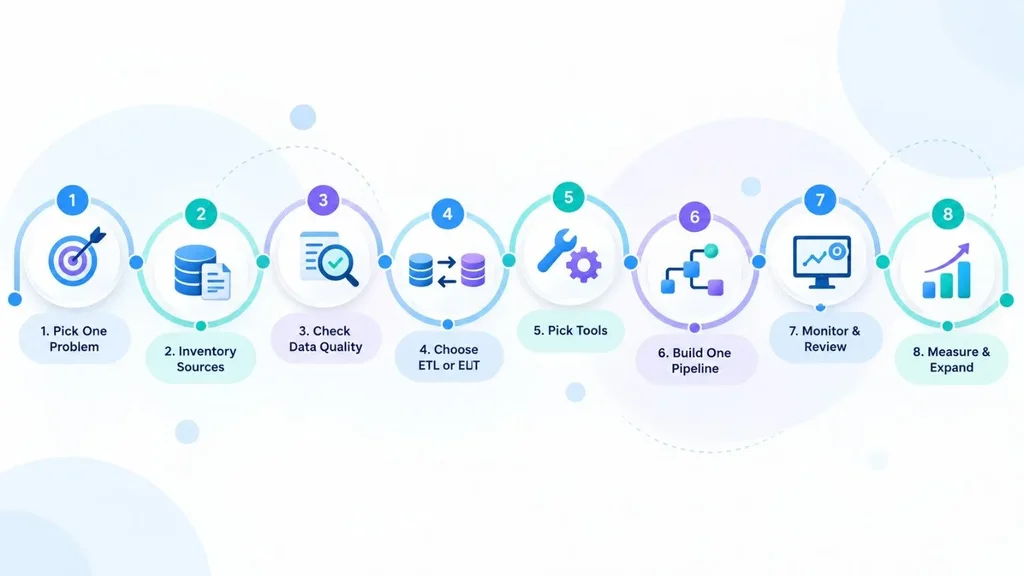
Here is the roadmap in order. Each step is small enough to finish in a week or two.
Step 1: Start with one business problem
Do not begin with a tool. Begin with a question you want answered or a task you want to stop doing by hand. Good first targets are specific and measurable:
• A weekly sales report that takes someone half a day to assemble
• Customer records that exist in three systems with three different spellings
• Support tickets you want an AI assistant to summarize next to order history
Pick one. A narrow scope gives you a quick win and teaches your team how the process works before you scale it.
Step 2: Inventory your data sources
List every system that touches the problem you chose: databases, SaaS apps, spreadsheets, APIs, devices, and shared folders. For each one, write down who owns it, how often it changes, what format it uses, and how you can get data out of it (API, export, or direct database connection).
Do not skip the unglamorous sources. Even a physical device can be one. A simple spreadsheet with five columns (system, owner, format, access method, update frequency) is enough, and it will save you from nasty surprises later.
Step 3: Check data quality before you automate
Automation makes good data faster and bad data worse. Before you connect anything, take a sample of your most important records and look for the usual problems: duplicates, missing values, inconsistent date formats, and mismatched IDs.
A useful quality checklist covers five things: freshness, completeness, accuracy, consistency, and uniqueness. Fix the obvious issues at the source when you can. AI can flag oddities and suggest matches, but a person should decide which record wins when two systems disagree.
Step 4: Choose between ETL and ELT
This choice decides where your data gets cleaned. In ETL, data is transformed before it lands in the destination. In ELT, raw data lands first and is transformed inside the warehouse. There is a deeper comparison in the next section, but the short version is this: choose ETL when you need strict control before data is stored, and ELT when you want flexibility and have a modern cloud warehouse.
Step 5: Pick your tools and platform
Now, and only now, shop for AI data integration tools. You will usually need a way to move data, a place to store it (a warehouse or lake, often called your AI data platform), a way to transform it, and a way to schedule and watch it all. Some products bundle several of these. We cover how to compare them below.
Step 6: Build one pipeline and automate it
Connect a single source to your destination, transform the data, and schedule it. This is data pipeline automation in its simplest form. Resist the urge to connect ten sources at once.
Plan for failure from day one. Canduit’s case study on a biometric attendance sync tool is a good real example. Syncing attendance logs from ZKTeco devices into ERPNext sounds simple, but the team had to add a global sync lock so a scheduled run could not collide with a manual one, plus a watchdog timer to recover when a device stopped responding. Duplicate records and silent hangs are the two failures that hurt most, so design against them early.
Step 7: Add monitoring, governance, and human review
A pipeline that runs is not the same as a pipeline you can trust. Add alerts for failed jobs, late data, and sudden changes in row counts. Keep a log of what moved, when, and how it was changed. Borrow habits from software delivery too: automated tests and staged releases catch problems before they reach your reports. Canduit’s guide to DevOps pipelines and automation explains those habits in plain terms.
For AI-assisted steps, set a confidence rule. For example, let the system auto-apply field mappings it is highly confident about, and send anything uncertain, sensitive, or tied to financial reporting to a person for review.
Step 8: Measure results and expand
Go back to the problem from Step 1 and measure it. Did the weekly report drop from half a day to ten minutes? Did duplicate customer records fall? Use those numbers to justify the next pipeline. Teams that grow one proven pipeline at a time tend to end up with a far more stable setup than teams that try to connect everything in one big launch.
ETL vs ELT: Which Fits a Beginner?
Both patterns are valid ways to build an ETL data integration workflow. The real question is where transformation happens and how much governance you need.
| ETL | ELT | |
| Where data is transformed | Before loading, in a staging layer | After loading, inside the warehouse |
| Strengths | Only clean, validated data reaches storage. Easier to enforce compliance rules up front. | Raw data is available quickly. Flexible for analytics, retraining models, and new questions later. |
| Watch out for | Slower to change. Source changes can break the pipeline. | Messy raw data can spread if governance is weak. Needs strong access controls. |
| Good fit when | You handle regulated or sensitive data, or need tight quality gates. | You use a cloud warehouse and want speed and flexibility. |
Many teams use both. They might run ETL for financial or health data and ELT for marketing and product analytics. For AI work, note that the transformation step also shapes data quality for model training and retrieval, so do not treat it as an afterthought either way.
How to Choose AI Data Integration Tools
The market is crowded, and most tools overlap. Instead of chasing a “best” list, match the tool to your team and your problem. These are the questions that matter most:
• Connector coverage: Does it support the apps and databases you actually use today?
• Technical skill needed: Is it low-code for analysts, or built for data engineers?
• Change data capture (CDC): Can it move only what changed, rather than reloading everything?
• Governance: Does it offer lineage, audit logs, and role-based access?
• AI features you can inspect: Can you see and override automated mappings and decisions?
• Deployment and security: Cloud, self-hosted, or hybrid? What certifications does the vendor hold?
• Pricing model: Is cost based on usage, capacity, or seats, and how will it grow with your data?
To make the landscape less confusing, here is how the main categories break down. The examples are illustrative, not an endorsement, and features and pricing change often, so confirm details on each vendor’s site.
| Category | Example products | Typically suits |
| Managed ELT / replication | Fivetran, Airbyte Cloud | Teams that want pipelines running with minimal upkeep |
| Open-source, self-managed | Airbyte (self-hosted) | Engineering teams that want control and can maintain it |
| Enterprise data management | Informatica, Qlik Talend Cloud | Large organizations needing governance, quality, and master data |
| Cloud transformation | Matillion, dbt | Teams transforming data inside a warehouse |
| Application integration (iPaaS) | Boomi, SnapLogic | Connecting business apps and APIs, not just analytics data |
| Orchestration | Apache Airflow, Prefect | Scheduling and monitoring complex multi-step workflows |
Whatever you shortlist, run a small proof of concept on real data. Vendor demos use clean sample data. Your data will not look like that.
Build, buy, or get help?
Building custom integrations gives you full control but adds ongoing maintenance. Buying a platform trades some flexibility for speed and lower upkeep. A common middle path is to buy for standard connections and build only what is truly unique to your business. If you are unsure whether to bring in outside help, Canduit’s guide to business software consulting and when to outsource lays out the trade-offs clearly.
A Realistic Example: A Small Online Retailer
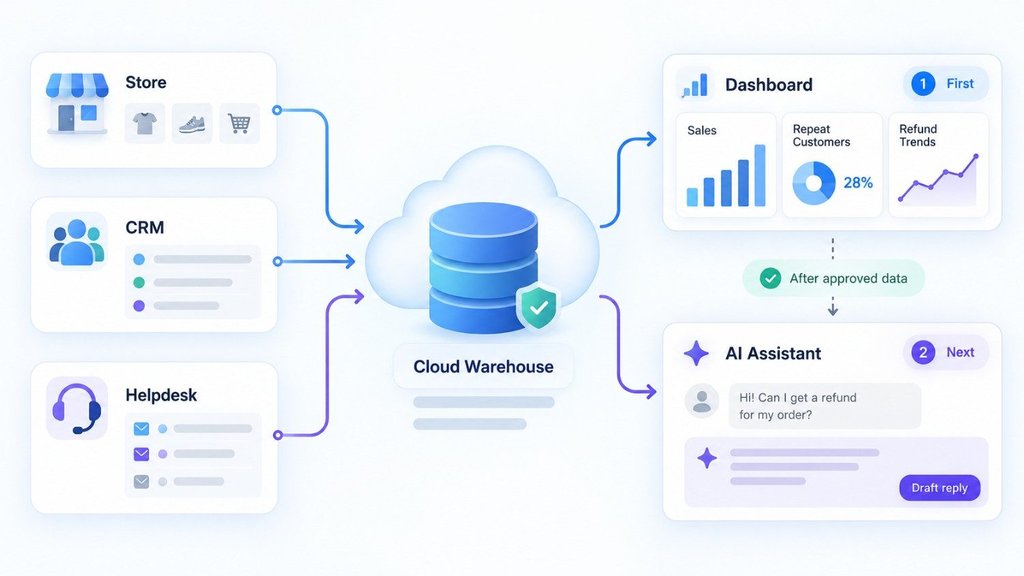
Here is a hypothetical example to show how the pieces fit together. Picture an online store that sells through its own website, tracks customers in a CRM, and handles questions in a helpdesk. The owner wants one weekly view of sales, repeat customers, and refund trends, and later wants an AI assistant to draft support replies.
1. Goal: Replace the weekly manual report with an automatic one.
2. Sources: Store orders, CRM contacts, helpdesk tickets.
3. Quality check: Customer emails are spelled differently across tools, so the team agrees to match on email and order ID.
4. Pattern: ELT into a cloud warehouse, since the data is standard business data.
5. First pipeline: Orders only, synced every few hours, with alerts if a run fails.
6. Expansion: CRM and helpdesk follow, and only then does the AI assistant get access to approved, up-to-date customer context.
Notice what happened. The AI assistant came last, and it works better because the groundwork was done first.
Common Mistakes to Avoid
• Buying the tool first. A platform cannot fix a goal you have not defined.
• Automating messy data. Clean up the worst problems before you scale.
• Trusting AI mappings blindly. Review low-confidence suggestions, especially for financial fields.
• Connecting everything at once. Big-bang launches are hard to debug.
• Ignoring failure handling. Plan for outages, schema changes, and duplicate runs.
• Forgetting ownership. Every pipeline needs a named owner who gets the alerts.
Security and Compliance Basics for US Teams
Integration moves sensitive data around, so security is part of the design, not an add-on. At a minimum, use role-based access, encrypt data in transit and at rest, mask or tokenize personal information when you can, and keep audit logs.
Depending on your business, specific rules may apply. The California Consumer Privacy Act (CCPA) covers personal information of California residents, and HIPAA applies when you handle protected health information. If a vendor will touch regulated data, ask about its security certifications, such as a SOC 2 report. This article is general information, not legal advice, so talk to qualified counsel about your obligations.
A Simple 90-Day Plan
• Days 1 to 30: Choose the problem, inventory sources, check data quality, and shortlist two or three tools.
• Days 31 to 60: Run a proof of concept, build the first pipeline, and add basic alerts and logging.
• Days 61 to 90: Measure results against your Step 1 goal, document ownership, and plan the next two pipelines.
This pace is realistic for a focused pilot. Larger rollouts with many systems or legacy platforms take longer.
Conclusion
Getting started with AI data integration is less about picking a clever tool and more about doing a few basics well. Pick one problem, know your sources, clean up the worst data, choose ETL or ELT on purpose, and build a single pipeline with monitoring and human review built in. Then measure, learn, and grow from there.
Do that, and your reports get faster, your teams stop arguing over whose numbers are right, and any AI you add later has solid ground to stand on. If you would rather not go it alone, Canduit’s AI data integration services focus on connecting the systems you already run and getting something working in weeks.
Frequently Asked Questions
How do I get started with AI data integration as a beginner?
Start with one specific business problem, such as a manual report. List the data sources involved, check their quality, choose ETL or ELT, and build one automated pipeline with monitoring. Expand only after you have measured the results.
What is the difference between ETL and AI data integration?
ETL describes the order of steps: extract, transform, load. AI data integration is a broader idea that uses machine learning and language models to help with those steps, such as suggesting field mappings, flagging anomalies, and extracting data from documents. Many modern data integration platforms combine both.
Do I need a data warehouse or AI data platform first?
Usually you need somewhere central to store integrated data, such as a cloud data warehouse or lake. For a small pilot, a simple warehouse is enough. A full AI data platform with governance and model tooling can come later, once your first pipelines are stable.
How much does AI data integration cost?
It varies widely. Open-source tools can be free to self-host, but they cost engineering time. Managed platforms often charge by usage or capacity, and enterprise suites are priced by contract. Start with a small pilot, estimate your data volume, and compare real quotes rather than relying on list prices.
How long does it take to see results?
A focused pilot with one or two sources can often show results within a few weeks to a couple of months, depending on data quality and access. Projects involving legacy systems, strict compliance needs, or many sources take longer.