Manufacturing ERP Software: What It Does, What It Costs, and How to Choose the Right One
Learn what manufacturing ERP software does, what it costs, and how to choose the right system.
Manufacturing ERP software is the system that keeps your bill of materials, inventory, purchasing, production schedule, and accounting talking to each other. When it works, the shop floor, the front office, and the warehouse all see the same numbers. When it is missing, people fill the gap with spreadsheets, sticky notes, and a lot of phone calls.
If you are comparing options, you have probably noticed that most guides read like vendor brochures. This one tries to be more useful. Below, you will find what the software actually does, how it relates to MRP, what it really costs, how to choose between process and discrete systems, and where projects tend to go wrong.
What Is Manufacturing ERP Software?
Manufacturing ERP software is a business management system built around how products get made. It combines core ERP functions such as finance, sales, and purchasing with production tools such as bills of materials, routings, shop floor control, quality checks, and material planning, all on one shared database.
A generic ERP can post invoices and track stock. A manufacturing system goes further. It knows that one finished product needs twelve components, that two of them have a six-week lead time, and that the machine you planned to use is booked until Thursday. That awareness is what separates ERP for manufacturing from a general accounting package.
Most US manufacturers reach this point the same way. QuickBooks or a similar tool handles the books, a spreadsheet handles production planning, and one person in purchasing keeps the real inventory count in their head. It works until order volume, product variety, or customer audits outgrow it. If that sounds familiar, our overview of ERP for manufacturing shows what an integrated setup looks like in practice.
MRP, MRP II, and ERP: How They Fit Together
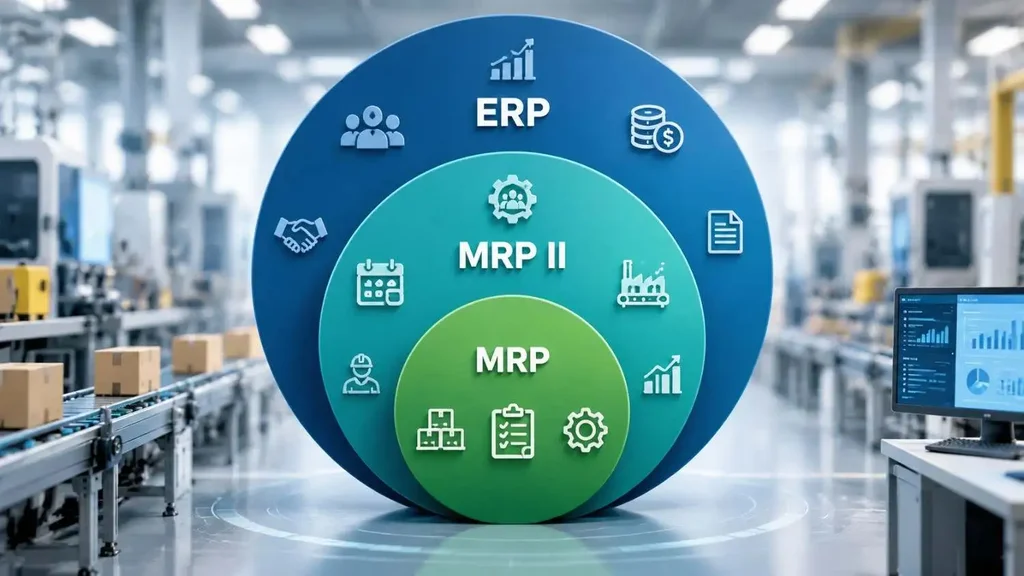
These three terms get mixed up constantly, so a quick note on naming helps. Many buyers search for "material resource planning software," but the original term is material requirements planning, or MRP. Same acronym, different words, and the confusion goes back decades.
| Layer | Full name | Question it answers | What it adds |
| MRP | Material requirements planning | What do I need to buy or make, how much, and by when? | BOM logic, inventory levels, production schedule |
| MRP II | Manufacturing resource planning | Can we actually build it with our machines, people, and time? | Capacity planning, shop floor control, a financial view |
| ERP | Enterprise resource planning | How does production affect cash, customers, and suppliers? | Finance, sales, purchasing, HR, and reporting on one database |
In practice, today's manufacturing resource planning software lives inside a full ERP. The MRP engine still does the math on materials, but it now reads real sales orders and writes real purchase orders. So when a vendor says "MRP system," ask whether finance and purchasing are included or whether you would be buying them separately.
Core Features of Production ERP Software
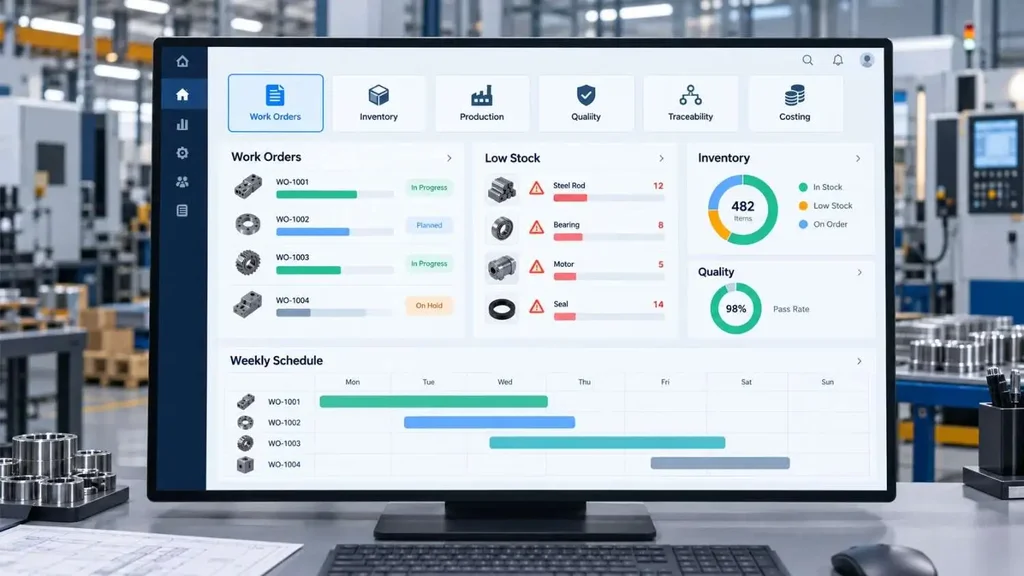
Feature lists get long fast. These six are the ones that decide whether production ERP software helps your team or slows it down.
Bill of materials and routings
The BOM lists every part, subassembly, and quantity. The routing lists the steps and work centers. Look for multi-level BOMs, revision control, and alternates for when a supplier runs out. If engineering changes live in a separate system, your shop will eventually build to an old revision.
Material planning and scheduling
The planning engine compares demand to stock and open orders, then suggests what to buy or make. Good scheduling adds finite capacity, so the plan respects machine and labor limits. Ask to see how the system handles a rush order that bumps three others. That test says more than any brochure.
Inventory and traceability
Lot and serial tracking should work in both directions. Backward trace tells you which supplier lot went into a finished item. Forward trace tells you which customers received it. When a recall question lands, you want an answer in minutes, not days.
Shop floor data capture
Barcode scans, tablets at work centers, or machine integrations feed actual times and quantities back to the system. Without that feedback, your costs and schedules rely on guesses.
Quality management
Inspection plans, nonconformance records, corrective actions, and certificates of analysis belong in the same system as the lots they describe. Auditors tend to ask for exactly that link.
Costing and finance
Material, labor, and overhead should flow to the general ledger without re-keying. This is where many manufacturers first discover margin surprises. Our guide to accounting in ERP explains how the financial side connects to operations.
Process vs Discrete: Choose the Right Type of Manufacturing ERP
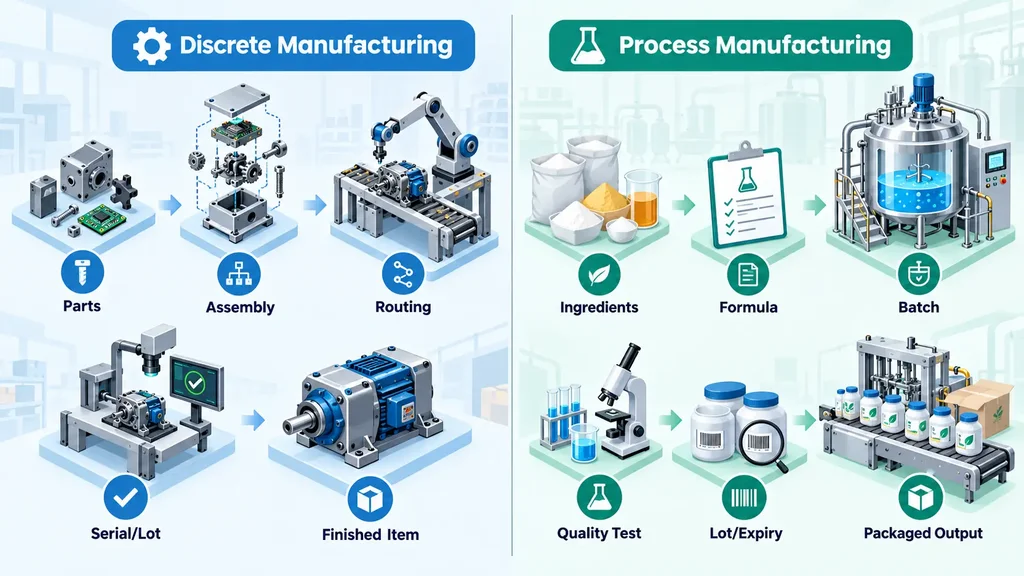
Not all manufacturing works the same way, and the software should not pretend it does.
Discrete manufacturers build countable items from parts, such as machinery, electronics, furniture, or medical devices. They rely on multi-level BOMs, routings, and serial numbers. Process manufacturers blend, mix, or react ingredients, as in food, beverages, chemicals, cosmetics, and supplements. They work from formulas and recipes, and output can shift from batch to batch.
| Area | Discrete manufacturing | Process manufacturing |
| Product definition | Multi-level BOM with fixed quantities | Formula or recipe with percentages and scalable batch sizes |
| Scaling | Linear: double the order, double the parts | Often stepwise, with yield and potency to manage |
| Traceability | Serial numbers and lots | Lot genealogy through intermediates, plus expiry dates |
| Units of measure | Mostly "each" | Mixed, with weight and volume conversions |
| Typical output | One finished item | Main product, co-products, and by-products |
| Daily focus | Engineering changes and routings | Batch tickets, quality testing, and regulatory records |
Process manufacturing ERP software has to handle variable yields, expiry dates, and lot inheritance natively. Many teams try to bend a discrete system to fit, then spend months on workarounds. If you make food, for example, look at how an ERP for food and beverage handles allergens, lot tracking, and first-expired-first-out picking.
Mixed-mode plants, such as a company that blends a product and then assembles it into kits, need both approaches. Ask vendors to demo that exact flow, not each side separately.
US compliance also shapes the choice. Food, supplement, and drug makers work under FDA current good manufacturing practice rules. Aerospace suppliers often work to AS9100 and may face ITAR controls, while automotive suppliers commonly follow IATF 16949. Your ERP should support the records those standards expect. Requirements depend on your products and customers, so confirm specifics with your quality lead before you shortlist anything.
What Changes on the Shop Floor After Go-Live
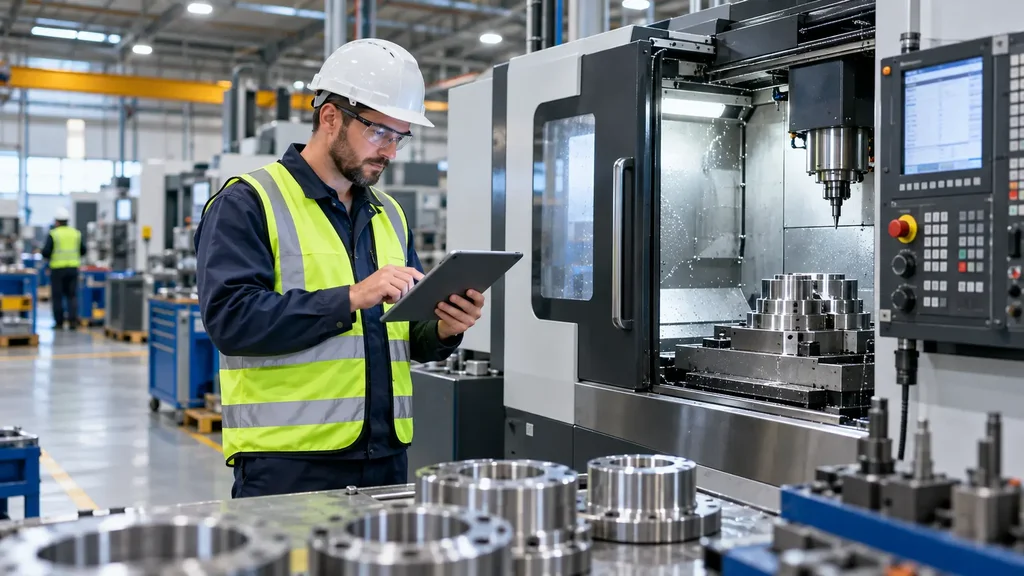
Here is an illustrative example based on a common pattern. A 60-person metal fabrication shop quotes jobs from a spreadsheet and tracks inventory in a separate tool. Purchasing orders sheet metal based on last month's usage. Engineering updates a drawing, but the floor keeps cutting the old revision for two more days.
After moving to an integrated system, the quote pulls current material costs. Releasing the job creates a purchase requisition if stock is short. The new drawing revision replaces the old one at the work center. Nothing magical happened. The same people simply stopped working from different versions of the truth.
Typical gains follow that same pattern:
• Fewer stockouts and emergency orders, because material planning sees demand early
• More accurate job costs, so you know which products actually make money
• Faster, more reliable delivery dates for customers
• Quicker audits and recalls, because records sit in one place
These are typical outcomes, not guarantees. Results depend on data quality and on how well your team adopts the system.
How Much Does Manufacturing ERP Software Cost?
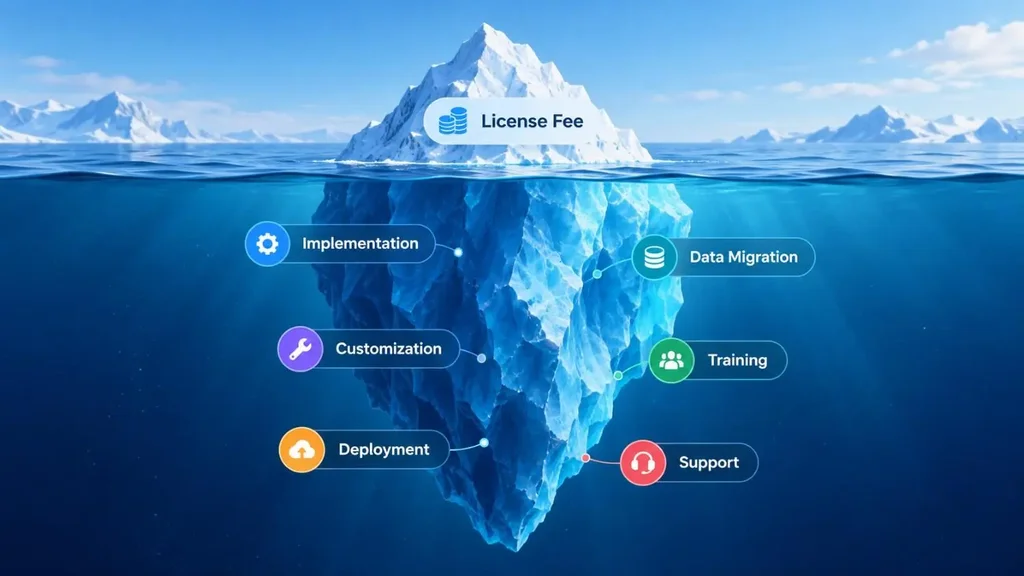
Published estimates vary widely, so treat the figures below as planning ranges, not quotes.
• Subscription: small-business cloud ERP commonly runs from about $1,500 to $10,000 or more per month, depending on users and modules. Per-user pricing for manufacturing systems is often cited between roughly $70 and $200 or more per user per month.
• Implementation: often one to three times the first-year license cost, according to several 2026 cost guides.
• Ongoing support: one estimate puts annual maintenance at 15 to 25 percent of the implementation cost.
• Timeline: about 6 to 12 months for most small and mid-sized manufacturers, and 12 to 24 months for larger or heavily customized projects.
A complete budget also covers data migration, customization, training, deployment, and support. Data migration is the line item most often underestimated. One implementation partner's review of more than 150 discrete manufacturers reported that heavy customization can double or triple implementation cost.
Quotes also differ because vendors scope the work differently, which is why two proposals for the same plant can be far apart. Our breakdown of why software pricing varies explains what sits behind those numbers.
Deployment affects the budget too. Cloud subscriptions are the common default in 2026, while some manufacturers keep sensitive processes on their own servers. Our guide to choosing and implementing cloud ERP covers that decision for smaller companies.
How to Choose Manufacturing ERP Software: A Practical Checklist
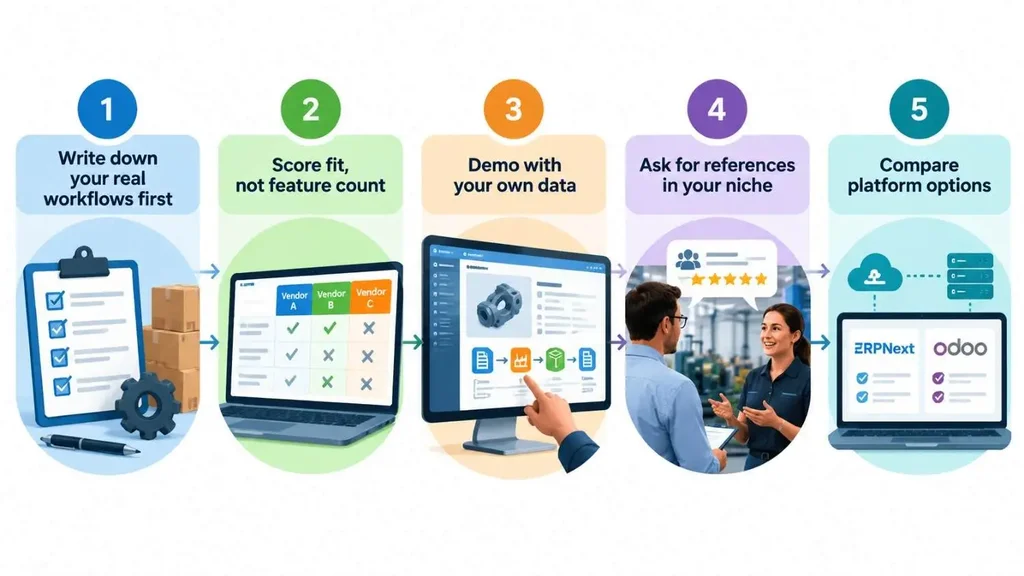
1. Write down your real workflows first
List the ten processes that cause the most pain, such as quoting, material planning, receiving, job tracking, shipping, and recalls. Rank them. This list becomes your scorecard.
2. Score fit, not feature count
A system with 400 features that misses your two critical workflows is the wrong system. Weight each requirement and score every vendor the same way.
3. Demo with your own data
Hand each vendor one real product: its BOM, a customer order, and a supplier delay. Ask them to take it from sales order to invoice. Vague answers show up quickly.
4. Ask for references in your niche
A reference from a plastics molder tells a food blender very little. Ask to speak with a customer of similar size, process type, and compliance load.
5. Compare platform options
Open-source and commercial platforms both deserve a look. Our comparison of ERPNext and Odoo walks through the trade-offs for growing businesses.
If you lack in-house ERP experience, an outside advisor can keep the selection honest. This piece on business software consulting explains when that makes sense.
Why Manufacturing ERP Projects Fail, and How to Avoid It
The technology is rarely the cause. Three issues come up again and again.
Bad data
Old part numbers, duplicate suppliers, wrong units of measure, and outdated BOMs get migrated straight into the new system. Then nobody trusts the reports. Clean, map, and test your data before cutover, and rehearse the migration at least once.
Weak change management
If supervisors keep a side spreadsheet "just in case," the ERP never becomes the source of truth. Name an internal project owner with real authority, train supervisors first, and retire the old tools on a set date.
Poor fit and over-customization
Customizing every screen to match old habits drives up cost and complicates upgrades. Change the process where the standard approach is better, and customize only where it protects a real advantage. Our walkthrough on how we implement and customize ERPNext shows how to draw that line.
One more tip: consider a phased go-live. Start with inventory and purchasing, then add production, then quality. A smaller first step gives the team early wins and exposes data problems while they are still cheap to fix.
Conclusion
Manufacturing ERP software earns its place when it replaces guesswork with shared, accurate data: what is in stock, what is on order, what is in production, and what each job really costs. Start with your own workflows, choose between process and discrete based on how you actually make product, and budget for more than the license. Treat data cleanup and training as part of the project, not an afterthought.
If you would like help mapping your requirements and building a shortlist, Canduit's ERP solutions team can talk through your plant's needs.
Frequently Asked Questions
What is the difference between manufacturing ERP software and MRP software?
MRP software calculates which materials you need and when. Manufacturing ERP software includes that MRP logic, then adds finance, sales, purchasing, quality, and reporting on one database. MRP answers "what should we buy or make?" while ERP also shows how those decisions affect cash, customers, and suppliers.
How much does manufacturing ERP software cost?
Costs vary by vendor, user count, and scope. Published estimates for small-business cloud ERP run from about $1,500 to $10,000 or more per month, and implementation often costs one to three times the first-year license. Get itemized quotes that include data migration, training, and support so you can compare fairly.
How long does it take to implement manufacturing ERP software?
Most small and mid-sized manufacturers should plan for roughly 6 to 12 months. Larger plants or heavily customized projects can take 12 to 24 months. Clean data, a committed internal owner, and a phased go-live all help keep the schedule realistic.
Do small manufacturers really need ERP, or is QuickBooks enough?
QuickBooks handles accounting well, but it does not plan materials, schedule production, or trace lots. If you track production in spreadsheets, miss delivery dates, or struggle to answer customer audits, a manufacturing ERP is worth evaluating. Some small shops start with a lighter, manufacturing-focused tool and grow from there.
What is the difference between process and discrete manufacturing ERP software?
Discrete ERP is built around multi-level BOMs, routings, and serial numbers for countable products. Process manufacturing ERP software is built around formulas, scalable batches, variable yields, expiry dates, and lot genealogy for products like food, chemicals, and supplements. Mixed-mode plants may need both capabilities in one system.