What Is DevOps? A Practical Guide to the Lifecycle, Pipelines, and Tools
If you have ever wondered why some companies ship new features every day while others take months,
If you have ever wondered why some companies ship new features every day while others take months, the answer is often DevOps. So, what is DevOps? In simple terms, it is a way of working that brings software development and IT operations together so teams can build, test, and release software faster and with fewer problems.
This guide explains DevOps in plain English. You will learn how the DevOps lifecycle works, what a DevOps pipeline looks like, which tools matter, what Azure DevOps is, and what a DevOps engineer actually does. You will also see practical examples you can apply to your own team.
What Is DevOps?
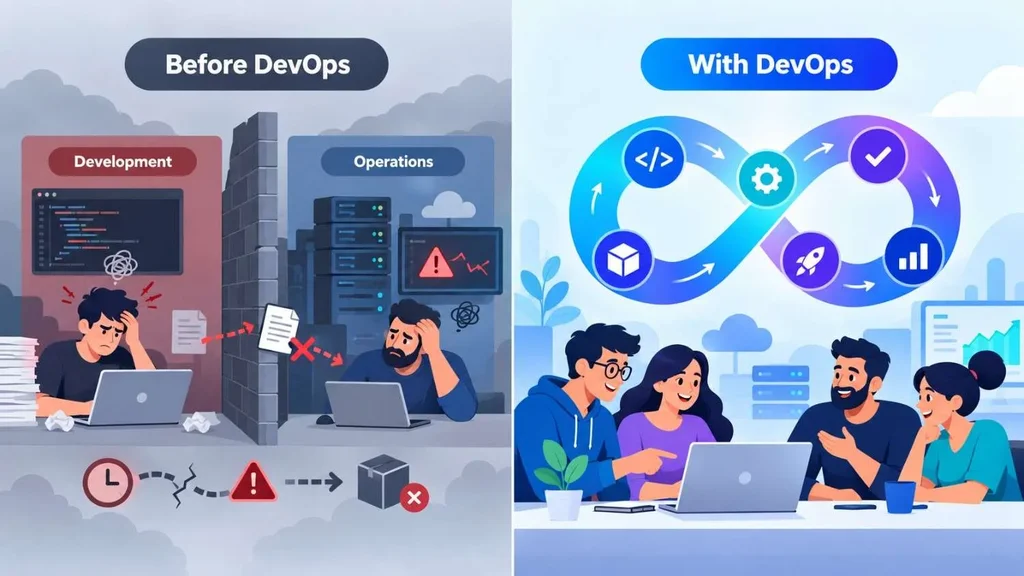
DevOps is a combination of culture, practices, and tools that helps teams deliver software quickly and reliably. The name comes from joining "development" and "operations."
Before DevOps, these two groups often worked in separate silos. Developers wrote code and handed it over. Operations teams then had to run it in production. When something broke, each side blamed the other. Releases were slow, stressful, and risky.
DevOps removes that wall. Both groups share responsibility for the full life of the software, from the first line of code to monitoring it in production.
It helps to remember that DevOps is not a single tool, a job title, or a magic product you can buy. It is a mindset supported by automation.
Why DevOps Matters for Modern Businesses
Customers now expect apps to work all the time and improve often. Slow releases and frequent outages push people toward competitors. DevOps helps solve this in several ways:
- Faster releases: Small, frequent updates replace big, risky launches.
- Higher quality: Automated testing catches bugs early, when they are cheap to fix.
- Better stability: Monitoring and quick rollbacks reduce downtime.
- Stronger collaboration: Shared goals reduce finger-pointing.
Lower stress: Repeatable processes replace late-night manual deployments.
The research behind this is well known. The DevOps Research and Assessment (DORA) program at Google Cloud studies software delivery performance and tracks four core measures: deployment frequency, lead time for changes, change failure rate, and time to restore service. You can read more at dora.dev. These metrics are a useful way to check whether your own DevOps efforts are working.
The DevOps Lifecycle Explained
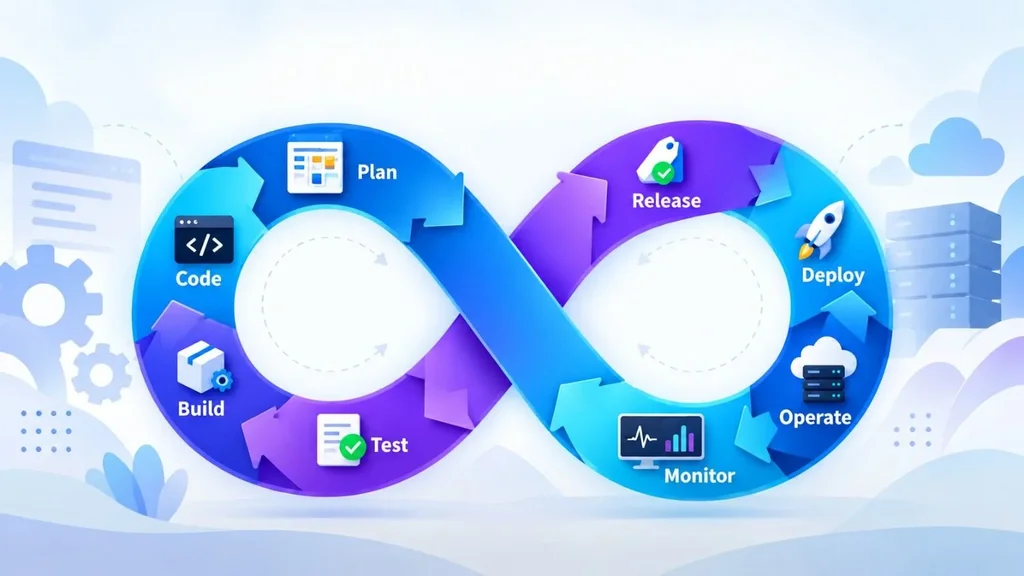
The DevOps lifecycle is often drawn as an infinity loop because the work never really ends. Each release feeds lessons into the next one. Here are the main stages.
1. Plan
Teams decide what to build and why. They break big ideas into small tasks and track them on a board.
2. Code
Developers write code and store it in a shared version control system such as Git. Branches and pull requests let teammates review each other's work.
3. Build
The code is compiled and packaged automatically. If the build fails, the team knows within minutes.
4. Test
Automated tests run on every change. These include unit tests, integration tests, and security checks.
5. Release
Once tests pass, the build is approved and prepared for delivery.
6. Deploy
The new version goes live in staging or production. Good teams use safe methods like blue-green deployments or canary releases, which send a small share of traffic to the new version first.
7. Operate
The application runs on servers or cloud services. Infrastructure is managed with code, so environments stay consistent.
8. Monitor
Teams watch logs, performance, and errors. What they learn goes straight back into planning.
A quick real-world example: imagine an online store that wants to add a new discount feature. A developer commits the change, the pipeline builds and tests it automatically, and it reaches a small group of shoppers within the hour. If error rates rise, the team rolls it back in minutes. Without DevOps, the same change might wait weeks for a scheduled release window.
What Is a DevOps Pipeline?
A DevOps pipeline is an automated series of steps that moves code from a developer's laptop to production. Think of it as an assembly line for software. Each stage checks the work before it moves to the next one.
A typical pipeline looks like this:
- A developer pushes code to the repository.
- The pipeline starts automatically.
- The code is built and packaged.
- Automated tests run.
- Security and quality scans check for issues.
- The approved build is deployed to staging.
- After final checks, it goes to production.
If any step fails, the pipeline stops and alerts the team. This simple rule prevents broken code from reaching customers.
What Is a CI/CD Pipeline?
People often use "DevOps pipeline" and "CI/CD pipeline" as if they mean the same thing. They are closely related, and CI/CD is the heart of most pipelines.
- Continuous Integration (CI): Developers merge their changes into a shared branch often, sometimes many times a day. Each merge triggers an automated build and test run. This catches conflicts and bugs early.
- Continuous Delivery (CD): Every change that passes the tests is ready to be released at any time. A person still approves the final push to production.
- Continuous Deployment (also CD): Every change that passes the tests is released to production automatically, with no manual approval.
The difference between delivery and deployment is a common point of confusion. Delivery keeps a human in the loop at the final step. Deployment removes it. Many regulated industries, such as finance and healthcare, prefer continuous delivery because approvals are required.
What Is DevOps Automation?
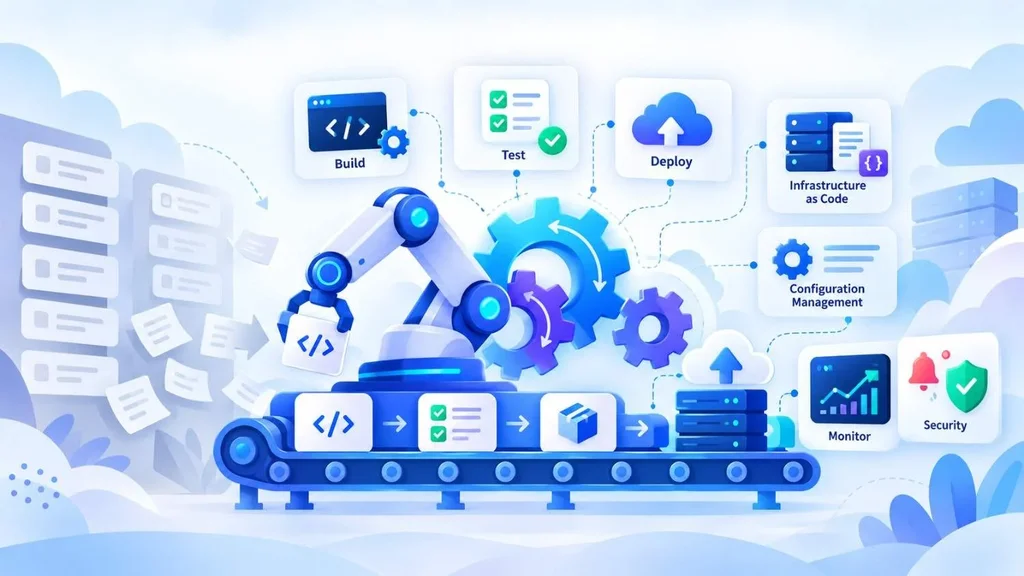
DevOps automation means using tools and scripts to handle repetitive work that people used to do by hand. The goal is not to replace people. It is to remove slow, error-prone tasks so people can focus on harder problems.
Common areas of automation include:
- Build and test automation: Code is compiled and tested on every commit.
- Deployment automation: Releases follow the same steps every time.
- Infrastructure as Code (IaC): Servers, networks, and databases are defined in files and created automatically. Tools like Terraform and Ansible are popular here.
- Configuration management: Systems stay consistent across environments.
- Monitoring and alerting: Tools detect problems and notify the right people.
- Security automation: Scans for vulnerabilities run inside the pipeline. This approach is often called DevSecOps.
A practical tip: do not try to automate everything at once. Start with the task that wastes the most time, such as manual deployments or repeated test runs. Automate that, measure the improvement, and then move to the next one.
Popular DevOps Tools
There is no single "best" DevOps tool. The right stack depends on your team size, cloud provider, and skills. Here are well-known tools grouped by purpose.
| Purpose | Common Tools |
| Version control | Git, GitHub, GitLab, Bitbucket |
| CI/CD | Jenkins, GitHub Actions, GitLab CI/CD, Azure Pipelines |
| Containers | Docker |
| Orchestration | Kubernetes |
| Infrastructure as Code | Terraform, Ansible, Pulumi |
| Monitoring and logging | Prometheus, Grafana, Datadog, ELK Stack |
| Planning and tracking | Jira, Azure Boards |
If you are new to this, begin with Git, one CI/CD tool, and Docker. These three give you the foundation. You can learn more about specific platforms in their official docs, such as the GitHub Actions documentation and the Kubernetes documentation.
What Is Azure DevOps?
Azure DevOps is a suite of services from Microsoft that covers the whole software delivery process in one place. Teams use it to plan work, store code, run pipelines, test, and publish packages. It works with many languages and can deploy to any cloud, not just Azure.
Its main services include:
- Azure Boards: Work tracking with boards, backlogs, and sprints.
- Azure Repos: Private Git repositories with pull requests and code review.
- Azure Pipelines: CI/CD for building, testing, and deploying code.
- Azure Test Plans: Manual and exploratory testing tools.
- Azure Artifacts: Package management for sharing libraries and dependencies.
Azure DevOps is a strong fit for teams that already use Microsoft products, or those that want one connected platform instead of stitching many tools together. For current features and pricing, check the official Azure DevOps documentation, since plans and limits change over time.
What Does a DevOps Engineer Do?
A DevOps engineer builds and maintains the systems that help teams ship software smoothly. They sit between development and operations and make sure code can move from idea to production safely.
Typical responsibilities include:
- Designing and maintaining CI/CD pipelines
- Managing cloud infrastructure on AWS, Azure, or Google Cloud
- Writing infrastructure as code
- Setting up monitoring, logging, and alerts
- Improving security and compliance in the pipeline
- Helping developers fix build and deployment problems
- Responding to incidents and reviewing what went wrong
Skills That Matter Most
- Linux and command-line basics
- Scripting with Bash or Python
- Git and version control
- Containers and Kubernetes
- At least one major cloud platform
- Networking and security fundamentals
- Clear communication, which is often underrated
Many successful DevOps engineers started as developers, system administrators, or cloud engineers. If you want to enter the field, build a small project: create a simple app, containerize it with Docker, and set up a pipeline that tests and deploys it automatically. Showing that on your résumé or GitHub profile says more than a certificate alone. For salary and job outlook, check current data from the U.S. Bureau of Labor Statistics and recent job listings, since pay varies by region and experience.
Common DevOps Mistakes to Avoid
Many teams adopt DevOps tools but still struggle. These are the mistakes that show up most often.
- Treating DevOps as a tool purchase. Tools help, but culture and shared ownership come first.
- Automating a broken process. If your manual steps are messy, automation will only make the mess faster. Fix the process first.
- Skipping tests. A fast pipeline with weak tests simply ships bugs faster.
- Ignoring security until the end. Add scans early in the pipeline.
- Not measuring results. Track metrics like deployment frequency and recovery time so you know what is improving.
- Making one person the "DevOps team." This recreates the old silo. DevOps works best when everyone shares responsibility.
How to Get Started With DevOps
You do not need a huge budget or a full reorganization. Here is a simple path for small and mid-sized teams.
- Move all code into version control and require code reviews.
- Set up basic CI so every commit triggers a build and test run.
- Add automated tests for the most critical features first.
- Automate deployment to a staging environment, then to production.
- Adopt infrastructure as code to keep environments consistent.
- Add monitoring and alerts so problems are found before customers report them.
- Review and improve after each release or incident.
If your team lacks the time or in-house skills, working with an experienced partner can speed things up. Canduit offers DevOps services to help teams set up pipelines, cloud infrastructure, and release workflows. If you are also planning custom software, see their web app development and mobile app development services, or explore AI integration for smarter automation. Teams that need extra hands can look at IT staffing augmentation.
Not sure what you need yet? This Canduit article on business software consulting explains when outside guidance is worth it. And if you want to understand budgeting, read why software pricing varies.
Conclusion
So, what is DevOps? It is a practical approach that joins development and operations through shared responsibility, automation, and constant feedback. The DevOps lifecycle keeps work moving in a loop. CI/CD pipelines turn code into reliable releases. Tools like Git, Docker, Kubernetes, and Azure DevOps make the process repeatable. And DevOps engineers keep everything running smoothly.
You do not have to change everything overnight. Start small, automate the most painful task, measure the results, and improve step by step. Over time, you will ship faster, break less, and spend more energy on what customers actually care about.
If you want expert help building a reliable delivery process, you can contact the Canduit team to talk through your goals.
Frequently Asked Questions (FAQ)
What is DevOps in simple words?
DevOps is a way of working where developers and IT operations teams collaborate and use automation to build, test, and release software faster and more safely.
What is the difference between DevOps and CI/CD?
DevOps is the overall culture and set of practices. CI/CD is one important part of it. CI/CD focuses specifically on automating how code is built, tested, and delivered.
What is Azure DevOps used for?
Azure DevOps is a Microsoft platform for planning work, hosting code, running CI/CD pipelines, testing, and managing packages. Teams use it to manage the full software delivery process from one place.
Is DevOps a good career choice?
For many people, yes. Demand for cloud, automation, and reliability skills remains strong across industries. Your best path is to learn Linux, Git, scripting, containers, and one cloud platform, then build hands-on projects. Check current job listings and official labor data for up-to-date pay in your area.
Do small businesses need DevOps?
Small teams can benefit a lot. Even basic practices like version control, automated testing, and scripted deployments save time and reduce errors. You do not need a large team or expensive tools to start.