Airbyte AI and ML Features: What They Actually Do for Data Integration
Find out which Airbyte AI and ML features move real data into RAG, analytics, and agents, and where they fall short.
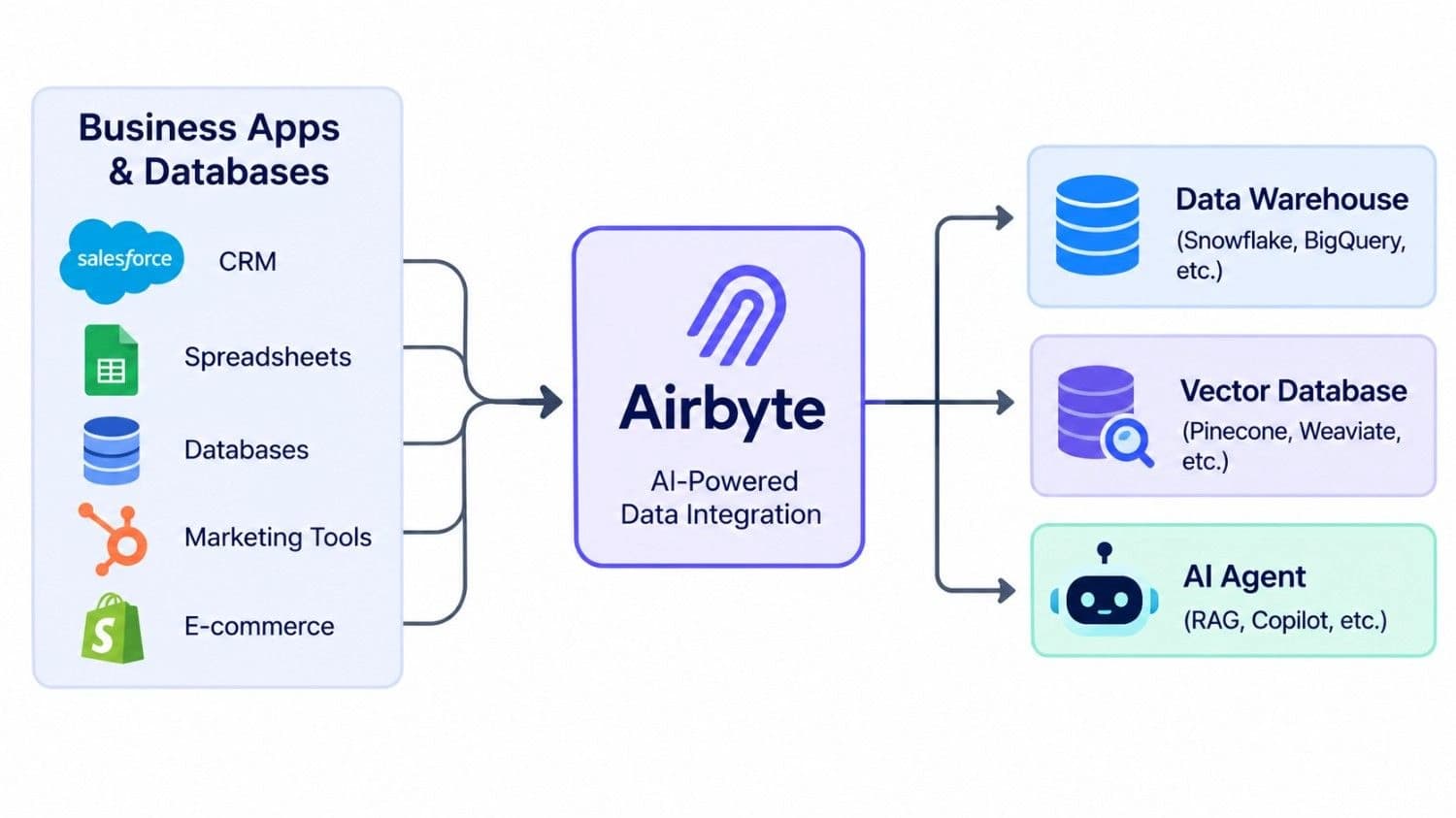
Most AI projects stall long before the model matters. The real delay is getting clean, current data out of a dozen business tools and into a place where a model, a dashboard, or an agent can actually use it.
That is the job Airbyte was built for, and over the past few years it has added features aimed squarely at AI and machine learning work. Some are genuinely useful. A few are described more generously by roundup sites than the official documentation supports. This guide separates the two so you can decide whether Airbyte belongs in your stack.
If you are still mapping out the basics, our guide on how to get started with AI data integration covers the groundwork first.
Everything below was checked against Airbyte's own documentation, launch announcements, and independent reviews in November 2026. Pricing and feature availability change often, so verify anything you plan to budget around.
The Short Answer: What Airbyte Does for AI and ML
Airbyte is a data movement platform with a growing set of AI-focused tools on top. Here is the quick version:
• Vector database destinations: sync text from business tools into Pinecone, Weaviate, Milvus, Qdrant, or Chroma, with chunking and embedding handled inside the pipeline.
• AI Assistant in Connector Builder (beta): drafts a custom API connector from a documentation link. You still review and test it.
• PyAirbyte: a Python library that runs Airbyte connectors inside notebooks and ML scripts.
• Airbyte Agents (launched May 2026): a Context Store, MCP server, and SDK that give AI agents access to indexed business data.
• What it is not: a model training platform, or a data quality engine driven by machine learning.
What Airbyte Is, and What It Is Not
Airbyte is an open-source platform that extracts data from apps, APIs, and databases and loads it into warehouses, lakes, and other destinations. That is the ELT pattern (extract, load, transform), where raw data lands first and gets transformed afterward. For most teams building ETL data pipelines for analytics and AI, that order is more flexible, because you can reshape the same raw data for several uses later.
"AI and ML features" can mean two different things, and the difference matters. One group helps AI systems get data (vector destinations, agent tooling). The other uses AI to make integration work easier (the connector assistant). Airbyte offers both.
What the official documentation does not describe is a built-in machine learning engine that cleans or monitors your data on its own. One popular roundup credits Airbyte with ML-based monitoring and anomaly detection, but the docs I reviewed describe a data movement platform and give no detail on such an engine. Ask for specifics in any demo before you count on it.
Airbyte AI and ML Features That Matter
Vector Database Destinations for RAG and Semantic Search
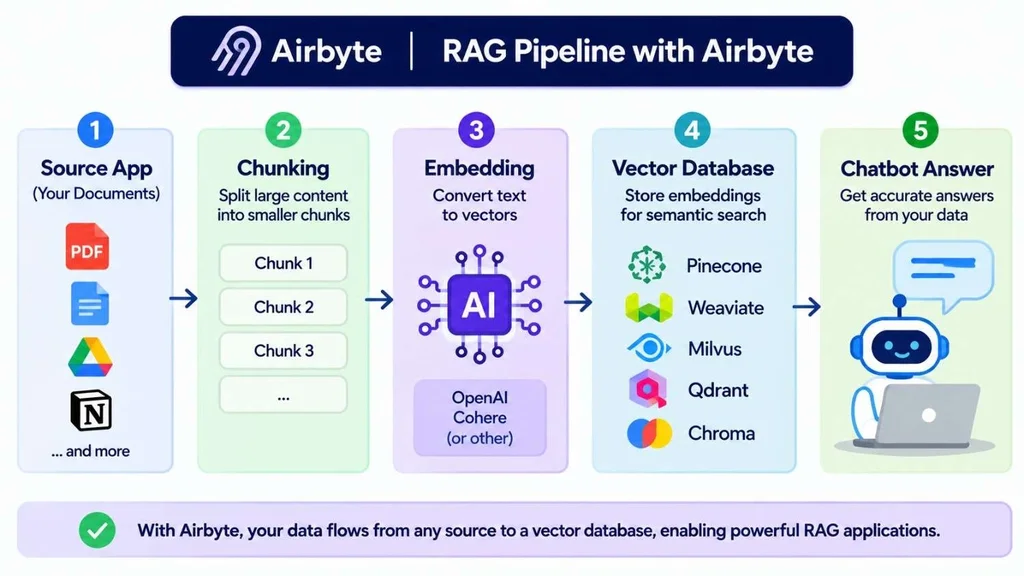
Retrieval-augmented generation (RAG) lets a language model answer questions from your own documents. To make that work, text must be split into chunks, converted into embeddings (numeric vectors), and stored in a vector database. Airbyte's vector destinations run those steps during the sync, so you do not have to build and schedule separate chunking and embedding scripts.
Supported destinations include Pinecone, Weaviate, Milvus, Qdrant, and Chroma. You pick which text fields to embed and which fields to keep as metadata, and you connect an embedding service such as OpenAI or Cohere. With incremental deduplicated syncs, an edited record replaces its older version instead of leaving stale chunks in your search results.
One caution. The original all-in-one "Vector Database (powered by LangChain)" destination is archived and has been split into separate destinations for each database. If an older tutorial sends you there, use the dedicated connector instead.
AI Assistant in the Connector Builder
Every team eventually needs a source that has no ready-made connector. Connector Builder lets you create one, and the AI Assistant speeds up the first draft. You paste a link to the API documentation or an OpenAPI spec, and it proposes the base URL, authentication method, pagination style, and available streams.
It is still in beta, and Airbyte says human review is required. It works best with REST APIs that return JSON, though GraphQL is possible. In practice, treat the output as a draft: test every stream, then check pagination and incremental sync before you trust it. Connector Builder also supports sources only, not destinations, and databases or message queues need a pre-built connector or the Python CDK. In Airbyte's version 1.6 docs, the assistant was listed on the paid cloud plans and not on the open-source Core edition, so confirm availability for your version.
PyAirbyte for Machine Learning Workflows
PyAirbyte is an open-source Python library you install with pip. It runs Airbyte connectors directly in Python and reads records into a local cache, which suits data scientists who want source data in a notebook without standing up a server. Airbyte's own example converts records into documents and splits them into chunks for LangChain, which makes it handy for quick RAG prototypes.
The limit is clear in the project's own documentation: PyAirbyte has no orchestration, scheduling, logging, or alerting. Use it for prototypes and feature exploration. When a pipeline becomes business-critical, pair it with a scheduler or move it onto the full platform.
Airbyte Agents, the Context Store, and MCP
Airbyte Agents launched in May 2026 and targets AI agents rather than analytics. The core idea is the Context Store, which pre-indexes business data so an agent queries a replicated, search-optimized index instead of calling many vendor APIs live. You can reach it through an MCP server (it works with Claude, ChatGPT, Cursor, and other MCP clients), a Python Agent SDK, or a CLI.
Airbyte reports early benchmarks of up to 80% fewer tokens and 40% fewer tool calls compared with querying vendor MCPs and APIs directly. Those are company numbers, not independent tests. The launch included about 50 connectors, with the wider catalog planned over time. Connectors use OAuth and row-level permissions so an agent sees only what the invoking user may see, and some can write back to systems like Salesforce and HubSpot, which makes approval steps worth planning. If you are weighing agents for customer-facing work, our piece on how AI agents can provide 24/7 support for your business shows where they pay off.
Security and Governance for AI Data
Airbyte's site lists ISO 27001, SOC 2, GDPR compliance, and a HIPAA conduit exception. According to Airbyte's pricing page, the Pro plan adds role-based access control, row filtering, and hashing and encryption features. If you handle protected health information, confirm the details with your compliance team rather than relying on a badge.
One AI-specific point deserves attention: whatever you sync into a vector database becomes searchable by the model. Filter out sensitive fields before they reach the index, not after.
A Practical Example: From Support Tickets to an AI Help Assistant
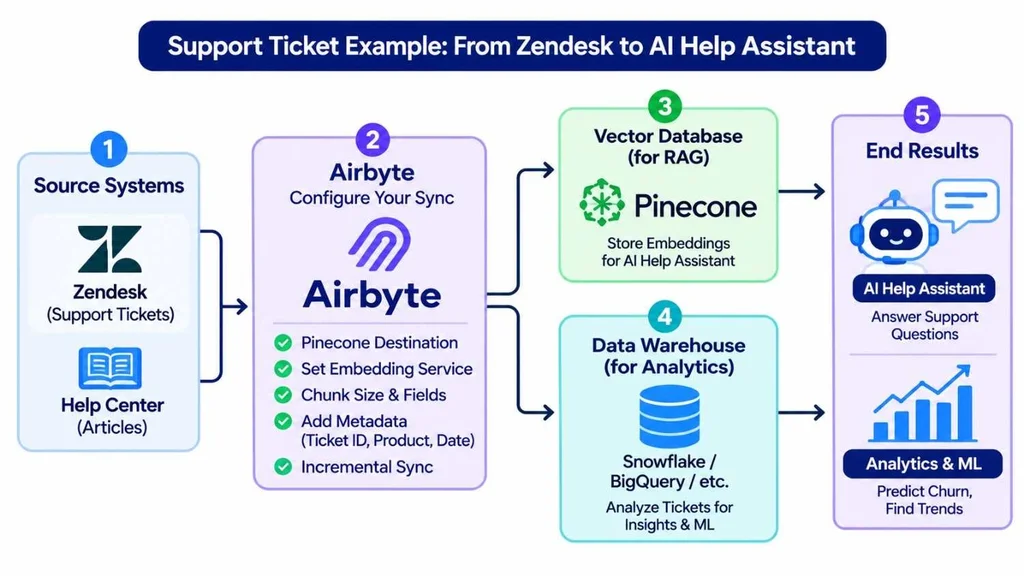
Here is an illustrative scenario, not a client case. A U.S. software company wants an internal assistant that answers support questions using past tickets and help articles.
1. Connect Zendesk and the help center as sources in Airbyte.
2. Choose Pinecone as the destination, then set the embedding service, chunk size, text fields, and metadata such as ticket ID, product, and date.
3. Use an incremental deduplicated sync so edited tickets replace older versions.
4. Point your retrieval layer, such as LangChain, at the index.
5. Send the same ticket data, plus fields like resolution time and tags, to a warehouse in a second connection for AI data analytics and ML work such as churn modeling.
That dual use is the strongest argument for a general-purpose tool. One set of source connections feeds both semantic search and your analytics stack, so you maintain one integration layer instead of two.
Where Airbyte Falls Short
No tool fits every job. These are the limits worth knowing before you commit:
• Batch, not streaming: syncs run on a schedule. Competitors such as Estuary highlight this, and they sell a rival product, so weigh it accordingly. For fraud detection or sub-second use cases, add a streaming platform like Kafka.
• Connector quality varies: Airbyte markets 700+ connectors, its GitHub organization says 600+, and an independent check by Orchestra in October 2026 counted 653 in the catalog. Marketplace connectors are not maintained by Airbyte and carry no SLA, so the count matters less than whether your specific sources are Airbyte-maintained.
• Setup and support complaints: G2 showed 4.4 out of 5 across 76 reviews when I checked, with recurring notes about setup complexity and support.
• Sync frequency depends on the plan: a third-party comparison from October 2026 lists hourly syncs on Standard, 15 minutes on Plus, and 5 minutes on Pro. Self-managed installs can sync more often.
• Pricing keeps moving: Airbyte changed its cloud pricing during 2026, and guides from different sites quote different numbers. Use the official pricing page, not a blog post, for budgeting.
Airbyte or Something Else? A Quick Decision Guide
Airbyte is a strong fit when:
• You need many long-tail SaaS and database sources in one place.
• You want open-source flexibility and an exit from vendor lock-in.
• Your AI work needs both analytics data and a vector index from the same sources.
• You have engineers who can review connectors and run pipelines.
Look elsewhere, or add a second tool, when:
• You need continuous, event-level streaming for real-time decisions.
• You want a built-in ML engine for data quality and anomaly detection.
• Your team has no engineering capacity and needs a fully hands-off service.
• Heavy transformation logic is the main problem, since transformation usually belongs in a warehouse tool like dbt after loading.
How to Get Started Without Wasting a Month
1. List your AI use cases and exact sources. Check each source against the connector catalog and note its support level.
2. Pick a starting edition. Core is the free, self-managed edition. Cloud Standard and Plus are volume-based, Pro and Enterprise Flex are capacity-based through Data Workers, and Airbyte Agents is priced separately with a free tier.
3. Choose one destination type first. Use a warehouse for analytics and ML, or a vector database for RAG. Do not build both on day one.
4. Test quality and permissions before scaling. Sample the records, look for personal data, and confirm what each user or agent is allowed to see.
5. Add scheduling, monitoring, and cost guardrails. Pipelines that nobody watches tend to fail quietly.
If you choose to self-host, remember that someone owns upgrades, uptime, and security. Our explainer on what DevOps is shows what that ownership involves.
Conclusion
Airbyte's AI and ML features are real, but they are narrower than the marketing around them suggests. Its strength is getting data from many sources into the right place for AI: a warehouse for analytics and models, a vector database for RAG, or a Context Store for agents. Its AI Assistant saves time on custom connectors, and PyAirbyte helps with quick experiments.
It is not a machine learning engine, it is batch-oriented, and its pricing and connector claims deserve a careful read. Start small, test one pipeline end to end, and verify every claim that affects your budget or compliance.
If you would rather have experienced engineers design the pipeline with you, our AI integration services team can help you plan and build it.
Frequently Asked Questions
Does Airbyte have built-in machine learning features?
Not as a core machine learning engine, based on the documentation I reviewed. Airbyte's AI-related features are vector database destinations, the AI Assistant for building connectors, PyAirbyte for Python workflows, and Airbyte Agents. Some roundups mention ML-based monitoring, so ask for proof before relying on it.
Can Airbyte load data into a vector database for RAG?
Yes. Airbyte offers destinations for Pinecone, Weaviate, Milvus, Qdrant, and Chroma. They handle chunking, embedding, and indexing during the sync. The older combined LangChain destination is archived, so use the dedicated connector for your database.
How reliable is the Airbyte AI Assistant for building connectors?
It is useful for a first draft but still in beta. It reads API documentation or an OpenAPI spec and configures authentication, pagination, and streams, and it works best with REST APIs that return JSON. Always test each stream and review the setup yourself.
What is the difference between Airbyte data replication and Airbyte Agents?
Data replication moves data into warehouses, lakes, and vector stores for analytics and AI. Airbyte Agents, launched in May 2026, gives AI agents access to an indexed Context Store through an MCP server, SDK, or CLI. They are priced separately, and Agents has a free tier.
Is Airbyte free to use?
The open-source Core edition is free to download, but you pay for the infrastructure and engineering time to run it. Airbyte Cloud has paid plans, and its pricing changed in 2026, so check the official pricing page before you budget.