The Complete Guide to Ecommerce Tools: How to Build a Stack That Actually Grows Your Store
If you run an online store, you have probably noticed how fast the list of ecommerce tools keeps growing. Every week a new app promises higher conversions, smarter ads, or an AI assistant that does the work for you. Many store owners end up with a pile of subscriptions, half-configured dashboards, and a nagging feeling that something important is being missed.
This guide is meant to fix that. We walk through the main categories of ecommerce tools, explain what each one is really for, and show you how to choose based on your stage, budget, and team size instead of hype. You will also find practical examples, a comparison table of sample stacks, and a simple 30-day rollout plan.
A quick note on how this guide was put together. We do not rank tools by who pays the most, and we do not claim that one product is best for everyone. Features and pricing change often, so please confirm the details on each vendor's website before you buy.
What Are Ecommerce Tools, and Why Does the Right Stack Matter?
Ecommerce tools are software products that help you run, measure, and grow an online store. They range from the storefront platform itself to the small apps around it, such as analytics, search, email, reviews, shipping, and customer support.
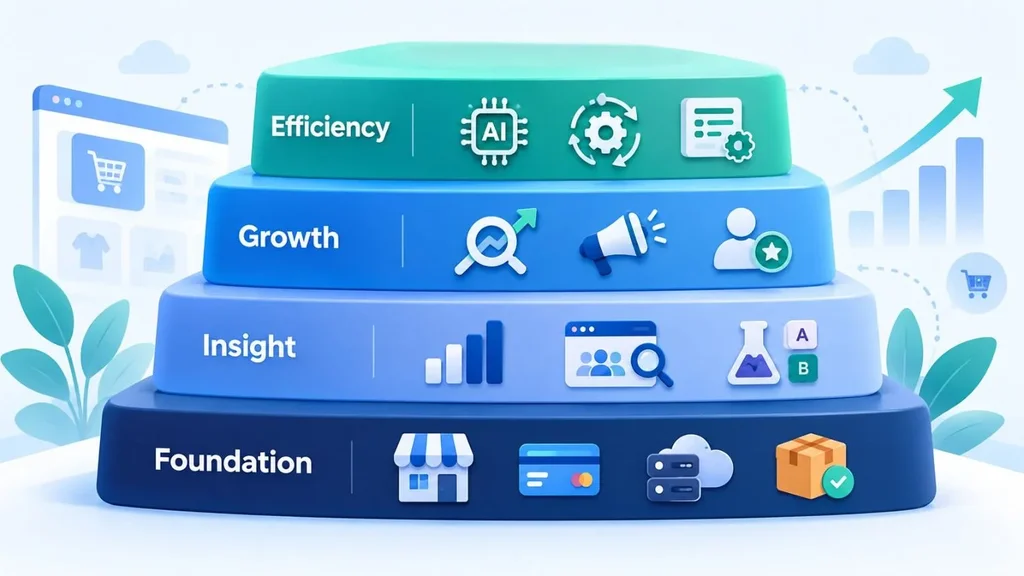
It helps to think about them in four layers:
- Foundation: your platform, payments, hosting, and order or inventory management.
- Insight: analytics, UX research, and testing tools that show what is happening and why.
- Growth: SEO, marketing, and personalization tools that bring in and keep customers.
- Efficiency: AI, automation, and back-office systems that save your team time.
Why does this matter? Because a tool only creates value when it answers a real question. "Why did revenue drop last week?" is a question for analytics. "Why do shoppers abandon the cart on mobile?" is a question for UX research. Buying software before you know the question is exactly how stacks get bloated and expensive.
If you are still choosing a storefront, our guide on which ecommerce platform will be right for your business covers that decision in depth. This article focuses on everything you add around the platform.
How to Choose Ecommerce Tools Before You Spend a Dollar
Most bad software decisions happen before the trial even starts. Use the four checks below as a filter.
Start With a Problem, Not a Feature List
Write one sentence that describes the problem. For example: "Our checkout completion rate is lower on phones than on desktop, and we do not know why." A sentence like that points you toward session recordings and usability testing. A vague goal such as "we want to grow" points you nowhere.
Check Integrations First
A tool that cannot share data with your platform, email system, or analytics setup will create manual work. Look for native integrations, a stable API, or support for common connectors. Also check how the tool affects page speed, because every extra script on your storefront adds weight.
Count the Full Cost
The subscription price is only part of the bill. Add setup time, developer help, transaction or usage fees, training, and the cost of switching later. A cheaper tool that takes three weeks to configure can easily cost more than a pricier one that works on day one.
Be Honest About Team Capacity
A powerful tool that nobody opens is wasted money. Before you buy, name the person who will own it and decide how often they will review it. If nobody has time, choose a simpler option.
Ecommerce Analytics Tools: Know What Is Really Happening
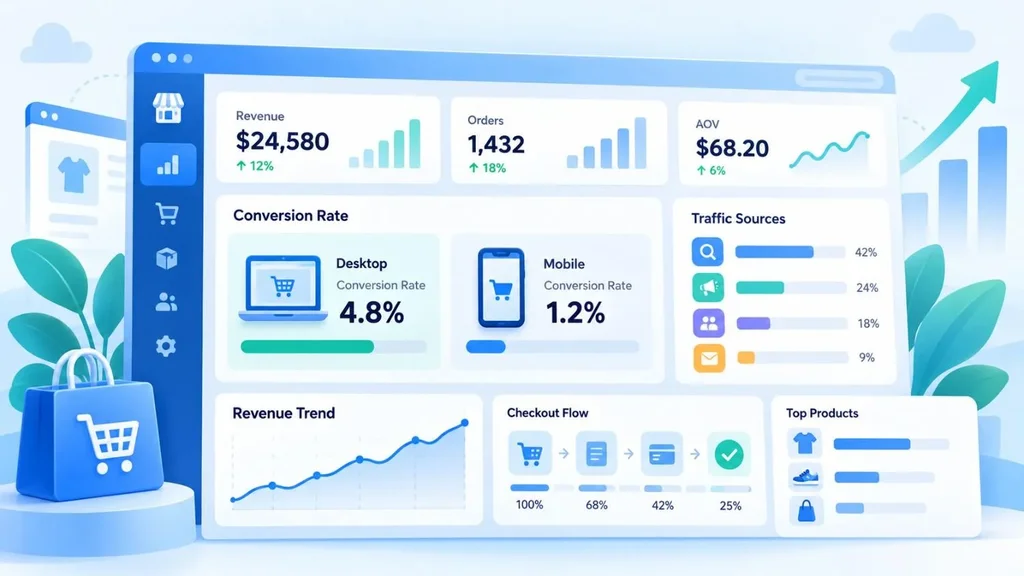
Ecommerce analytics tools tell you what is happening in your store: where visitors come from, which products sell, how people move through the funnel, and what each channel costs. They are the first category most stores should get right, because every other decision depends on trustworthy numbers.
Common Options
- Google Analytics 4 (GA4): a free, event-based tool with ecommerce reporting. It is the default starting point for most stores.
- Platform-native reports: Shopify, WooCommerce, and BigCommerce all include sales, product, and customer reports. They are often more accurate for revenue than any third-party tool.
- Looker Studio: a free dashboard tool that combines data from GA4, ad platforms, and spreadsheets in one view.
- Attribution tools such as Triple Whale or Northbeam: useful for brands that spend heavily on paid media and need a clearer view of what drives sales.
Metrics Worth Tracking
You do not need fifty charts. Start with conversion rate, average order value, cart abandonment rate, customer acquisition cost, repeat purchase rate, and revenue by channel. Review them weekly, and always split them by device and traffic source. An overall average often hides the real problem.
A Practical Example
Here is a scenario we see often. A store notices that traffic is up 30 percent after a campaign, yet revenue is flat. The owner opens GA4 and splits conversion rate by device. Desktop converts normally, but mobile is far lower. That finding sends the team to the mobile checkout, where they discover a shipping form that is hard to complete on a small screen. Without the device split, the team might have blamed the ad creative and wasted another month.
One warning: before you trust any dashboard, test your tracking. Run a test purchase and confirm that the purchase event, revenue value, and product details arrive correctly. GA4's DebugView is built for exactly this check.
UX Research Tools for Ecommerce: Find Out Why Shoppers Leave
Analytics shows you where people drop off. UX research tools for ecommerce help you understand why. Used together, they turn guesses into evidence.
Session Recordings and Heatmaps
Tools such as Microsoft Clarity, Hotjar, Lucky Orange, FullStory, and Contentsquare record how real visitors scroll, click, and hesitate. Clarity is free, which makes it a sensible first step. Look for rage clicks, repeated back-and-forth between pages, and form fields where people give up.
Surveys and Customer Feedback
On-site surveys can ask a simple question such as "What almost stopped you from buying today?" Post-purchase surveys, offered by tools like Fairing or KnoCommerce, ask customers how they found you. The answers often reveal channels that analytics misses, such as podcasts or word of mouth.
Usability Testing
Platforms like UserTesting, Maze, and Lyssna let you watch real people try to complete tasks on your site, such as finding a product and checking out. Small rounds of testing with around five participants often surface the most obvious problems, so you do not need a large budget to learn something useful.
A/B Testing
Once you have a hypothesis, tools like Optimizely, VWO, and Convert let you test it. Keep in mind that Google Optimize was shut down in 2023, so older tutorials that mention it are out of date. Also, run tests long enough to reach a meaningful sample. Stopping early because a variant "looks like it is winning" is one of the most common testing mistakes.
A Simple Research Routine
- Watch 20 to 30 recordings of sessions that reached checkout but did not buy.
- Write down the patterns you see, such as confusing shipping costs or a broken coupon field.
- Run a short usability test to confirm the biggest issue.
- Fix it, then compare conversion rate before and after.
A note on privacy: mask sensitive fields such as payment and address inputs in any recording tool, and make sure your cookie banner and privacy policy reflect what you collect. For stores that sell to US shoppers, this includes state laws such as the California Consumer Privacy Act.
Ecommerce SEO Tools: Earn Traffic You Do Not Pay For
Paid ads stop the moment you stop paying. Ecommerce SEO tools help your category and product pages appear for the searches your customers already make, and that traffic keeps working month after month.
The Essentials
- Google Search Console: free and non-negotiable. It shows which queries bring impressions and clicks, which pages are indexed, and whether there are product or merchant listing issues.
- Semrush, Ahrefs, or Moz: keyword research, competitor analysis, and backlink data. You rarely need more than one.
- Screaming Frog or Sitebulb: crawlers that find broken links, duplicate titles, redirect chains, and missing canonical tags.
- Platform SEO plugins and apps: options such as Yoast for WooCommerce help with titles, meta descriptions, and structured data.
Where Ecommerce SEO Usually Goes Wrong
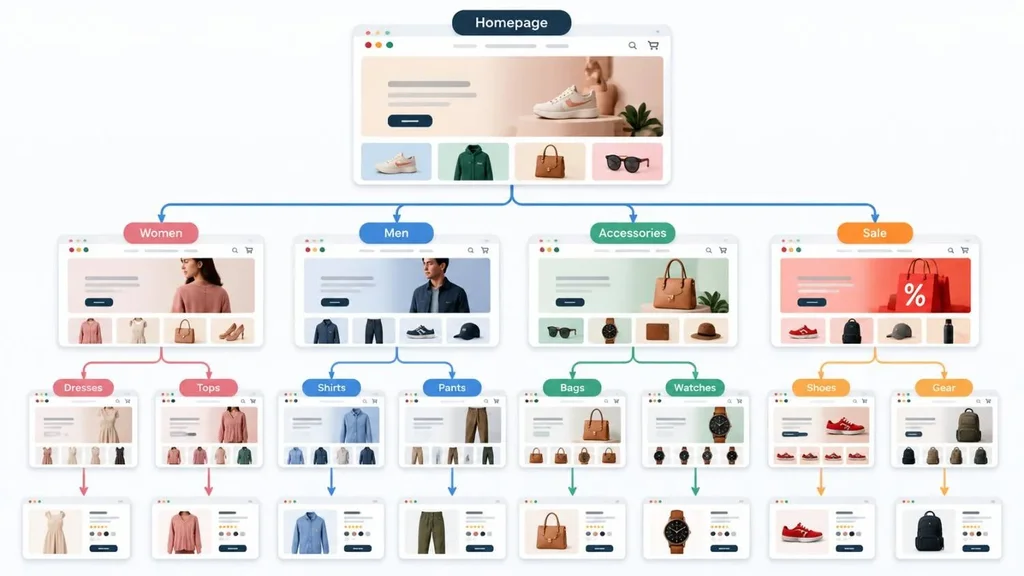
Most stores spend too much time on individual product pages and too little on category pages. Category pages often match broader, higher-volume searches such as "women's running shoes," so they deserve unique copy, clear filters, and internal links.
Faceted navigation is another trouble spot. Filters for size, color, and price can generate thousands of near-duplicate URLs. Google has published guidance on this in its ecommerce documentation, including advice on URL structure and structured data. Add Product and merchant listing markup, then check it with Google's Rich Results Test.
Finally, remember that Google's systems aim to reward helpful, people-first content rather than pages made mainly to rank. Thin, copy-pasted manufacturer descriptions rarely help anyone. Add real details, such as sizing advice, care instructions, and honest comparisons.
Ecommerce Personalization Tools: Show Each Shopper Something Relevant
Ecommerce personalization tools change what a shopper sees based on behavior, context, or customer data. Done well, they make a store feel like it understands the visitor. Done badly, they feel random or even intrusive.
Main Types of Personalization
- Product recommendations: "frequently bought together," "recently viewed," and "you may also like" blocks. Tools in this space include Nosto, Rebuy, and Dynamic Yield.
- Personalized search and merchandising: tools like Algolia, Searchspring, and Constructor adjust search results and category sorting based on shopper behavior.
- Lifecycle messaging: email and SMS flows triggered by actions, which platforms such as Klaviyo are built around.
- On-site messaging: different banners or offers for first-time visitors, returning customers, or members of a loyalty program.
Start Simple
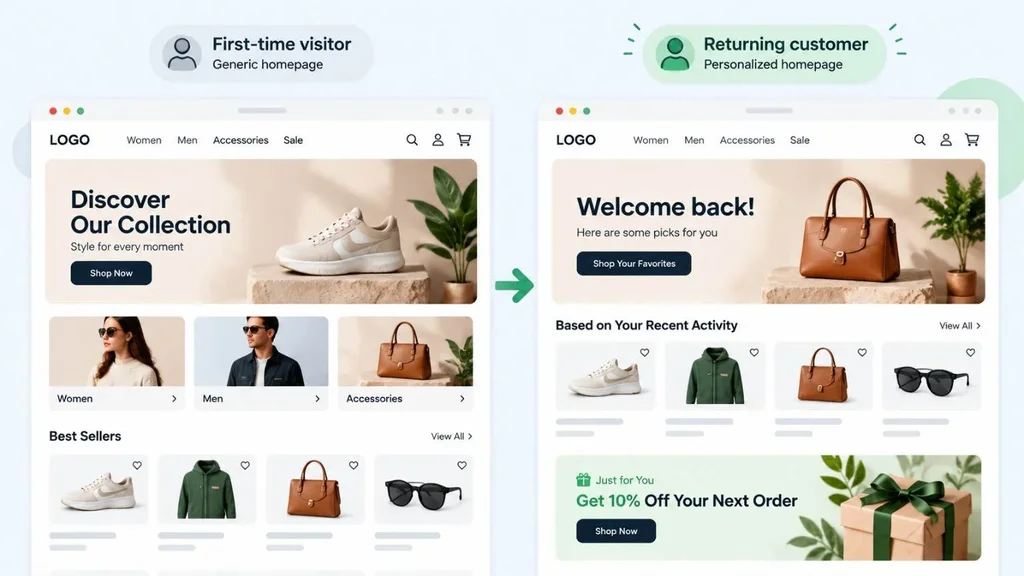
You do not need machine learning on day one. Begin with rule-based personalization, such as showing a welcome offer to new visitors and a "reorder" prompt to returning customers. Advanced recommendation engines need a good amount of clean behavioral data to work well, so a store with very low traffic may see little benefit from them yet.
Also respect your customers. Use first-party data, be clear about consent, and avoid recommendations that feel too personal. If off-the-shelf apps do not fit your catalog or business model, a custom approach through AI integration services can be a better long-term investment.
Ecommerce Marketing Tools: Bring Shoppers In and Bring Them Back
Ecommerce marketing tools cover the channels that drive traffic and repeat sales. Because ad costs can rise quickly, smart stores invest in owned channels, especially email and SMS, alongside paid media.
Key Categories
- Email and SMS: Klaviyo, Mailchimp, Omnisend, Attentive, and Postscript are popular choices. Build four flows first: welcome, abandoned cart, post-purchase, and win-back.
- Paid ads and product feeds: Google Ads, Meta Ads, and Google Merchant Center, often supported by feed management tools for larger catalogs.
- Reviews and user-generated content: Yotpo, Judge.me, Okendo, and Stamped collect reviews and photos that build trust.
- Loyalty and referrals: Smile.io and LoyaltyLion help turn one-time buyers into repeat customers.
- Social and influencer tools: Later, Buffer, and Aspire help plan content and manage creator partnerships.
Do Not Forget the Rules
If you sell in the United States, email must follow CAN-SPAM requirements, and text marketing needs proper consent under rules such as the TCPA. Most reputable tools include compliance features, but responsibility still sits with you. When in doubt, ask a qualified attorney.
Marketing tools also work better when they connect to your customer records. A good CRM helps you follow up with leads before they go cold, which we explain in our posts on cloud-based CRM software for small businesses and how you are losing leads without realizing it.
AI Tools for Ecommerce: Where They Help and Where to Be Careful
AI tools for ecommerce are the fastest-moving category right now. Some deliver real time savings today. Others still need close supervision.
Where AI Helps Most
- Drafting product copy: AI can produce first drafts from supplier spec sheets, which an editor then checks and improves.
- Customer support: AI assistants can answer order status and policy questions and hand off complex cases to a person. Gorgias and similar help desks now include AI features, and our article on AI agents for 24/7 business support explains how this works in practice.
- Image work: background removal, resizing, and variant creation save hours for small teams.
- Review summaries and insights: AI can scan hundreds of reviews and highlight recurring complaints or praise.
- Forecasting and search: demand forecasting and smarter site search are growing areas for larger catalogs.
Where to Be Careful
AI can state wrong facts with great confidence. A made-up fabric type, wrong dimensions, or an incorrect return policy can lead to refunds, complaints, and lost trust. Treat AI output as a draft, never as a final answer.
Here is a safer workflow. Feed the tool your verified spec sheet, generate descriptions, and have a team member check materials, sizes, and claims against the source. Then add something AI cannot supply, such as a real customer question you hear often. Google has also made clear that using automation mainly to manipulate rankings goes against its spam policies, so quality and human review matter.
Before you switch on any AI feature, record a baseline. For support, track first response time, resolution rate, and customer satisfaction. After a month, compare the numbers and decide whether the tool earned its place.
The Tools Behind the Storefront: Inventory, ERP, and CRM
Customers only see your storefront, but growth often breaks the back office first. Spreadsheets that worked at 20 orders a week start to fail at 200. Typical warning signs include overselling out-of-stock items, mismatched inventory across channels, slow month-end accounting, and no clear view of margins by product.
This is where an ERP (enterprise resource planning) system comes in. It connects inventory, purchasing, sales, and accounting so everyone works from the same numbers. If you want to see how that fits into online retail, take a look at ERPfy and Canduit's ERP solutions, or read our guide to choosing and implementing a cloud ERP. For a wider view of how software supports stores, see our page on software solutions for retail and ecommerce.
If you are just launching with a lean model, the picture is different. Our article on whether dropshipping is still profitable shows how to start small without overspending on tools you do not yet need.
Sample Ecommerce Tool Stacks by Business Stage
There is no single perfect stack, but the table below gives a realistic starting point. Treat it as a guide, then adjust it to your catalog, team, and budget. Tool names are examples, not endorsements.
| Stage | Analytics and UX research | SEO | Marketing, personalization, and AI |
| Early stage | GA4 plus Microsoft Clarity | Google Search Console plus a free keyword tool | Basic email flows, a review app, and AI for copy drafts and image cleanup |
| Growing | GA4, Looker Studio, and Hotjar or similar | Semrush or Ahrefs plus Screaming Frog | Klaviyo, SMS, a recommendations app, and an AI support assistant with human handoff |
| Established | Contentsquare or FullStory, an attribution tool, and an A/B testing platform | Regular technical audits and structured data monitoring | Advanced personalization, loyalty tools, and custom AI such as forecasting or search |
A Simple 30-Day Plan to Put Your Ecommerce Tools to Work
- Week 1, audit and baseline: list every tool you pay for, who owns it, and what question it answers. Cancel anything unused. Record your current conversion rate, average order value, and cart abandonment rate.
- Week 2, fix tracking and run one UX check: test your purchase tracking, install a free recording tool, and review a batch of checkout sessions.
- Week 3, launch one growth improvement: pick either the abandoned cart flow or a round of category page SEO fixes, not both.
- Week 4, review and decide: compare results to your baseline, keep what helped, and write down the next priority.
- This slow, measured approach beats installing ten apps in a weekend. It also gives you a clear record of what actually moved the numbers.
Common Mistakes When Choosing Ecommerce Tools
- Installing too many apps: each one can slow your site and hurt Core Web Vitals. Audit scripts regularly.
- Skipping the integration test: a tool that does not sync correctly creates more work than it saves.
- Trusting AI without review: accuracy errors damage trust quickly.
- Ignoring privacy and consent: collecting data without clear disclosure invites legal and reputational risk.
- No owner for each tool: if nobody is responsible, nobody uses it.
- Chasing features instead of outcomes: the best tool is the one that improves a number you care about.
Conclusion
The best ecommerce tools are not the ones with the longest feature lists. They are the ones that answer a real question for your store and that your team will actually use. Start with analytics so you trust your numbers, add UX research to understand shopper behavior, and invest in SEO and marketing to grow steadily. Bring in personalization and AI once you have clean data and a clear process, and keep humans in charge of quality.
If you want help turning this into a working setup, from a custom storefront to integrations and automation, explore Canduit's ecommerce development services or get in touch with our team. We are happy to talk through your stack and suggest a practical next step.
Frequently Asked Questions About Ecommerce Tools
What are the most important ecommerce tools for a new online store?
Start with five basics: a reliable ecommerce platform, a payment processor, an analytics tool such as Google Analytics 4, Google Search Console for SEO, and an email marketing tool. Add a free session recording tool like Microsoft Clarity to see how shoppers behave. You can layer on personalization and AI later.
How many ecommerce tools does a store really need?
There is no magic number. A small store can run well on five to eight tools, while larger operations use more. What matters is that each tool has a clear purpose, an owner, and a measurable result. If you cannot explain what a tool improves, it is a good candidate to cancel.
Are free ecommerce analytics tools good enough?
For many early-stage stores, yes. GA4, Google Search Console, Looker Studio, and your platform's built-in reports cover the basics at no cost. Paid tools make sense when you need deeper attribution, advanced segmentation, or more detailed behavior analysis across many channels.
Do AI tools for ecommerce hurt SEO?
Not by themselves. Google has said its systems focus on whether content is helpful and reliable, and that using automation mainly to manipulate search rankings violates its spam policies. If you use AI to draft content, review it for accuracy, add real expertise and original detail, and publish it for your customers rather than for search engines.
When should I invest in ecommerce personalization tools?
Invest once your analytics are accurate, your catalog and traffic are large enough to produce useful behavior data, and you have already covered the basics such as email flows and a clean checkout. Until then, simple rule-based personalization, like welcome offers and recently viewed products, usually gives the best return.