How to Choose ERP Software for an HVAC Business: A Practical 7-Step Guide
Learn how to choose ERP software for your HVAC business, from deciding if you need one to scoring vendors and avoiding costly mistakes.

Picking business software is rarely exciting. In an HVAC company, though, it decides how fast invoices go out, how often a truck shows up without the right part, and whether your dispatcher gets home on time. Choose badly and you pay twice: once for the software, and again in workarounds.
This guide explains how to choose ERP software for an HVAC business without losing months to demos that go nowhere. You will learn when you really need an ERP system, which features matter in the field, how to compare costs honestly, and a seven-step process you can start this quarter.
Do You Need ERP Software or HVAC Service Management Software?
Start here, because this one question can save more money than any other. The word ERP gets used loosely in the HVAC world. Many products sold as "HVAC ERP" are really HVAC service management software: tools built around scheduling, dispatching, invoicing, and customer history.
A true ERP system goes wider. It connects accounting, purchasing, inventory, payroll, and project management in one place. Neither type is better. They solve different problems.

| Factor | HVAC service management software | ERP system |
| Main purpose | Run field work: scheduling, dispatch, mobile job tickets, invoicing | Run the whole business: finance, inventory, purchasing, HR, projects |
| Strongest at | Technician workflow and customer history | Financial control, inventory, and multi-branch reporting |
| Common weak spot | Limited depth in accounting, purchasing, and HR | Clumsy field app and heavier setup |
| Typical setup effort | Days to a few weeks | Often several months |
| Best fit | Service-focused teams, small to mid-size | Companies with installs, warehouses, or several entities |
Plenty of HVAC companies need strong field tools plus a clean accounting connection, and nothing more. Others, especially those running installation projects, a parts counter, or several branches, outgrow service software quickly.
Which one fits your stage?
Think in terms of complexity, not only headcount. Here is a rough guide:
• Small, service-focused team: HVAC software for scheduling and billing, connected to QuickBooks or a similar tool, is usually enough.
• Growing company with installs and service: Look at HVAC business management software with solid job costing and purchasing, or a lightweight ERP.
• Multi-branch, multi-entity, or a distribution arm: A full ERP system makes sense, often paired with a dedicated field app.
A 15-technician company that bills commercial installs by progress percentage and stocks parts in two warehouses may need more than a 40-technician residential shop that mostly sells replacements. Headcount alone can mislead you.
Signs you have outgrown your current setup
• Invoices go out days after the job is finished.
• You cannot see job profit until the books close.
• Office staff retype the same job data into two or three systems.
• Truck stock never matches the system, so techs make extra supply-house runs.
• Maintenance agreement renewals depend on someone’s memory or a spreadsheet.
If three or more of these sound familiar, better software will likely pay for itself. If only one or two do, try fixing the process or upgrading your current tool before you shop for an ERP.
What HVAC Businesses Need From ERP Software

Generic feature lists will not help you here. HVAC work has its own rhythm: seasonal spikes, recurring agreements, equipment that stays on a customer’s property for 15 years, and techs who work far from the office. These are the capabilities worth testing.
Scheduling, dispatch, and a usable mobile app
Technicians work in attics, basements, and on rooftops, not at desks. The app should work with a weak signal, capture photos and signatures, and show equipment history before the tech knocks on the door. Many traditional ERPs were designed for office users, so test the mobile experience yourself.
Service agreements and recurring billing
Maintenance plans are some of the steadiest revenue an HVAC company has. The system should schedule visits automatically, bill on a cycle, flag upcoming renewals, and show whether each agreement is actually profitable.
Equipment, warranty, and refrigerant records
Look for records tied to each unit and location: model, serial number, install date, warranty terms, and past repairs. For refrigerant work, ask how the software helps you keep the service records that EPA rules can require. Regulations change, so confirm current requirements with the EPA or a compliance advisor.
Job costing and pricebooks
Residential shops often use flat-rate pricing, while commercial work leans on time and materials or progress billing. Either way, the software should cost each job by labor, parts, and subcontractors close to real time, not at month end.
Inventory across the warehouse and every truck
Parts on trucks are money on wheels. Good inventory control lets you set reorder points, transfer stock between trucks, and tie parts to jobs so billing stays accurate.
Accounting and financial reporting
If you keep QuickBooks, confirm the sync is two-way and handles items, taxes, and payments. If you want accounting built in, a strong ERP module gives you one version of the numbers. Our guide to accounting in ERP explains what to expect from that side of the system.
Reports you will actually use
Skip the dashboards that look impressive in a demo. Ask for the numbers an owner checks weekly: revenue per technician, first-visit fix rate, callback rate, agreement renewals, and average ticket.
How to Choose ERP Software for Your HVAC Business: 7 Steps
Here is the process we recommend. It works whether you are comparing lightweight HVAC software or a full ERP platform.
Step 1: Map your workflow from first call to final payment
Write down what happens to a job: the call, the booking, dispatch, the visit, the invoice, the payment, and the follow-up. Mark every place where someone retypes information or waits on a phone call. Better yet, sit beside your dispatcher for a day. The gaps you see will become your requirements list, and it will be far more honest than any feature checklist.
Step 2: Set a budget based on total cost of ownership
The monthly price is only the beginning. Budget for these items:
• Subscription or license fees, and whether they are per user or per technician
• Implementation and configuration
• Data migration from your old systems
• Training for office staff and technicians
• Integrations, add-on modules, and ongoing support
Here is a simple hypothetical. A company with 12 technicians is quoted $150 per technician per month. That is $21,600 a year in subscription fees. Add $6,000 for implementation, $3,000 for data migration, and $2,000 for training, and year one costs $32,600, about 50 percent more than the headline number. Your figures will differ, but the pattern is common.
For a deeper look at what drives these numbers, read our breakdown of ERP implementation cost and our explainer on why software pricing varies.
Step 3: Shortlist three or four vendors, not ten
Long lists waste time. Narrow the field by asking each vendor for customers of your size and trade. A platform that shines with residential service may struggle with commercial projects, and the reverse is also true. If a vendor cannot name similar HVAC customers, treat that as useful information.
Step 4: Run scenario-based demos
Standard demos show the software at its best. Instead, hand every vendor the same real situations and ask them to walk through each one live:
1. A customer calls at 4 p.m. with no cooling. Show how the call becomes a job, gets dispatched, and reaches the technician’s phone.
2. A tech finishes a repair, uses a part from truck stock, takes payment, and closes the job on site. Show what the books look like afterward.
3. A maintenance agreement renews and the next two visits are scheduled automatically.
4. A commercial install bills 30 percent on equipment delivery. Show progress billing and job cost against the estimate.
5. Export your customer and equipment data to show how easily you could leave.
Invite a dispatcher and one technician to these sessions. They will spot friction that owners miss.
Step 5: Score vendors with a weighted scorecard
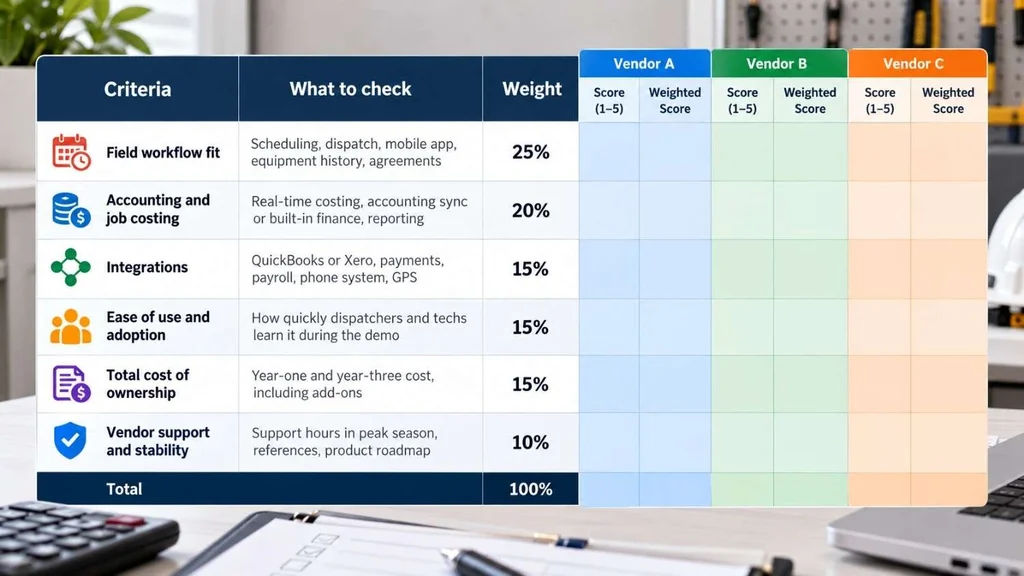
A scorecard keeps the decision from turning into a popularity contest. The weights below are a starting point. Adjust them to match what hurts most in your business.
| Criteria | What to check | Sample weight |
| Field workflow fit | Scheduling, dispatch, mobile app, equipment history, agreements | 25% |
| Accounting and job costing | Real-time costing, accounting sync or built-in finance, reporting | 20% |
| Integrations | QuickBooks or Xero, payments, payroll, phone system, GPS | 15% |
| Ease of use and adoption | How quickly dispatchers and techs learn it during the demo | 15% |
| Total cost of ownership | Year-one and year-three cost, including add-ons | 15% |
| Vendor support and stability | Support hours in peak season, references, product roadmap | 10% |
| Total | 100% |
Step 6: Check references and read the contract
Ask for two references of similar size and trade. Ask what went wrong during rollout, not only what went well. Then read the contract closely, or have an attorney review it. Pay attention to:
• Who owns your data, and how you can export it
• Contract length and automatic renewal terms
• Caps on annual price increases
• Fees for extra users, modules, or integrations
• Support hours during your busiest months
• What happens if you cancel
Step 7: Plan the rollout around your busy season
Do not go live in the middle of a July heat wave or a January cold snap. Many US shops use the spring or fall shoulder seasons. A calmer rollout usually follows a few simple rules:
• Name one internal owner, not just a vendor contact.
• Clean your customer and equipment data before you migrate it.
• Start with core functions like scheduling and invoicing, then add more.
• Run the old and new systems side by side for a short period.
• Train dispatchers and office staff first, then technicians in small groups.
Our guide to choosing and implementing a cloud ERP solution covers rollout planning in more detail.
Cloud or On-Premise, Off-the-Shelf or Custom?
For most HVAC companies, cloud-based software is the practical choice. Technicians get access from any device, updates arrive automatically, and you avoid running your own servers.
The other decision is how much to customize. Off-the-shelf HVAC software works well when your processes are fairly standard. If your business has unusual workflows, such as combining installs, a parts counter, and service contracts, a flexible platform like ERPNext or Odoo can be configured to match. Our team does this through our ERP solutions service.
One caution: every customization adds cost and maintenance. Reserve it for the processes that truly set your company apart.
ERP Software for Small Business: What HVAC Owners Should Prioritize
If you run a small shop, the biggest risk is buying more system than your team will use. A smaller tool that everyone adopts beats a powerful ERP that the office works around.
• Adoption over feature count. If techs avoid the app, the data in your system will always be wrong.
• Monthly pricing without long lock-ins. Early on, flexibility matters more than a small discount.
• A clear upgrade path. Make sure you can export your data or add modules as you grow.
• Good accounting integration. Most small HVAC companies do fine with service software plus accounting software.
If you feel stuck between options, an outside opinion can help. This article on business software consulting explains when it is worth hiring one.
Common Mistakes When Choosing an ERP System
• Buying a full ERP when HVAC service management software would do the job.
• Letting the owner choose alone, without input from dispatchers and technicians.
• Judging software by a polished demo instead of your own scenarios.
• Ignoring data cleanup, so old errors move into the new system.
• Underbudgeting training, then watching the team slip back to spreadsheets.
• Going live at peak season with no parallel run.
Conclusion
Learning how to choose ERP software for an HVAC business comes down to a few honest questions. Do you need a full ERP system, or does HVAC service management software cover your needs? Which workflows cost you the most time and money today? And can your team realistically adopt what you buy?
Map your workflow, count the total cost, test vendors with real scenarios, and plan the rollout around your busy season. Do those four things and you will avoid the most expensive mistakes.
If you want a second opinion or help configuring a system around your workflows, you can talk to the Canduit team.
Frequently Asked Questions
What is the best ERP software for an HVAC business?
There is no single best option. The right choice depends on your size, whether you do residential or commercial work, and how complex your inventory and accounting are. Small service shops often do well with HVAC software connected to accounting tools. Larger companies with installs, warehouses, or several entities may need a full ERP system.
Do small HVAC companies need ERP software?
Usually not a full ERP. Most small HVAC companies get more value from HVAC business management software that handles scheduling, dispatch, and invoicing, paired with accounting software. Consider ERP software for small business use only when your operations become complex, for example with multiple locations or heavy inventory.
How much does ERP software for an HVAC company cost?
Costs vary widely. Lightweight HVAC software is often priced per user or per technician each month, while a full ERP adds implementation, migration, and training costs that can run into the tens of thousands. Always compare year-one total cost, not just the monthly price.
What is the difference between HVAC service management software and an ERP system?
HVAC service management software focuses on field work: scheduling, dispatch, mobile tickets, and invoicing. An ERP system covers the whole business, including accounting, inventory, purchasing, HR, and project management. Some platforms blend both, so check what a product does rather than what it is called.
How long does ERP implementation take for an HVAC business?
Lightweight cloud tools can often be running in a few weeks. A full ERP rollout commonly takes several months, depending on scope, data quality, and how many modules you launch. Planning around your busy season helps avoid disruption.