What Is a DevOps Pipeline? A Plain-English Guide With a Real Example
Learn what a DevOps pipeline is, how each stage works, and which tools help your team release software faster with fewer errors.
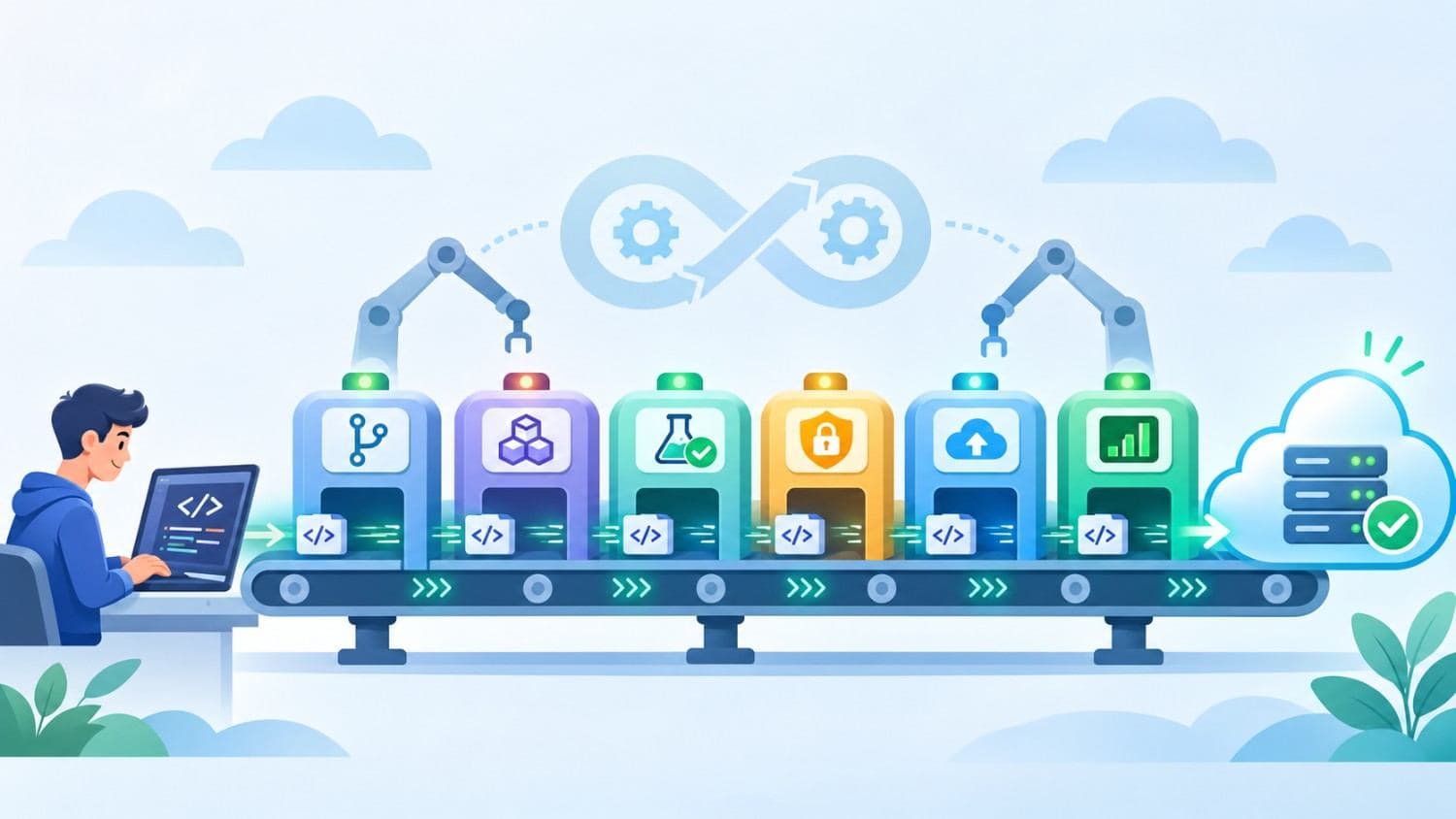
Most software teams reach the same turning point. The code runs fine on a developer's laptop, but getting it to customers safely takes manual handoffs, long checklists, and a lot of hope. A DevOps pipeline is built to remove that friction.
In plain terms, a DevOps pipeline is an automated route that carries every code change from commit to production, with testing, security checks, and monitoring built in. In this guide, you will learn how the stages work, how a pipeline differs from CI/CD, which tools teams rely on, and how to tell whether your own setup is healthy.
What Is a DevOps Pipeline?
A DevOps pipeline is a set of automated steps that moves software from a developer's code change to a live production release. It builds the code, runs tests, scans for security issues, deploys the update, and monitors how it behaves, so teams can ship faster with fewer manual mistakes.
Think of it as a shared route that every change must travel. Instead of one person copying files to a server and another person checking whether anything broke, the pipeline does the repetitive work the same way every time. Some teams call this a software deployment pipeline, and the idea is identical. Humans stay focused on decisions, such as what to build, how to review it, and when to release.
A pipeline is also more than a tool. It reflects how a team works. Developers, testers, security engineers, and operations staff agree on shared rules, such as what must pass before code is merged and who gets alerted when a release misbehaves. Tools enforce those rules, but the agreement comes first. If you are new to the wider philosophy, our guide on what is DevOps is a good starting point.
DevOps Pipeline vs CI/CD Pipeline: What Is the Difference?
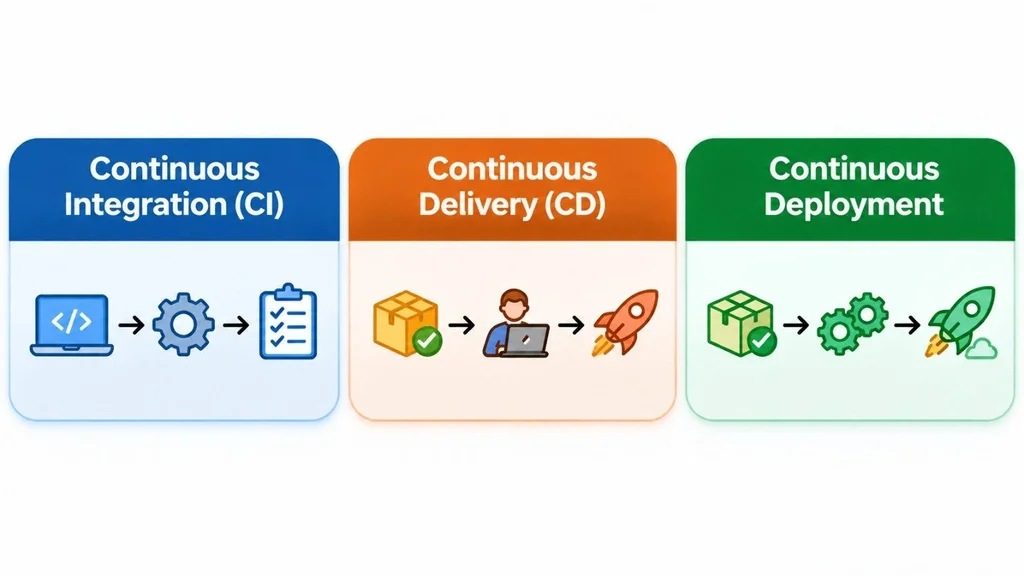
People often use these terms as if they mean the same thing. They overlap, but they are not identical. A CI/CD pipeline is the automated engine at the center. It covers building, testing, and delivering code. A DevOps pipeline is the bigger picture. It wraps that engine with planning, infrastructure management, security, monitoring, and the feedback that flows back to the team.
CI/CD stands for continuous integration and continuous delivery (or continuous deployment). Those three practices are easy to mix up, so here is how they compare:
| Practice | What it does | Human approval? |
| Continuous integration | Merges code often and runs automated builds and tests on every change | No |
| Continuous delivery | Keeps every passing build ready to release, while a person triggers production | Yes, at release |
| Continuous deployment | Pushes every passing build to production automatically | No |
Most teams begin with continuous integration, add continuous delivery once their tests are trustworthy, and move to full continuous deployment only when they have strong monitoring and quick rollback. Skipping that order is a common cause of painful releases.
The Stages of a DevOps Pipeline
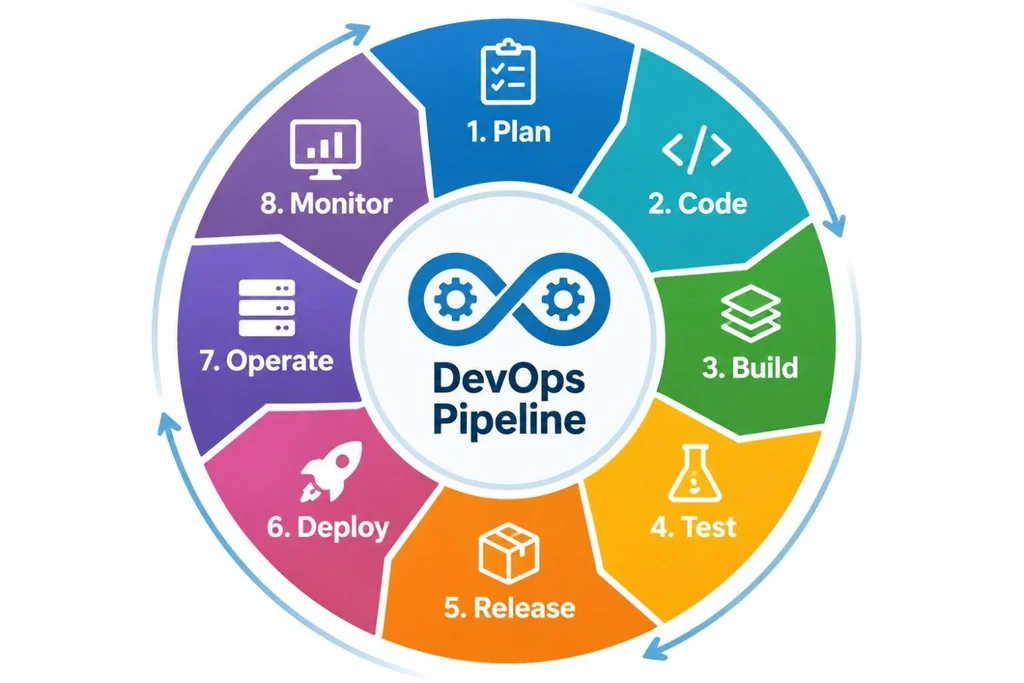
Companies name these steps differently, but the flow is consistent. These DevOps pipeline stages appear in most diagrams, and each one feeds the next.
1. Plan
Planning turns an idea into scoped work. Teams write tickets, define acceptance criteria, and set priorities in tools such as Jira or GitHub Issues. Good planning helps the pipeline later, because a clearly defined change is much easier to test automatically.
2. Code
Developers write code in short-lived branches and store it in a version control system such as Git. Pull requests trigger peer review, and many teams add automated linting so style issues never reach a human reviewer. Small, frequent commits keep each change easy to review and easy to undo.
3. Build
The build stage compiles the code, resolves dependencies, and packages the result, often as a Docker image. A build that behaves the same on every machine removes the classic problem of "it works on my laptop."
4. Test
Automated tests run next. Unit tests check small pieces of logic, integration tests confirm that components work together, and end-to-end tests simulate real user journeys. Security scans for vulnerable dependencies and exposed secrets often run here too, which is the idea behind DevSecOps. If any check fails, the pipeline stops and the developer gets feedback within minutes.
5. Release
Once a build passes, it is versioned, stored in an artifact registry, and marked as a release candidate. Some teams add a manual approval gate at this point. Others rely entirely on automated checks.
6. Deploy
The release moves into staging first and then into production. Teams use strategies such as blue-green deployments, canary releases, or rolling updates to limit risk. Infrastructure as code tools like Terraform keep environments consistent, so staging behaves like production.
7. Operate
After release, the application runs on servers or inside a Kubernetes cluster. Operations work includes scaling, patching, configuration management, and keeping the platform healthy.
8. Monitor
Monitoring closes the loop. Logs, metrics, and alerts show how the release behaves under real traffic. If error rates climb, the team can roll back quickly. Insights from this stage flow straight back into planning, which is why a pipeline works as a loop rather than a straight line.
A Real-World Example: One Bug Fix From Commit to Production
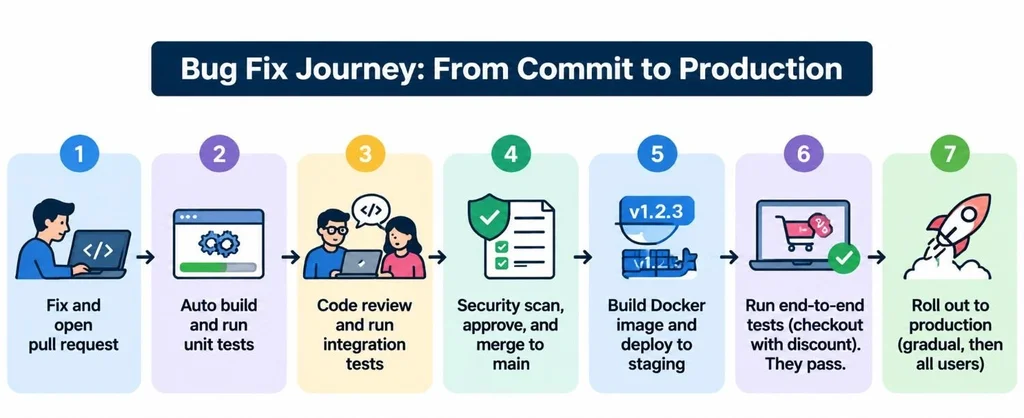
Theory is easier to follow with a concrete case. This is an illustrative scenario, not a specific company's setup. Imagine a team that runs an online store and needs to fix a bug where discount codes fail at checkout. Here is how a mature pipeline would handle that single change.
1. A developer creates a branch, fixes the discount logic, and opens a pull request.
2. The pipeline starts automatically. It installs dependencies, builds the app, and runs unit tests in a few minutes.
3. A teammate reviews the code while integration tests run against a temporary test database.
4. A security scan checks the dependencies and flags nothing, so the change is approved and merged into the main branch.
5. The pipeline builds a Docker image, tags it with a version number, and deploys it to a staging environment.
6. Automated end-to-end tests walk through a checkout with a discount code. They pass.
7. The release goes to a small share of production traffic first. Monitoring shows normal error rates, so the rollout continues to all users.
The team's hands-on effort was writing the fix and reviewing it. Everything else was automated. Without a pipeline, the same fix might wait for a weekly release window and depend on someone remembering to run the right tests.
DevOps Automation Tools Teams Commonly Use
There is no single correct toolset. Teams usually combine several tools, and the best choice depends on your existing stack, budget, and skills. These categories cover most pipelines:
• Source control: Git with GitHub, GitLab, or Bitbucket
• CI/CD engines: GitHub Actions, GitLab CI/CD, Jenkins, CircleCI, Azure DevOps, AWS CodePipeline
• Build and packaging: Docker, Maven, Gradle, npm
• Infrastructure as code: Terraform, Ansible, AWS CloudFormation
• Orchestration: Kubernetes, Amazon ECS
• Testing: JUnit, Cypress, Selenium
• Security scanning: SonarQube, Snyk, Trivy
• Monitoring: Prometheus, Grafana, Datadog
Start with the platform that already hosts your code. If your repositories live on GitHub, GitHub Actions is usually the lowest-friction way to begin. Adding six tools in week one tends to create more maintenance than value. If your developers also use AI assistants while coding, our roundup of the best AI tools for web app development covers options that sit well beside a pipeline.
Benefits of a DevOps Pipeline
A well-run pipeline pays off in ways both engineers and business owners notice:
• Faster releases: Automation removes waiting between steps, so teams ship small updates often instead of large, risky ones.
• Fewer production bugs: Tests run on every change, so problems surface while the code is still fresh in the developer's mind.
• Repeatable releases: The same steps run every time, which removes mistakes caused by skipped steps or manual typing.
• Easier rollbacks: Versioned artifacts let teams return to the last good release quickly.
• Stronger security: Scans run early and automatically, so vulnerabilities are caught before they reach customers.
• Better collaboration: Developers and operations staff work from the same system, which reduces handoff delays and finger-pointing.
These benefits do not appear overnight. They grow as the pipeline matures and the team learns to trust its automated checks.
How to Build a DevOps Pipeline Step by Step
1. Set clear goals. Decide what you want to improve, such as release speed, quality, or stability. A goal like "deploy to production in under 30 minutes" is easy to measure.
2. Standardize version control. Choose a branching approach, require pull requests, and protect the main branch.
3. Automate the build and unit tests first. This is the foundation. Get a clear pass or fail result on every commit before adding anything else.
4. Layer in more testing. Add integration, end-to-end, and security tests gradually. Fix flaky tests as soon as they appear, because unreliable tests teach people to ignore failures.
5. Automate deployment to staging. Use infrastructure as code so staging mirrors production, then add production deployment with an approval step.
6. Add monitoring and alerts. Track error rates, latency, and resource use. Decide in advance who responds and how to roll back.
7. Review and improve regularly. Look at pipeline duration, failure causes, and team feedback every few weeks.
Starting small is not a weakness. A basic pipeline that builds and tests every commit already delivers real value. If your team lacks the time or in-house experience to set this up properly, outside help can shorten the learning curve. Our DevOps services page outlines how Canduit can support that work.
Common DevOps Pipeline Mistakes to Avoid
• Automating a messy process. Automation makes a bad process faster, not better. Simplify the manual steps first.
• Letting the pipeline get slow. When builds take too long, developers batch changes or skip checks. Many teams aim to keep the main feedback loop to around ten minutes.
• Tolerating flaky tests. A test that fails at random erodes trust in the entire pipeline.
• Storing secrets in code. Passwords and API keys belong in a secrets manager, not in a repository.
• Having no rollback plan. Every deployment needs a tested way back.
• Ignoring monitoring data. A pipeline that stops at deployment misses the lessons production offers.
• Adding tools without owners. Every tool needs someone responsible for upgrades and fixes.
How to Measure Whether Your Pipeline Is Working
The DevOps Research and Assessment program, known as DORA, popularized four metrics that many teams use to judge delivery performance:
• Deployment frequency: how often you release to production
• Lead time for changes: how long a commit takes to reach production
• Change failure rate: the share of releases that cause problems
• Time to restore service: how quickly you recover after a failure
Track these over months, not days, and use them to find bottlenecks rather than to compare individual developers. For example, faster releases paired with a rising failure rate usually mean testing needs attention.
Is a DevOps Pipeline Worth It for Small Teams?
Yes, in a lighter form. A solo developer or early-stage startup does not need Kubernetes and a dozen scanners. A hosted CI service that runs tests on every push and deploys on merge captures most of the value. Add complexity only when a real problem demands it.
Conclusion
A DevOps pipeline is the automated route that turns a code change into a reliable production release. Its stages, from planning to monitoring, work together as a loop, and its real strength comes from fast feedback and repeatable steps. Start with the basics: version control, automated builds, and tests on every commit. Then add security checks, automated deployment, and monitoring as your team gains confidence.
If you are planning to build or improve a pipeline, pick one bottleneck, fix it, measure the result, and repeat. That steady approach beats a big-bang rollout almost every time.
Frequently Asked Questions
What is a DevOps pipeline in simple terms?
A DevOps pipeline is an automated process that takes new code and moves it through building, testing, deployment, and monitoring until it reaches users. It replaces manual handoffs with repeatable steps, which helps teams release faster and catch problems earlier.
What are the main stages of a DevOps pipeline?
The common stages are plan, code, build, test, release, deploy, operate, and monitor. Some teams merge or rename them, for example combining release and deploy, but the flow from idea to monitored production software stays the same.
What is the difference between a DevOps pipeline and a CI/CD pipeline?
A CI/CD pipeline automates building, testing, and delivering code. A DevOps pipeline is broader. It includes CI/CD plus planning, infrastructure management, security, monitoring, and the feedback loop that informs future work.
Which tools are used to build a DevOps pipeline?
Popular choices include Git for source control, GitHub Actions, GitLab CI/CD, or Jenkins for automation, Docker for packaging, Terraform for infrastructure, Kubernetes for orchestration, and Prometheus or Grafana for monitoring. The right mix depends on your stack and team skills.
How long does it take to set up a DevOps pipeline?
It varies with team size and system complexity. A basic setup that builds and tests every commit can often be running within a few days. A mature pipeline with security scanning, infrastructure automation, and monitoring typically evolves over several months.