What Is Mobile App Development? A Plain-English Guide for Beginners and Business Owners
Mobile app development is the process of designing, building, testing, and launching apps for phones and tablets. Here is how it works, what it costs, and how to get started.

Think about the last hour on your phone. You may have checked a bank balance, ordered lunch, tracked a package, or scrolled through a feed. Every one of those moments runs on software that someone designed, coded, tested, and published. That work is called mobile app development.
In simple terms, mobile app development is the process of planning, designing, building, testing, and releasing software that runs on smartphones and tablets. It covers everything from a basic habit tracker to a banking app that handles millions of transactions.
This guide explains how it all works without the jargon. You will learn what a mobile app is, the main types, the technologies and platforms behind them, the steps involved, what it costs, and the mistakes that sink projects. By the end, you should know exactly where to start.
What Is Mobile App Development?
Mobile app development, also called mobile application development, is the process of creating software built to run on mobile devices such as smartphones, tablets, and wearables. It combines design, programming, testing, and deployment. It also continues after launch through updates and support.
Mobile apps are not simply shrunken desktop programs. They are built around how people really use their phones: small screens, touch input, patchy connections, and limited battery life. They also use hardware that desktops rarely offer, including the camera, GPS, fingerprint and face sensors, and push notifications. That is why a delivery app can show your driver moving on a map, and a banking app can deposit a check from a photo.
What Is a Mobile App?
A mobile app, short for mobile application, is a program installed on a phone or tablet to perform a specific task. Most people download apps from the Apple App Store or Google Play. Some apps work fully offline, such as a notes app, while others rely on servers to load fresh data, like a social feed.
It helps to separate an app from a mobile website. A mobile website opens in a browser and needs no installation. An app lives on the device, loads faster for repeat use, and can send notifications and access sensors. Both have a place, and we will compare them later in this guide.
Types of Mobile Apps
Before anyone writes code, the first big decision is how the app will be built. Four approaches cover almost every project.
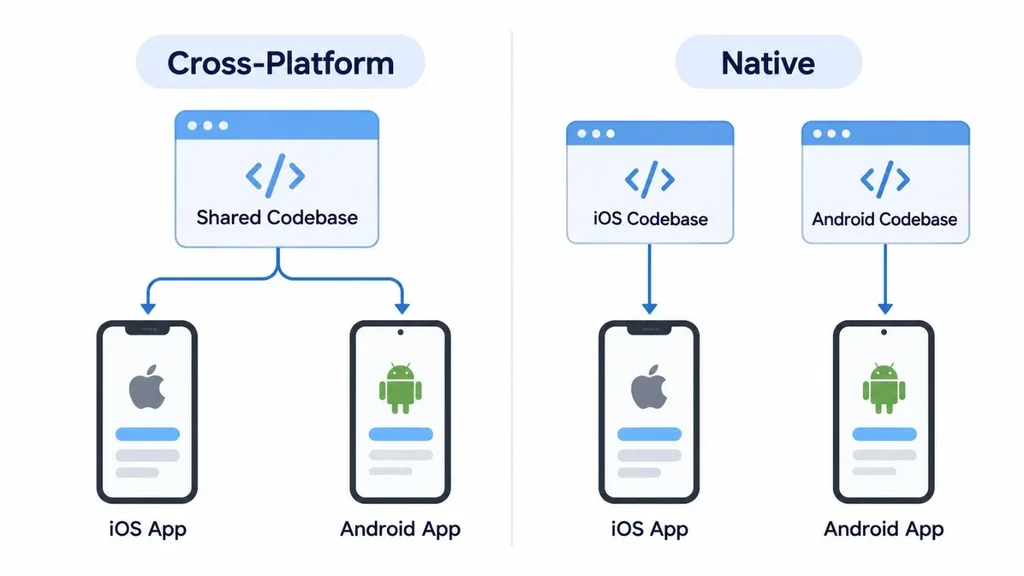
• Native apps are built separately for each operating system using its own language. They offer the best performance and full access to device features, but you maintain two codebases.
• Cross-platform apps use one codebase to produce both an iOS and an Android app. Flutter and React Native are the best-known frameworks.
• Hybrid apps wrap web technologies (HTML, CSS, and JavaScript) inside a native shell. They suit simpler, content-focused apps.
• Progressive web apps (PWAs) are websites that behave like apps. Users open them in a browser, so there is no app store involved.
| Approach | Common tools | Best for | Main trade-off |
| Native | Swift (iOS), Kotlin (Android) | Games, performance-heavy apps, deep device features | Two codebases and a higher budget |
| Cross-platform | Flutter, React Native, Kotlin Multiplatform, .NET MAUI | Most business and consumer apps launching on both platforms | Some platform-specific features need extra native code |
| Hybrid | Ionic with Capacitor, HTML, CSS, JavaScript | Content apps and simple internal tools | Complex screens can feel less smooth |
| PWA | Standard web technologies | Reaching users fast without an app store | Limited device access, especially on iPhones |
For most startups, cross-platform is a sensible default for a first release. Teams usually move to native only when performance or a specific device feature demands it. If you are building a 3D game or an app that relies heavily on camera processing, native is often the better call from day one.
Mobile App Development Platforms: iOS and Android
Two operating systems dominate the market. Android leads worldwide, while iOS holds the larger share in the United States. If your audience is mostly American, that detail can shape which platform you build first. Always check your own analytics or customer data before deciding.
• iOS: Apps are written mainly in Swift using Apple's Xcode. There are fewer device variations to test, and Apple's review process is generally stricter. Publishing requires an Apple Developer Program membership, which costs $99 per year at the time of writing.
• Android: Apps are written mainly in Kotlin using Android Studio. The device range is far wider, so testing takes longer. Google Play charges a one-time registration fee of $25 at the time of writing.
Fees and policies change, so confirm current details on the Apple and Google developer sites before budgeting.
You will also see the phrase mobile app development platforms used for tools that speed up building. These include backend services like Firebase and AWS Amplify, and low-code tools such as Microsoft Power Apps and OutSystems. They can shorten timelines for simple apps, though they may limit customization as your product grows.
Mobile App Development Technologies
Every app is a stack of layers working together. Understanding them makes conversations with developers much easier.
• Front end (what users see): Swift and SwiftUI for iOS, Kotlin and Jetpack Compose for Android, Dart with Flutter, or JavaScript and TypeScript with React Native.
• Back end (what users never see): Servers, databases, and APIs that handle logins, data storage, and business rules. Teams commonly use Node.js, Python, Java, or .NET, paired with databases like PostgreSQL or MongoDB.
• Cloud and delivery: Hosting, monitoring, and automated build pipelines. Automating builds and releases, a core idea in DevOps, means fewer manual errors and faster, safer updates.
• Design and testing tools: Figma for interface design, and TestFlight (iOS) or Google Play internal testing (Android) for beta releases.
• Third-party services: Payments, maps, analytics, and push notifications, usually added through ready-made SDKs rather than built from scratch.
How Mobile App Development Works: The Process
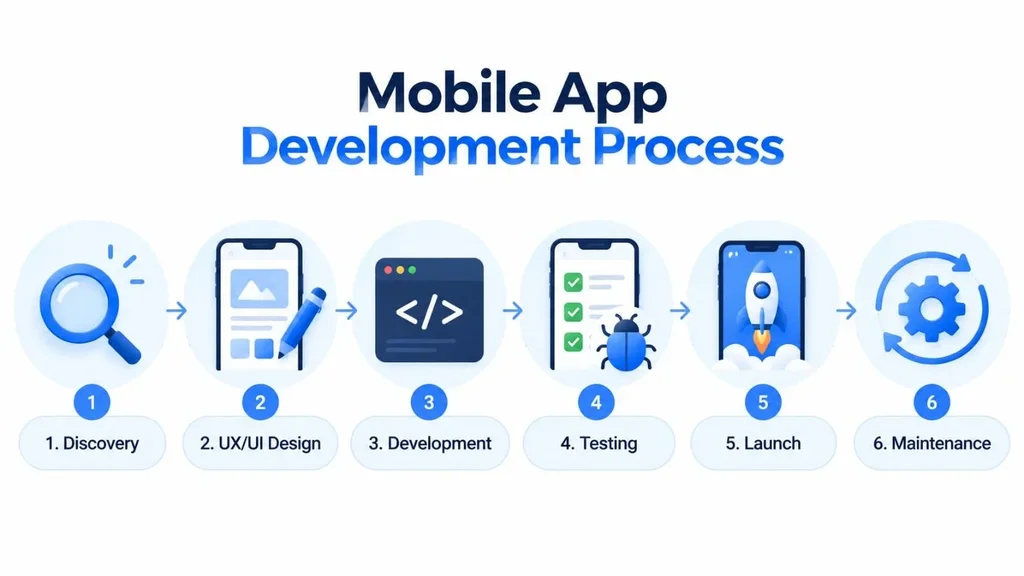
Every team has its own style, but most projects follow the same six stages. A focused first version often takes about three to six months, though complex products take longer.
1. Discovery and Research
This stage answers three questions: who is the app for, what problem does it solve, and why would anyone choose it over existing options? Reviewing competitor apps and reading their user reviews is one of the fastest ways to spot gaps you can fill.
2. UX and UI Design
Designers map the user journey, then build wireframes and clickable prototypes. Testing a prototype with five to ten real users before coding starts is cheap and often reveals confusing steps that would be costly to fix later. Apple's Human Interface Guidelines and Google's Material Design are the standard references.
3. Development
Developers build the front end, the back end, and the connections between them. Most teams work in short cycles called sprints, so the product can be reviewed and adjusted every couple of weeks.
4. Testing
Testing covers functionality, performance, security, and compatibility across devices and OS versions. Testing on real phones matters because simulators miss issues like slow networks, low battery behavior, and unusual screen sizes.
5. Launch
The app is submitted to the App Store and Google Play for review. Reviews can take anywhere from a few hours to several days, so build that time into your launch plan. Apple's App Review Guidelines are worth reading before you finalize your design.
6. Maintenance and Updates
Launch is the starting line, not the finish. iOS and Android both release major updates every year, and apps need fixes and improvements to keep working well.
How Much Does Mobile App Development Cost?
There is no honest one-size-fits-all number, because cost depends on what you build. The biggest drivers are feature complexity, the number of platforms, custom design work, the back end, third-party integrations, security or compliance needs, and the team you hire.
As a rough guide in the US market, a simple app with a handful of screens can start in the low tens of thousands of dollars. Products with custom back ends, real-time features, or advanced AI can reach six figures or more. Treat these as ballparks and request detailed estimates from any team you consider.
Budget for the long term too. A common rule of thumb is to set aside roughly 15 to 20 percent of the original build cost each year for updates, bug fixes, and compatibility. If you want to understand why quotes differ so widely, this breakdown of why software pricing varies explains what sits behind the numbers.
Mobile App vs Web App: Which Do You Need?
Not every idea needs an app. Choose a mobile app when you need camera or sensor access, push notifications, offline use, or a daily habit loop, as with fitness or loyalty programs. Choose a web app when your users mainly view data or complete tasks on a screen, and when reaching everyone quickly matters more than device features.
Many businesses launch a web product first to validate demand, then add a mobile app once usage proves the need. If that sounds like your situation, Canduit's web app development service is a useful starting point.
Real-World Examples of Mobile App Development
• Banking: Mobile check deposit uses the camera, while biometric login protects accounts. Security and compliance drive most of the engineering effort here.
• Ride-hailing and delivery: GPS tracking, live maps, payments, and push alerts all work together in real time, which makes the back end just as important as the interface.
• Health and fitness: Step counts and heart-rate data come from phone and wearable sensors, so privacy handling is critical.
Common Mistakes to Avoid
These problems show up again and again in app projects, and most are avoidable.
• Building too much at once. Launch with the one or two features that solve the core problem, then expand based on real user behavior.
• Ignoring store rules until the end. Rejections often come from privacy disclosures or incomplete account-deletion options. Read Apple and Google policies early.
• Treating security as a final step. Plan it from the start. The OWASP Mobile Top 10 is a widely used reference for common mobile security risks.
• Skipping accessibility. Support for larger text, screen readers, and good color contrast widens your audience and reduces risk.
• Forgetting analytics. Without usage data, you are guessing which features matter.
• Underestimating maintenance. An unmaintained app can break after a single OS update.
Trends Shaping Mobile App Development
• AI-powered features: Personalized recommendations, smart search, chat assistants, and image recognition are becoming standard expectations. Businesses exploring this can learn more about AI integration before planning their roadmap.
• Stronger privacy controls: Both platforms keep tightening permission prompts and data disclosure rules, so apps need to collect only what they truly use.
• Mature cross-platform tools: Frameworks like Flutter and React Native now power many production apps, which makes one-codebase development a realistic choice for more teams.
How to Choose the Right Team
You have three main options: an in-house team, freelancers, or a development agency. In-house gives the most control but takes time to build. Freelancers suit small, well-defined tasks. An agency brings design, engineering, and testing under one roof, which works well for first launches.
Whichever route you take, ask to see apps they have shipped to the stores, how they handle testing, who owns the source code, and what support looks like after launch. The criteria in this guide on choosing a development partner apply just as well to mobile projects. And if you would like to talk through your own idea, you can learn more about Canduit's mobile app development services.
Conclusion
Mobile app development is the full journey of turning an idea into a working app that people can install and use: research, design, coding, testing, launch, and ongoing care. The right choices depend on your audience, budget, and goals, not on whatever technology is trending.
Start small, validate with real users, and pick technologies that fit your needs today while leaving room to grow. Plan for security and maintenance from the beginning, and your app will have a much better chance of lasting. With a clear understanding of the process, you are now ready to take the next step with confidence.
Frequently Asked Questions
What is mobile app development in simple words?
It is the process of creating apps for phones and tablets. That includes planning the idea, designing the screens, writing the code, testing it, publishing it to an app store, and updating it over time.
What are the main types of mobile app development?
The four main approaches are native, cross-platform, hybrid, and progressive web apps. Native apps are built separately for iOS and Android, cross-platform apps share one codebase, hybrid apps wrap web code in a native shell, and PWAs run in the browser.
How much does it cost to develop a mobile app?
Costs vary widely. A simple app can start in the low tens of thousands of dollars, while complex apps with custom back ends or AI features can cost six figures or more. Also plan for yearly maintenance, which is commonly estimated at 15 to 20 percent of the build cost.
How long does it take to build a mobile app?
A focused first version often takes three to six months, covering design, development, testing, and store review. Larger or more complex apps can take considerably longer.
Should I build for iOS or Android first?
It depends on your audience. In the United States, iOS holds the larger market share, so many US-focused products launch there first. If your users are global or your market skews toward Android, start there. Cross-platform frameworks let you reach both with a single codebase.