What Does ERP Stand for in Healthcare? A Plain-English Guide for U.S. Hospitals and Clinics
Get a clear answer on what ERP stands for in healthcare, how it differs from an EHR, and what it does inside a hospital.

ERP stands for Enterprise Resource Planning. In healthcare, it refers to software that connects a provider's finances, supplies, staffing, purchasing, and reporting in one system, so teams stop working from separate spreadsheets and disconnected tools.
That short answer clears up the acronym, but it raises better questions. How is ERP different from the EHR your clinicians already use? What does a hospital ERP system actually do all day? And does your organization need one? This guide answers each question in plain language, with practical examples for U.S. hospitals, clinics, and labs.
What Does ERP Stand for in Healthcare?
ERP means Enterprise Resource Planning. The word "enterprise" points to the whole organization, not a single department. "Resource" covers the things a provider runs on: money, people, medicines, equipment, and space. "Planning" is the part that turns all that data into decisions, such as how many nurses to schedule next week or when to reorder surgical supplies.
Put together, healthcare enterprise resource planning is the operational backbone of a medical organization. It manages the business side of care so clinicians can spend their time on patients.
Other Meanings of ERP You May See
Search results can be confusing because ERP is also used in other medical settings. If you landed here looking for one of these, here is a quick guide:
• Exposure and Response Prevention: a type of cognitive behavioral therapy commonly used to treat obsessive-compulsive disorder.
• Event-Related Potential: a brain response measured with EEG in neuroscience research.
• Emergency Response Plan: a written procedure hospitals follow during events such as fires, outbreaks, or power failures.
The rest of this article covers the software meaning, which is what most hospital administrators, finance leaders, and IT teams are looking for.
What Is a Healthcare ERP System in Plain Terms?
Think of a hospital as a small city. It buys supplies, pays hundreds of employees, maintains expensive equipment, bills insurers, and answers to regulators. A healthcare ERP system is the shared record book and control room for that city's operations. Some vendors sell the same idea as hospital resource planning software, but the goal is identical.
Without one, each department often keeps its own tools. Purchasing uses one system, payroll uses another, and the finance team stitches reports together by hand at month-end. That works for a small clinic. As volume grows, it leads to duplicate data entry, stock surprises, and slow answers to simple questions like "what did this service line cost us last quarter?"
A hospital ERP system fixes this by keeping every department on one database. When the pharmacy receives a shipment, finance sees the cost, inventory updates automatically, and purchasing knows what to reorder.
A simple example: picture a 150-bed community hospital that runs its supply room from a spreadsheet. A surgeon books a knee replacement, but the implant size is not in stock because nobody linked the surgery schedule to inventory. The case is delayed, the operating room sits idle, and the patient waits. With ERP software for hospitals, the booking triggers a stock check, and purchasing gets an alert days before the procedure.
ERP vs EHR: What Is the Difference?
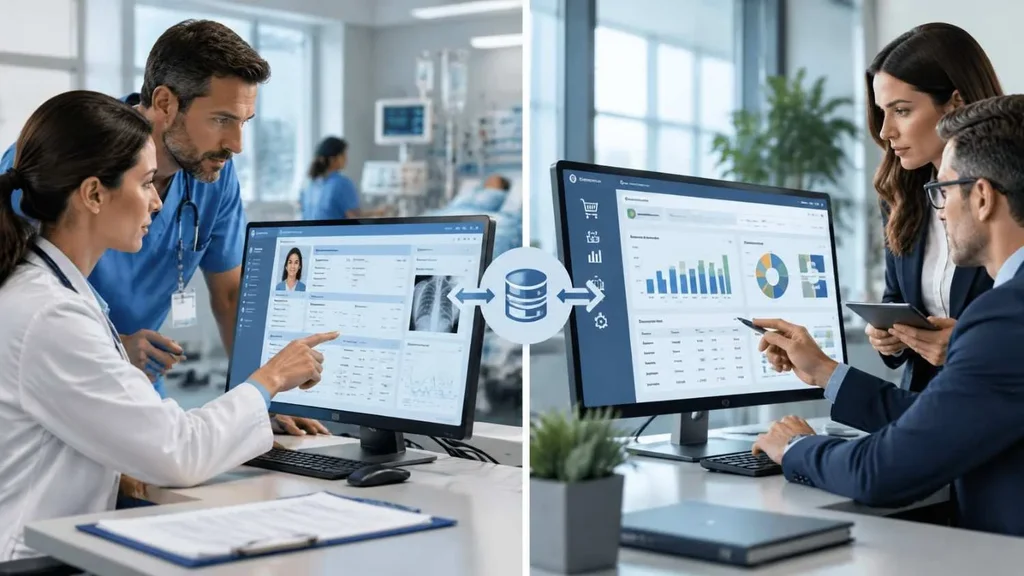
This is the most common point of confusion. Both are software, both store data, and both live inside the same building. They simply do different jobs.
An electronic health record (EHR) holds clinical information such as diagnoses, medications, lab results, and visit notes. An ERP manages the organization's operations: money, people, inventory, assets, and purchasing.
| EHR | Healthcare ERP | |
| Main purpose | Document and support patient care | Run business operations |
| Main users | Physicians, nurses, clinical staff | Finance, HR, supply chain, administrators |
| Typical data | Medical history, orders, results, notes | Budgets, invoices, payroll, stock, assets |
| Question it answers | What does this patient need? | What does care cost, and what do we need to deliver it? |
| Example modules | Charting, e-prescribing, order entry | General ledger, procurement, inventory, payroll |
Most U.S. providers need both, and the best results come when the two systems share data. Standards such as HL7 FHIR make that exchange possible. For example, a patient encounter in the EHR can pass charge data to the ERP's finance module, while the ERP tells clinical teams which supplies are on the shelf.
Keep in mind that some vendors bundle ERP features inside a larger hospital information system, so the line can blur. When you evaluate healthcare management software, ask which functions are built in and which depend on integrations.
Key Modules in Hospital ERP Software
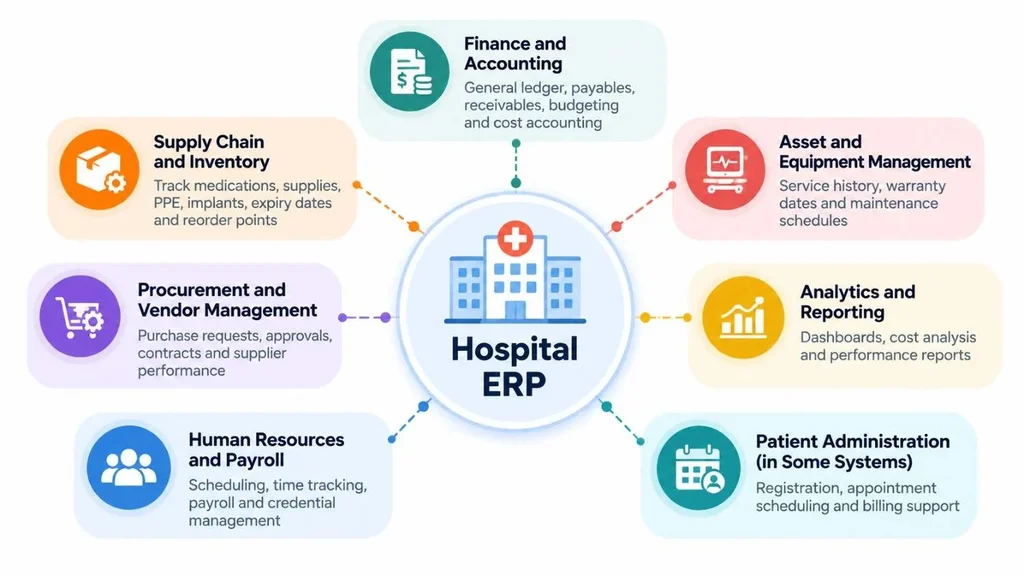
Every vendor packages features differently, but most systems include the building blocks below.
Finance and Accounting
This covers the general ledger, payables, receivables, budgeting, and cost accounting. Hospitals also need to track costs by department or service line, which generic accounting tools handle poorly. If you want a deeper look, see how accounting works inside an ERP.
Supply Chain and Inventory
This module tracks medications, surgical supplies, PPE, and implants. Good systems handle expiry dates, lot numbers, par levels, and automatic reorder points. The result is fewer stockouts and less waste from expired products.
Procurement and Vendor Management
Purchase requests, approvals, contracts, and supplier performance live here. Approval workflows help control spending and leave a clear paper trail for audits.
Human Resources and Payroll
Expect scheduling, time tracking, payroll, and credential management. In healthcare, that includes alerts when a nurse's license or a technician's certification is about to expire, which keeps you from scheduling someone who is no longer cleared to work.
Asset and Equipment Management
Imaging machines, ventilators, and infusion pumps need regular maintenance. An ERP stores service history, warranty dates, and maintenance schedules in one place, so downtime is planned instead of discovered.
Analytics and Reporting
Dashboards can show labor cost per shift, supply spend by department, or budget against actuals. Leaders spot problems early instead of at quarter-end.
Patient Administration (in Some Systems)
Some platforms also include registration, appointment scheduling, and billing support. Whether these sit in the ERP, the EHR, or a separate practice management tool depends on the vendor, so confirm this during demos.
How a Healthcare ERP Works in Everyday Operations
Here is what a typical purchase looks like when everything runs through one system:
1. A department head submits a request for infusion pump tubing.
2. The ERP routes the request for approval based on spending rules.
3. Purchasing sends the order to the vendor, and finance records the commitment.
4. When the goods arrive, staff scan them in and inventory updates instantly.
5. The vendor invoice is matched against the order and receipt, then paid on schedule.
6. Leaders see actual spend against budget on a dashboard.
This chain, often called procure-to-pay, touches four departments. Without a connected system, it usually takes emails, phone calls, and re-keyed data.
Benefits of Healthcare ERP Software
• One source of truth. Every department works from the same numbers, so meetings stop turning into debates about whose spreadsheet is right.
• Less waste and fewer stockouts. Automatic reorder points and expiry tracking reduce both emergency purchases and expired stock.
• Faster financial close. When data is already connected, month-end reconciliation takes far less manual effort.
• Better labor cost control. Labor is one of the largest expenses for most providers, and visibility into overtime and agency use helps you manage it.
• Audit readiness. Approvals, changes, and user access are logged, which makes internal and external audits less painful.
• Smarter planning. Historical usage data helps forecast supply needs and staffing levels.
Set realistic expectations, though. An ERP will not fix a broken process by itself. Organizations that map their workflows before implementation usually get much more value from the system.
Compliance and Security: What U.S. Providers Should Check
Healthcare ERP handles sensitive data. Clinical notes live in the EHR, but billing, payroll, and patient account details can still include protected health information (PHI), so HIPAA applies. The HHS Security Rule requires administrative, physical, and technical safeguards for electronic PHI.
When you review a vendor, look for these basics:
• Role-based access, so staff only see what their job requires.
• Audit logs that record who viewed or changed data.
• Encryption of data at rest and in transit.
• A signed business associate agreement (BAA) if the vendor handles PHI.
• A backup and disaster recovery plan with tested restores.
No software makes you compliant on its own. Compliance depends on how the system is configured, who has access, and how your team follows policy. Ask your compliance officer to review any vendor before you sign.
On-Premises, Cloud, or Hybrid ERP for Hospitals?
| Model | Best for | Main trade-off |
| On-premises | Large systems with strict data control needs and in-house IT | Higher upfront cost, and you manage updates and security |
| Cloud | Clinics, labs, and mid-size providers that want faster setup | Relies on internet reliability and vendor security |
| Hybrid | Organizations moving in stages or keeping some data local | More integration work to manage |
Cloud adoption has grown because it reduces hardware and maintenance work, but the right choice depends on your size, IT staff, and risk tolerance. This guide to choosing a cloud ERP explains the decision in more depth.
Who Actually Needs Healthcare ERP?
• Hospitals and multi-facility health systems
• Multi-location clinics and physician groups
• Diagnostic labs and imaging centers
• Long-term care and nursing facilities
• Ambulatory surgery centers
A solo practice with a handful of staff may not need a full ERP. A solid practice management system plus good accounting software can be enough. Once you manage several locations, meaningful inventory, or a growing headcount, an ERP starts paying for itself in saved time and avoided errors.
How to Choose the Right Healthcare Management Software
1. Map your current workflows and list the biggest pain points first.
2. Check EHR integration options (HL7, FHIR, APIs) and the vendor's healthcare track record.
3. Match modules to real needs instead of paying for the entire suite.
4. Review security: HIPAA support, access controls, audit logs, and a BAA.
5. Ask for total cost of ownership, including licenses, setup, training, support, and upgrades. Our breakdown of ERP implementation cost shows what to include.
6. Request a demo using your own scenarios, such as a purchase order or a staff schedule.
7. Speak with reference customers of a similar size.
If off-the-shelf products do not fit unusual workflows, a tailored build may be worth considering. Our overview of custom software explains when that makes sense.
Common Mistakes When Rolling Out Hospital ERP
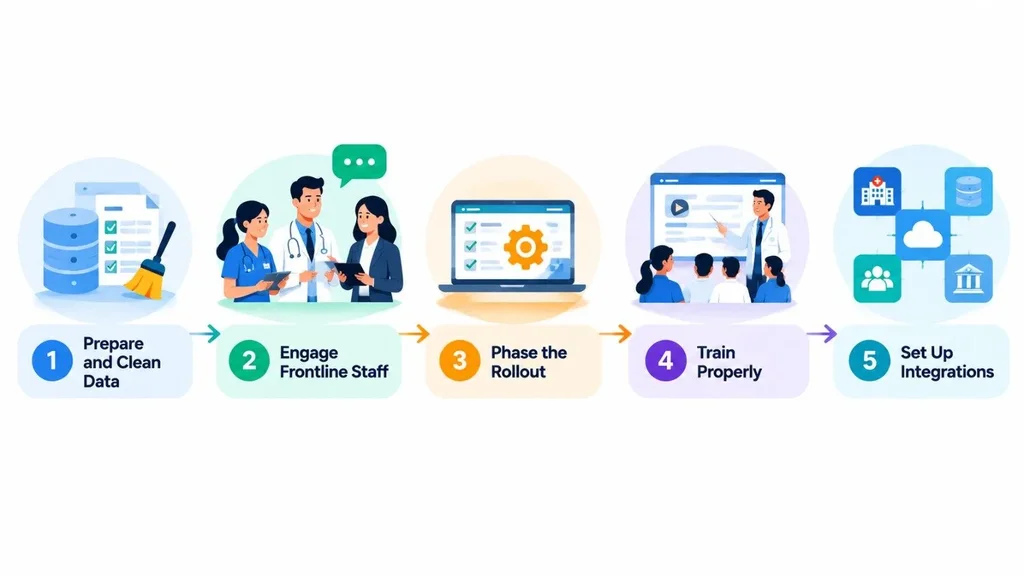
• Skipping data cleanup. Moving messy item lists, vendor records, and cost centers into a new system gives you messy reports. Clean the data first.
• Leaving frontline staff out. Nurses, pharmacists, and supply technicians know where the real bottlenecks are.
• Going live all at once. A big-bang launch raises risk. Phasing by module or by site is safer.
• Thin training. If the system feels hard, people drift back to spreadsheets. Budget real training time.
• Ignoring integrations. Plan EHR, payroll, and banking connections from day one.
A phased plan with clear owners usually works best. If you lack in-house experience, a software consulting partner can help you scope the project before you commit to a vendor.
Conclusion
ERP stands for Enterprise Resource Planning, and in healthcare it means one connected system for the money, people, supplies, and equipment that keep a facility running. It is not a replacement for your EHR. It is the operational layer that works alongside it, giving leaders accurate numbers and giving staff fewer manual tasks.
Start by understanding your own workflows, pick modules that match real problems, and treat security and training as part of the project, not an afterthought. If you are exploring options, you can learn more about ERP for healthcare and see how a tailored system could fit your organization.
Frequently Asked Questions
What does ERP stand for in healthcare?
ERP stands for Enterprise Resource Planning. In healthcare, it is software that unifies finance, supply chain, HR, procurement, and reporting so a hospital or clinic can manage its operations from one system.
Is ERP the same as EHR?
No. An EHR stores patient clinical data such as diagnoses, medications, and lab results. An ERP manages business operations such as budgets, payroll, inventory, and purchasing. Most providers use both and connect them through integrations.
What are the main modules in hospital ERP software?
Common modules include finance and accounting, supply chain and inventory, procurement, human resources and payroll, asset management, and analytics. Some systems also add patient administration features such as scheduling and registration.
Is healthcare ERP software HIPAA compliant?
It can support HIPAA compliance, but the software alone does not make an organization compliant. Look for role-based access, audit logs, encryption, and a business associate agreement, and make sure your team follows proper policies.
Do small clinics need an ERP system?
Not always. A small practice may do well with practice management and accounting software. ERP becomes worth considering when you have multiple locations, significant inventory, or growing staff and reporting needs.