What Is Custom Software? A Clear Guide to Costs, Benefits, and When to Build It
Learn what custom software is, how it differs from ready-made tools, and when to build one.
Find out what custom software means, how it compares with ready-made tools, and how to tell if your business is ready to build one.
Most businesses start with ready-made software. It works for a while. Then the workarounds begin: a spreadsheet to patch a missing report, a manual export every Friday, three tools that refuse to share data.
That is usually the moment people start asking, what is custom software, and is it worth the money?
In short, custom software is a program designed and built for one organization’s specific processes instead of a mass market. This guide explains how it works, what it costs in the United States, where projects go wrong, and how to decide whether you need it. It also draws on a real project from our own team at Canduit, so you can see the idea in practice.
What Is Custom Software?

Custom software, also called bespoke or tailor-made software, is an application built around the needs of a specific person, team, or company. It follows your workflows, your data, and your users, not the needs of the average customer.
The easiest way to picture it is clothing. Off-the-shelf software is the rack at a department store. It fits many people reasonably well. Custom software is the tailored suit, cut to your measurements.
Custom does not always mean “built from zero.” Good developers reuse proven frameworks, open-source libraries, and cloud services. What makes the result custom is that the features, rules, and integrations are chosen for you, and that you usually control the code and the roadmap.
Custom Software vs. Off-the-Shelf Software
Off-the-shelf software, often called COTS, is built once and sold to many buyers. Think of accounting platforms, email suites, and standard CRMs. The two approaches solve different problems, so the comparison below focuses on what actually changes for your business.
| Factor | Custom Software | Off-the-Shelf Software |
| Fit to your process | Built around how you work | You adapt to how the tool works |
| Upfront cost | Higher, project-based | Lower, usually a subscription |
| Long-term cost | Build cost plus hosting and maintenance | Fees often grow with users and features |
| Time to launch | Weeks to many months | Days to weeks |
| Integrations | Designed for your existing systems | Depends on the vendor’s available connectors |
| Control and ownership | You decide the roadmap | The vendor decides the roadmap |
| Best for | Processes that set you apart | Standard, well-solved tasks |
Neither option is automatically better. A five-person team with a standard sales process rarely needs a custom build, because an off-the-shelf CRM does the job for far less. Most growing companies end up with a mix: custom systems for what makes them different, ready-made tools for everything else.
The Middle Path: Customizing an Existing Platform
Sometimes the smartest answer sits between the two. Configurable platforms such as ERPNext can be extended to match your workflows without writing a full system from scratch. We explain how that works in our guide on how we implement and customize ERPNext.
Common Types of Custom Software Solutions
Custom software solutions come in many shapes. These are the types we see most often:
• Web applications: customer portals, booking systems, dashboards, and internal tools that run in a browser.
• Mobile apps: iOS and Android apps built for a specific audience or workflow. Our explainer on what mobile app development involves covers the basics.
• Business management systems: ERP, CRM, HR, and inventory platforms shaped around your operations.
• Integration and automation tools: small programs that move data between systems that do not talk to each other.
• E-commerce platforms: stores with custom pricing, checkout, or fulfillment logic.
• AI-powered features: assistants, forecasting, or document processing connected to your own data.
If a browser-based product is on your list, a look at web app development services will show what the work typically includes.
A Real Example: What Custom Software Looks Like in Practice
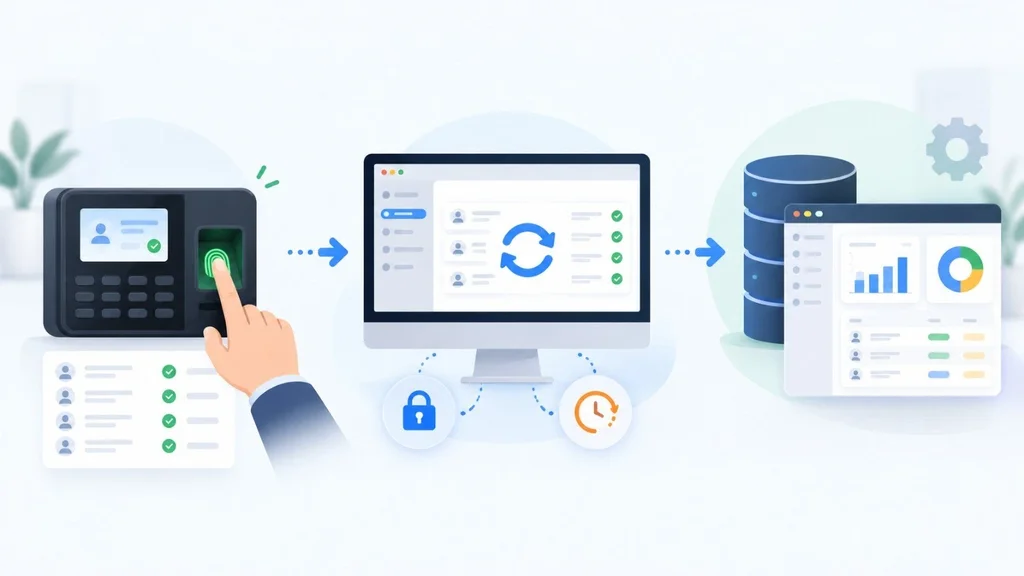
Definitions only go so far, so here is a project from our own work. Movimoda Ltd. used ZKTeco biometric devices to record employee attendance. The logs needed to reach ERPNext reliably, every day, without someone copying files by hand.
Our team built a desktop sync tool for Windows and macOS. On paper, the logic is simple: collect the logs, validate them, and send clean data to ERPNext. In reality, most of the effort went into the messy parts:
• A scheduled sync could start while a manual sync was still running, which risked duplicate records. A global lock fixed that.
• An unreachable device could freeze the app forever. A watchdog timer now aborts and recovers from stalled syncs.
• The app failed when launched at Windows startup because of a working-directory problem. A dedicated launcher solved it.
The lesson applies to almost every custom project. The value is not only in features. It is in handling the real-world situations a generic product was never designed for. You can read the full breakdown in our attendance sync tool case study.
It also shows a useful starting point. A narrow tool that fixes one painful process is often a smarter first step than a giant platform.
Benefits of Custom Software Development Solutions
A Better Fit for Your Workflow
Your team stops forcing work through screens that were designed for someone else. Fewer workarounds usually mean fewer errors and less training time.
Scalability and Smoother Integrations
Custom software can grow with your volume and connect directly to the systems you already use. You are not waiting for a vendor to build the connector you need.
Ownership and Control
When the contract is written properly, you own the code and decide what gets built next. Your feature request does not compete with thousands of others in a vendor’s queue.
Security That Matches Your Risk
You can build access rules, audit trails, and data handling to match your industry requirements. That matters in healthcare, finance, and any business handling sensitive customer data.
Drawbacks and Hidden Costs Most Guides Skip
A fair guide should also tell you where custom projects struggle. Plan for these before you sign anything:
• Higher upfront investment. You pay for design, development, and testing before you see a return.
• Maintenance is on you. There is no vendor patching things in the background. Hosting, monitoring, security updates, and bug fixes need a budget and an owner.
• Scope creep. Every “while we are at it” request adds time and cost. A clear first release keeps projects on track.
• Key-person risk. If one developer holds all the knowledge and nothing is documented, switching teams becomes painful.
• Overbuilding. Building a custom tool for a problem that a $50 per month subscription already solves wastes money.
How Much Does Custom Software Cost in the US?
There is no single price, and published estimates vary widely. One 2026 guide puts most projects between $15,000 and $500,000 or more, from a narrow internal tool to a full enterprise platform. Another places typical custom builds at roughly $25,000 to $250,000 or more, with four to sixteen weeks as a common timeline for focused projects. Treat these as ballparks, not quotes.
Maintenance is a separate line item. One published benchmark pairs a $180,000 build with about $27,000 of first-year maintenance, which is roughly 15 percent of the build cost. Your own number will differ, but the point stands: budget for life after launch.
The main cost drivers are:
• Number of features and user roles
• Complexity of integrations with existing systems
• Design and user experience requirements
• Security and compliance needs
• Team location, size, and experience
For a deeper look at why quotes differ so much between vendors, read our breakdown of why software pricing varies. Whatever range you hear, ask for a paid discovery phase first. It turns a vague estimate into a scoped plan.
How Custom Software Development Works
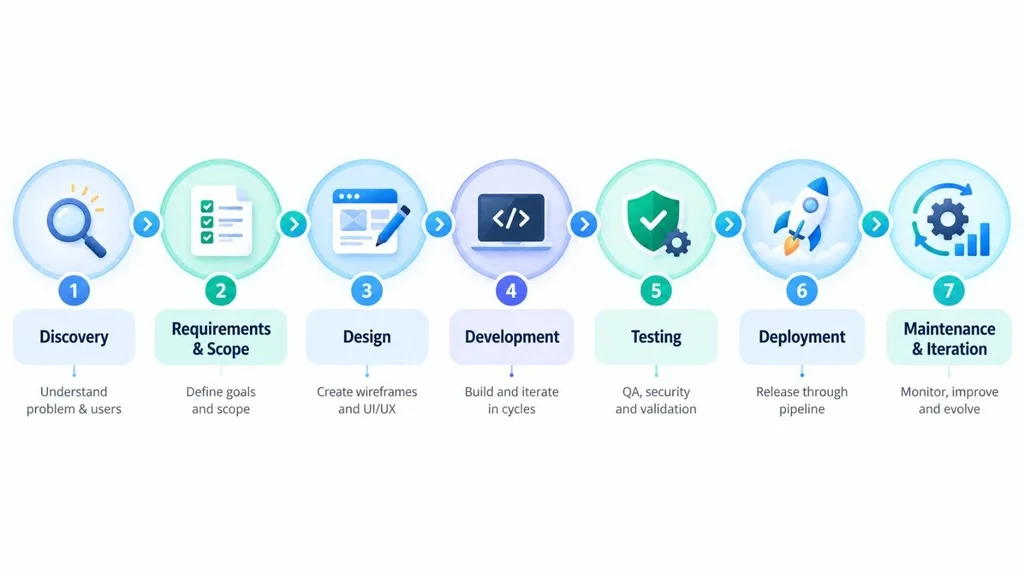
Every team has its own flavor, but most custom software development services follow the same arc:
1. Discovery. Define the problem, the users, and what success looks like.
2. Requirements and scope. Decide what goes into the first release and what waits.
3. Design. Create wireframes and clickable prototypes so you can react before code exists.
4. Development. Build in short cycles, with working demos along the way.
5. Testing. Check functionality, performance, and security before real users arrive.
6. Deployment. Release to production, ideally through an automated pipeline.
7. Maintenance and iteration. Monitor, fix, and improve based on real usage.
The last two steps get less attention than they deserve. Automated releases and monitoring, the core ideas behind DevOps, make updates safer and keep small problems from becoming outages.
When Is Custom Software Worth It?
Signs You Are Ready
• You rely on several tools plus manual steps to complete one process.
• Staff spend hours each week re-entering or reconciling data.
• Your process is a competitive advantage that generic tools cannot support.
• Licensing fees keep climbing as your team grows.
• You have outgrown the limits of your current platform and workarounds are costing real money.
When Off-the-Shelf Is the Smarter Call
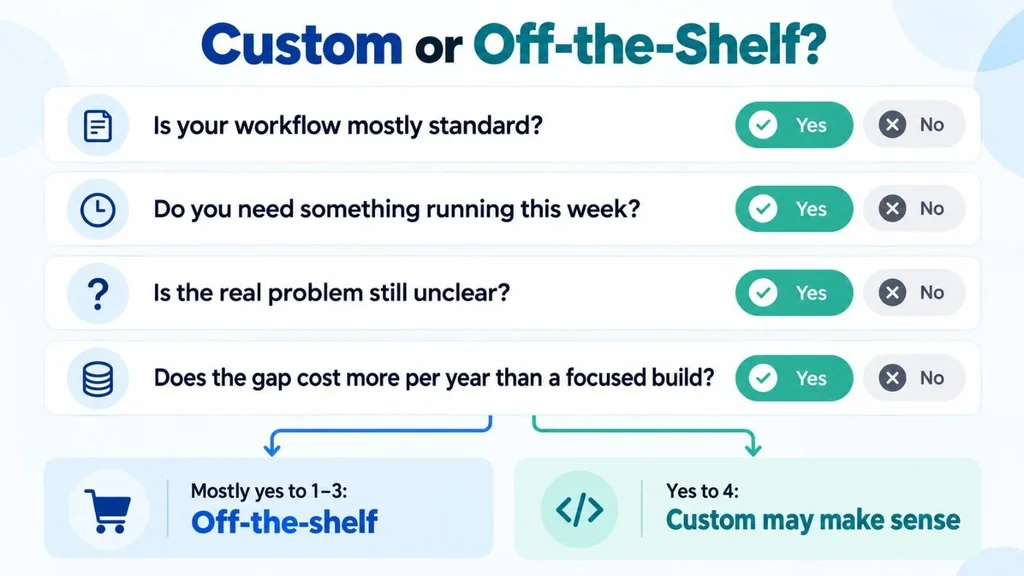
• Your workflow is standard, such as basic payroll, email, or bookkeeping.
• You need something running this week.
• The problem is unclear. Fix the process first, then decide on software.
A simple test works well here: put a dollar figure on the gap between what your current tools do and what your business needs. If that gap costs more each year than a focused build would, custom starts to make sense.
How to Choose a Custom Software Development Company
The partner you pick matters as much as the idea. Whether you search for a custom software development company or a custom application development company, the vetting questions stay the same:
• Do they start with discovery? Teams that jump straight to a quote often miss critical requirements.
• Can they show relevant work? Ask for case studies and, where possible, client references.
• Who owns the code? Get intellectual property terms and repository access in writing.
• How do they handle security and testing? Look for a clear process, not vague promises.
• What happens after launch? Confirm support, documentation, and handover options.
• How do they communicate? Regular demos and a single point of contact prevent surprises.
Our guide on how to choose a web app development partner walks through these questions in more detail.
If you are still unsure whether to build at all, business software consulting can help you decide before you commit budget.
Conclusion
Custom software is simply software built for you. It fits your workflow, grows with your business, and gives you control, but it asks for a larger upfront investment and a plan for maintenance. For standard tasks, ready-made tools are still the practical choice.
The best way to decide is to look at the real cost of your current workarounds. If they are draining time and money, well-planned custom software development solutions can pay for themselves. Start small, define a clear first release, and choose a partner who is honest about trade-offs.
Ready to talk through your own project? Contact our team for a free consultation.
Frequently Asked Questions
What is custom software in simple words?
Custom software is a program built for one specific business or user instead of the general public. It is designed around your processes, so you do not have to change how you work to fit the tool.
What are some examples of custom software?
Common examples include customer portals, internal inventory systems, mobile apps built for a single brand, and integration tools that connect devices or platforms. Our biometric attendance sync tool for Movimoda Ltd. is one real example.
Is custom software better than off-the-shelf software?
It depends on your needs. Custom software wins when your process is unique and off-the-shelf tools force costly workarounds. Off-the-shelf software wins for standard tasks, tight budgets, and fast launches.
How long does it take to develop custom software?
A narrow tool can take a few weeks. A complex platform can take many months. Scope, integrations, and approval speed on your side all affect the timeline, so a discovery phase is the best way to get a realistic estimate.
Who owns custom software after it is built?
Ownership depends on your contract. Many clients require full intellectual property assignment and access to the source code. Confirm these terms in writing before work begins, and ask a lawyer to review the agreement if the project is large. This is general information, not legal advice.